


Kling O1 Review: The Era of Unified Multi-Modal Video Synthesis
Article Summary: This article provides an in-depth analysis of Kling O1, the first unified multi-modal video model. It explores its capabilities in semantic editing, character consistency, and "Universal Instructions," offering a roadmap for creators to integrate these tools into professional video production workflows.
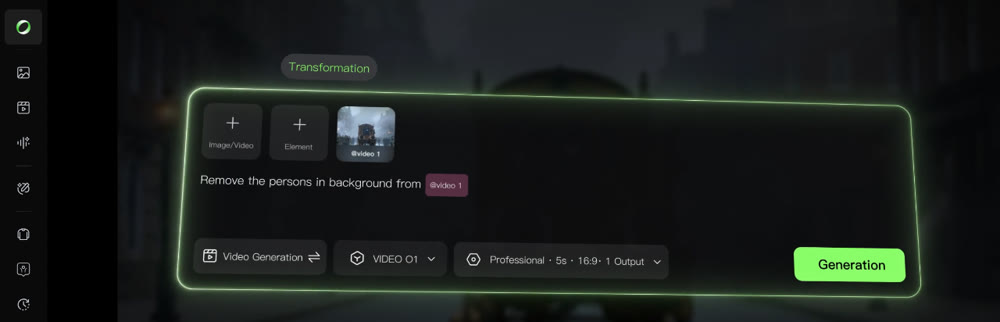
The landscape of AI video creation has rapidly evolved from simple curiosity—"Can text turn into video?"—to a rigorous demand for professional utility: "Can we achieve consistency, precise editing, and high-fidelity synthesis in a single workflow?"
Kling O1 (Omni One) emerges as a definitive answer to these questions. It represents the world's first unified multi-modal video foundation model, designed to merge the fragmented stages of video production into one seamless engine. For creators and marketers, this means the days of juggling separate tools for text-to-video creation, image animation, and post-production editing are ending.
This article explores how Kling O1 utilizes "Multi-modal Visual Language" (MVL) to transform video workflows. We will analyze its core capabilities, from maintaining character consistency to executing complex edits via natural language, and how it fundamentally changes the creative process.
The Philosophy of MVL: A Single Semantic Space
At its core, Kling O1 operates on a philosophy where natural language acts as the semantic backbone of visual creation. In this system, text, images, and video clips are all treated as interchangeable "tokens."
Instead of functioning as a standard "tool" that applies filters, the model interprets your uploads and prompts as a unified instruction set. Whether you are synthesizing a new shot from scratch or modifying an existing clip, the operation occurs within the same large model architecture. This unification allows for a conversational approach to post-production, where describing a change yields pixel-perfect reconstruction without manual keyframing.
📌 Core Capabilities Breakdown
In our deep Kling O1 review, we identified five distinct pillars that separate this model from previous iterations of video AI:
- Unified Engine: It consolidates text-to-video, image-to-video, and video-to-video editing (inpainting, extending, style transfer) into one interface.
- Universal Instructions: Users can direct complex edits—like removing objects or changing weather—using simple English commands.
- Subject Consistency: By analyzing up to four multi-view images, the model creates a "Subject" token, ensuring characters or products remain recognizable across different shots.
- Stacked Skills: You can combine instructions. For example, "Add a character AND change the lighting to cyberpunk style" in a single pass.
- Rhythmic Control: Supporting 3-10 second outputs allows for narrative pacing, from quick transitions to established story beats.
💡 Practical Techniques: Conversational Post-Production
The true power of Kling O1 lies in its ability to understand "Universal Instructions." This allows creators to act as directors rather than technicians.
Example Workflow 1: The Natural Language Edit
Imagine you have a 5-second clip of a car driving down a sunny coastal road. In traditional software, changing this to a snowy night scene involves masking, color grading, and particle effects. With Kling O1, the instruction is semantic.
Prompt Example:
"Transform the environment into a snowy mountain pass at twilight. Change the red sports car into a matte black futuristic rover. Keep the camera motion identical."
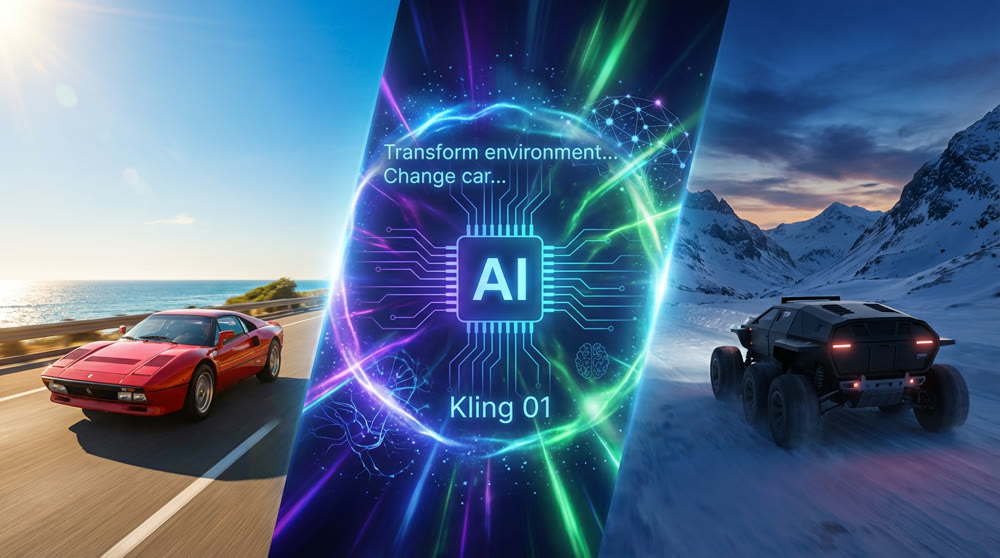
The model retains the spatial movement of the original footage but reconstructs the pixels to match the new semantic logic.
Example Workflow 2: The Character & Mood Transformation
Consider a scenario where you have a short clip of a person sitting in a casual setting, but you need to change their mood, attire, and even the surrounding environment to fit a different narrative. Kling O1 can handle these complex semantic shifts while maintaining the core identity of your subject.
Prompt Example:
"Keep the same woman, but change her expression from calm to frustrated. Replace her casual attire with a sharp business suit. Transform the cozy cafe background into a bustling modern office with a stormy, rainy cityscape outside the window. Maintain the original camera angle and subtle head movement."
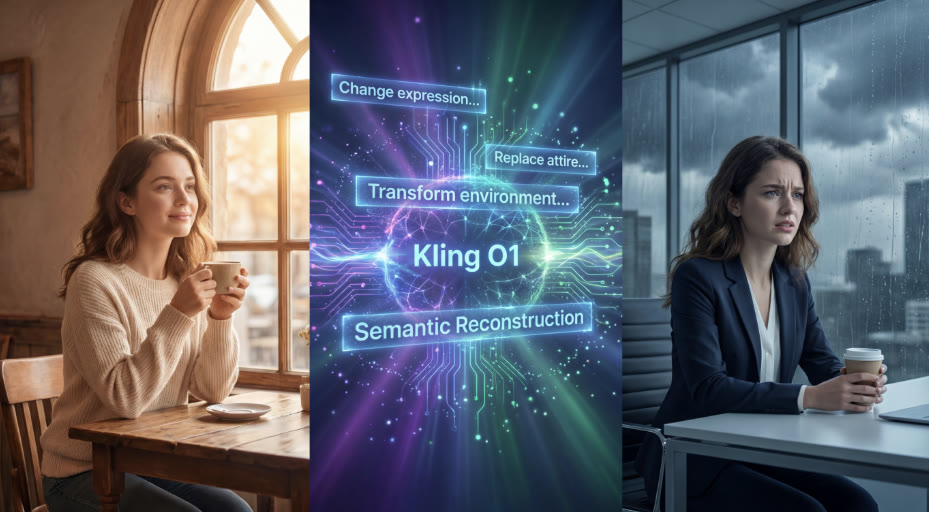
This demonstrates Kling O1's ability to precisely control character attributes and emotional states, along with complex scene transformations, all from simple text commands.
Comparative Analysis: Traditional vs. Unified Workflow
To understand the efficiency gains, observe the difference in handling complex video tasks:
| Task | Traditional AI Workflow | Kling O1 Unified Workflow |
|---|---|---|
| Character Consistency | Trial and error with seeds; often results in morphing faces. |
Subject Tokenization: Upload 4 reference images to lock identity across shots. |
| Scene Modification | Requires exporting frames, masking in Photoshop, and re-animating. |
Instructional Edit: "Replace the wooden table with a marble countertop." |
| Motion Transfer | Manual animation or complex motion capture rigs. |
Reference Motion: "Apply the movement from Video A to the character in Image B." |
| Shot Extension | using separate "outpainting" tools, often with visible seams. |
Native Extension: Seamlessly synthesize t he "next shot" within the same context. |
✨ Key Strategies for Commercial Application
For professionals, Kling O1 opens new doors in advertising and narrative storytelling.
1. The Virtual Runway (Fashion & E-commerce)
Brands can now solve the logistics of physical photoshoots. By uploading a "Subject" (the model) and reference images of clothing, you can synthesize an entire seasonal lookbook without booking a studio.
- Technique: Upload a mannequin shot + fabric references. Instruct the model to "render a fashion walk in a Parisian street setting."
2. Narrative Storyboarding
Filmmakers can move from static storyboards to "videoboards."
- Technique: Use the "First/Last Frame" control to define the start and end of a shot, allowing the model to synthesize the dramatic action in between. This is ideal for visualizing camera movements like complex dolly zooms.
🚀 Orchestrating Production with Genmi AI
While the Kling O1 model provides the raw engine power, maximizing its potential requires a platform built for professional orchestration. Genmi AI integrates this advanced model into a comprehensive ecosystem designed for scalable production.
When your project requires starting from a script, Genmi's text-to-video capabilities allow you to visualize narrative beats instantly. For users specifically looking to leverage the nuances of the latest technology, accessing the Kling model via Genmi provides a streamlined interface optimized for commercial outputs. This commitment to evaluating the entire landscape of generative video is also reflected in Genmi's expert breakdowns, such as the recent in-depth WAN 2.2 review.
Furthermore, the Genmi AI platform excels at asset management. If you have high-quality static assets (like product photography), you can utilize the image-to-video tools to breathe life into them, applying the consistency principles of O1 to ensure your brand identity remains intact. This integration ensures that powerful models don't just exist in a vacuum but serve a cohesive creative pipeline.
Conclusion
Kling O1 marks a pivotal shift from experimental AI generation to controllable, consistent video synthesis. By treating text, images, and video as a unified language, it allows creators to bypass technical hurdles and focus purely on direction and storytelling.
Whether you are refining a commercial spot or building a narrative short, the ability to edit and synthesize within a single semantic space offers a level of creative freedom previously unattainable. As these tools mature, the barrier between "imagining" a scene and "producing" it continues to dissolve.
Empower Your Creative Vision
The transition to unified video production is here. By adopting tools that understand the semantic depth of your ideas, you can produce broadcast-quality visuals faster than ever before. Explore the capabilities of the Kling model on Genmi AI today and turn your concepts into consistent, moving realities.
Recommended Articles
Krea AI Review: A Deep Dive into Real-Time Creative Workflows
An in-depth Krea AI review analyzing its real-time image creation, video tools, and overall performance to see if it's the right fit for your creative toolkit.
Mastering AI Visual Creation: An In-Depth Look at Leonardo.Ai for Creative Enthusiasts
Explore our in-depth Leonardo.Ai review. Discover its strengths, prompt adherence, speed, and how it compares to other AI image creation tools.

From Stagnation to Sensation: How AIGC-Powered Retrospection Revives YouTube Shorts
Break through stagnation on YouTube Shorts with a data-driven, AIGC-powered retrospection workflow. Analyze key metrics, refine content strategy.