


Mastering AI Character Consistency: The Ultimate Guide to Reference Images
Article Summary: A comprehensive guide for AIGC creators on using reference images to achieve character consistency. It details advanced workflows for image and video generation using tools like Midjourney, DALL-E, and Runway, including --cref, style fusion, and start/end frame techniques for professional results.
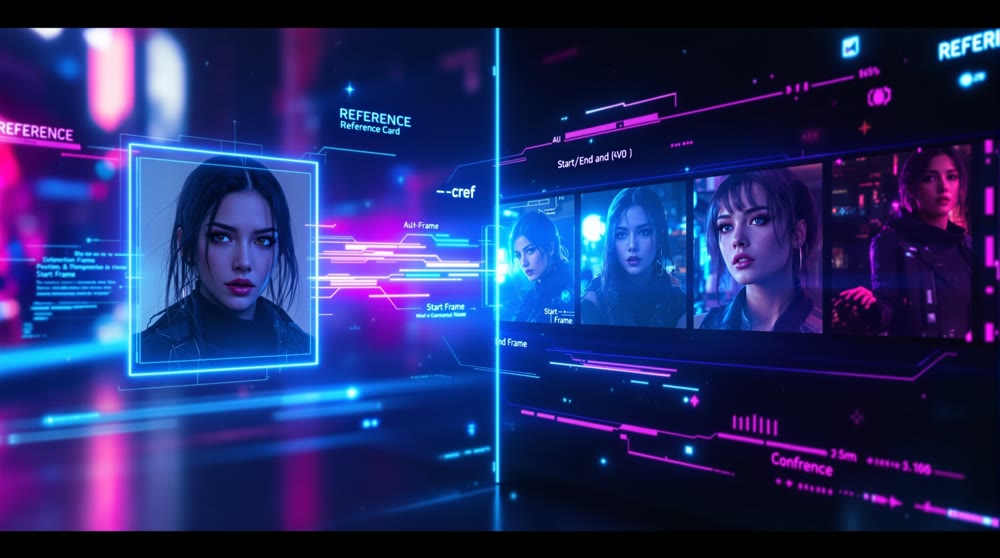
In the world of AIGC short-form video, reference images are the cornerstone of success. They are essential for maintaining character consistency, replicating viral styles, and scaling content production efficiently. More than just a supplement to text prompts, this technique is a powerful method for achieving the advanced goal of "precise control" over your creations.
This guide will break down how to effectively use reference images in both storyboard image generation and video synthesis, covering key techniques, best practices, and the go-to tools for each scenario.
I. The Role and Purpose of Reference Images
Reference images have evolved beyond simple visual cues for the AI. Today, they enable precise control over visual elements through specific parameters and tool features, allowing creators to lock in critical details.
1. Core Application Types
| Reference Type | Function | Typical Use Cases |
|---|---|---|
| Character Reference | Keep character features, outfit and appearance consistent across frames. Ensures visual continuity in multi-shot generation. |
• Story-based videos • Digital human creation • AI character cloning |
| Style Reference | Replicates a specific art style or visual theme. Includes color palette, lighting and rendering method. |
• Viral content creation • Brand aesthetic consistency • Trend exploration (Guide) |
| Composition / Pose Reference | Locks in shot composition, pose or cinematic language. Improves accuracy for complex human movements. |
• Character motion videos • Cinematic framing • Complex choreography |
| Start / End Frame Reference | Uses start and end frames to control transitions. Improves motion continuity and transformation flow. |
• One-shot transitions • Video morphing • Seamless transformation scenes |
2. Character Consistency: The Achilles' Heel of Text Prompts
For narrative-driven or IP-based content (like mythology series or K-pop fan edits), maintaining a character's appearance across 20+ frames using text prompts alone is nearly impossible. This is where reference images become the most effective solution to this critical pain point.
- ✨Advanced Technique: For complex IP characters, creators must establish a "comprehensive character identifier" and reuse it verbatim across all prompts. This ensures the AI model can consistently recognize and render the specific character.
Especially when it comes to lip-syncing, Hedra AI's performance opens up new possibilities for narrative storytelling.
II. Reference Image Techniques in Storyboard Image Generation
During the image generation phase, reference images are primarily used to lock down character appearance and style. This dramatically reduces the endless trial-and-error of "gacha" style generating and significantly boosts efficiency.
1. Leonardo.Ai: Intelligent Referencing and Efficiency
Leonardo.Ai is a popular image generation tool known for its user-friendly approach to referencing.
- Intelligent Referencing: Leonardo.Ai's "Image Guidance" feature allows the model to intelligently analyze an input image, particularly facial features, helping maintain character similarity in subsequent generations.
- Advantages: Compared to more complex tools, Leonardo.Ai offers a streamlined workflow with an intuitive interface, web-based access, and in-platform editing tools, making it highly accessible and video-friendly due to its often bright and clear outputs.
- Important Note: If your goal is to make significant alterations to the original reference image, Leonardo.Ai's guidance system might be too restrictive. In such cases, a tool with more granular controls may be preferable.
2. Using GPT/DALL·E for Prompt Reverse-Engineering
While the final image quality of GPT-4o and DALL·E may not always match specialized models, they excel at analyzing reference images.
- Reverse-Engineering Prompts: You can upload a screenshot from a high-performing video and ask GPT-4o or DALL·E to "write the English prompt for this image." This helps you quickly deconstruct the prompt structure and keyword weighting of viral content, providing a precise starting point for generation in more advanced models.
- Pose and Composition Borrowing: For complex actions or scenes that are difficult to describe with words, upload a reference image and have the AI generate a descriptive prompt. You can then modify this prompt by adding your unique character identifier.
3. 【Advanced】Midjourney (MJ): Mastering Reference Parameters and Style Fusion
Midjourney is renowned for its exceptional image quality and artistic flair. Its reference image capabilities are controlled via parameters for fine-tuned adjustments.
- Character Reference (
--cref): By adding--creffollowed by an image URL, you instruct Midjourney to lock onto the character in the reference image, ensuring consistency across multiple generations. This is a foundational technique for AI video character consistency.
- Weight Control (
--cw): The--cw(character weight) parameter, from 0 to 100, adjusts how strongly the model adheres to the reference character. Higher values prioritize character fidelity.
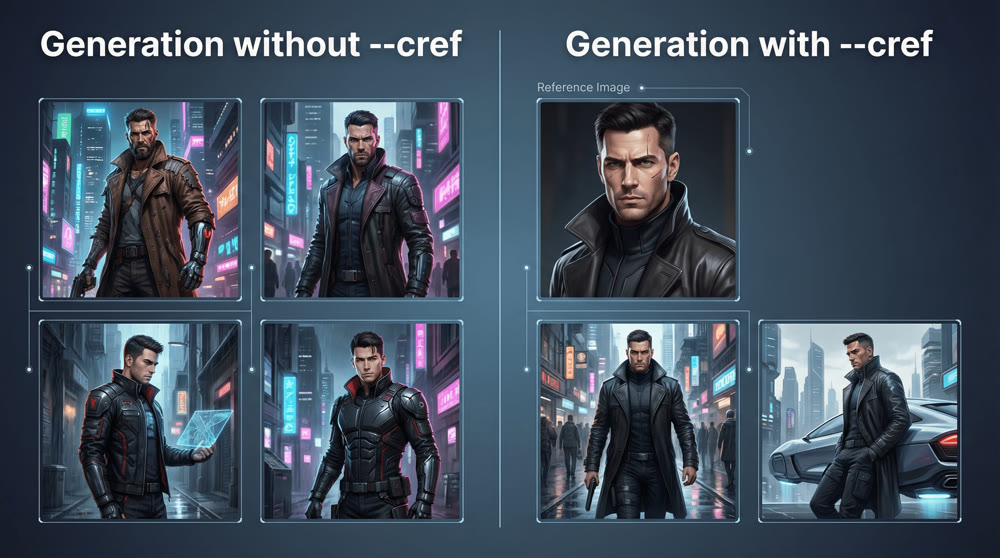
As you can see in the example above, using the
--crefparameter is a game-changer for consistency. On the left, the same prompt yields two different characters. On the right, the character remains perfectly consistent with the reference image.
- Style Reference (
--sref): Using--srefwith an image URL tells Midjourney to mimic the overall style, lighting, and color of the reference image without altering the subject described in your text prompt. This is great for emulating the photorealistic texture of models like Stable Diffusion (SD).- Creative Fusion: Stacking Style Codes: Some advanced creators are pushing boundaries by upscaling viral cover images from benchmark accounts, compiling them into a "style board," and generating a "style code." They then fuse this new style code with their own trained style codes. This fusion produces a new character that shares traits with the successful benchmark but is unique enough to stand out, helping to avoid homogenization and create truly novel IP.
For creators seeking granular control over style, Leonardo AI remains one of the strongest competitors to Midjourney.
III. Reference Image Techniques in Storyboard Video Generation
In the image-to-video stage, reference materials primarily control motion and transitions, a function achieved through "Start/End Frames."
1. Start/End Frames: Application and Model Comparison
Start/End Frames allow you to provide two static images, and the model will generate the animated sequence that smoothly transitions from the first image to the second, guided by your prompt.
| Model | Start/End Frame Performance Evaluation | Strengths / Applications |
|---|---|---|
| Kling 2.1 | Exceptional, in a class of its own. |
Perfect for transformations and scene transitions with incredibly smooth results. |
| Runway | Excellent, especially for transitions and morphs. |
Ideal for transformation sequences and other scenes requiring seamless motion. |
| Hailuo 02 | Strong, but detail can be less refined than Kling. |
Excels in action sequences and motion extension. |
| VidU Q2 | Good performance. | Produces a cinematic, blockbuster feel; strong in action and motion. |
| Jiemeng 3.0 | Average performance. | Better for painterly styles; less effective for realistic transformations than specialized tools. |
Video Example (Generated by Kling 2.1.)
2. Operational Tips for Using Start/End Frames
For story-driven or transformation videos that demand high continuity, using start/end frames correctly is critical.
- Precise Framing: The start and end frames must be meticulously generated static images, typically the final shot of the previous scene and the opening shot of the next.
- Controlling Transitions:
- Extend Transition Time: In tools like Runway, you can sometimes create more dynamic and detailed intermediate motion by spacing out the start and end frames within the tool's timeline (e.g., placing image A at the start and image B further down the sequence).
- Ensure Motion Fluidity: In your image-to-video prompts, add directives like "ensure the video is coherent, smooth, and follows realistic motion principles; do not introduce other characters" to maintain the subject's realism.
3. 【Advanced】Troubleshooting Common Issues in Image-to-Video Generation
If the reference image itself has issues, it can cause the video generation to fail or produce flawed results.
- 🚫Avoiding 'Flagged' Content Issues: If a tool like Runway flags your image and blocks generation, try uploading the image to its internal asset library and referencing it from there. Alternatively, making minor edits (cropping, adjusting brightness) before re-uploading can often bypass the filter.
- ✨Managing Expectations: Image Quality: Even if you use a 4K reference image, the output from most image-to-video models is typically 720p or 1080p. The high-resolution input serves to help the model better understand and interpret the prompt details, not to guarantee an equivalent output resolution.
Mini Case Study: Creating a Consistent Character for a Short Video Series
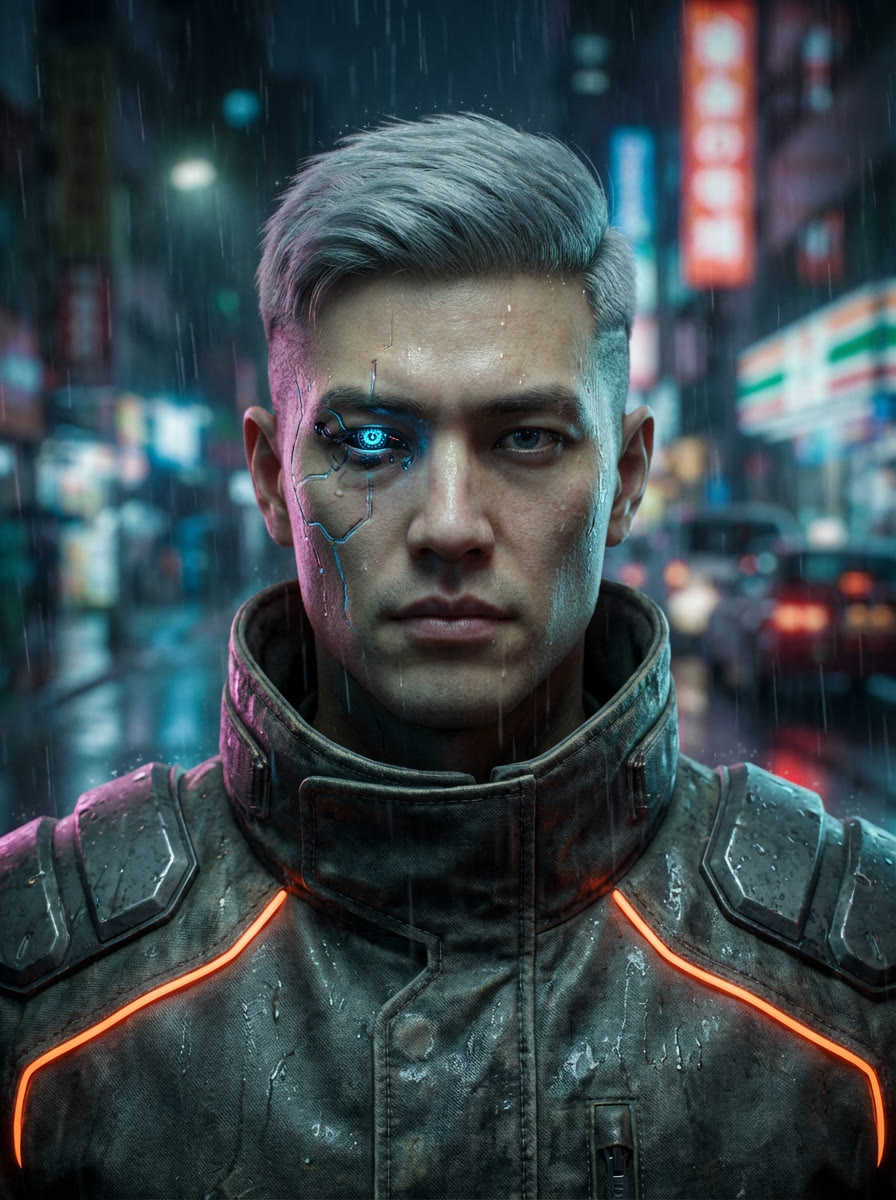
Step 1: The Character Reference. We started with this single, high-detail reference image for our character, 'Kai', a cyberpunk explorer.**
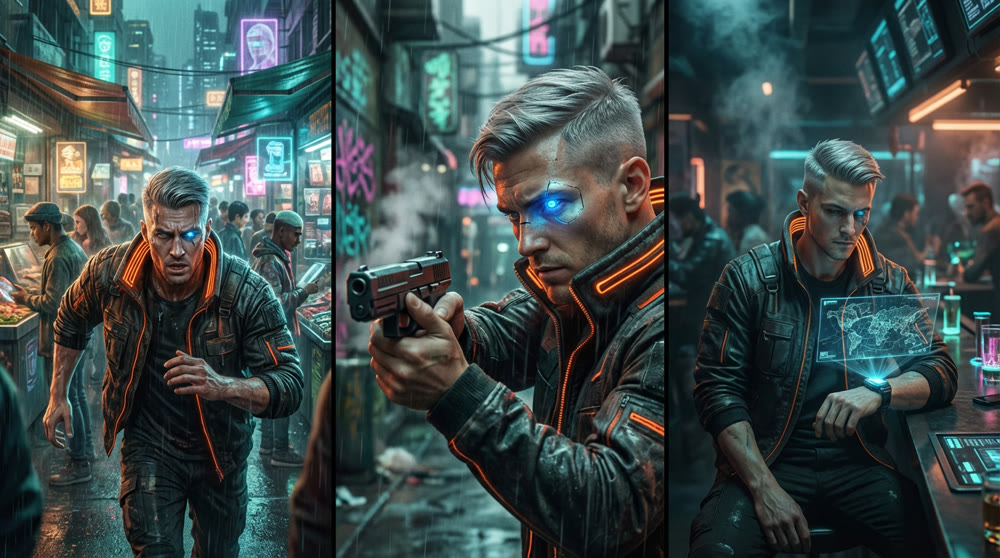
Step 2: Generating Storyboard Frames. Using the reference image with the --cref parameter in Midjourney, we generated key frames for our 3-part video series. Notice the consistency in his facial structure, cybernetic eye, and jacket across different scenes and expressions.**
Mastering these reference image techniques is the first step toward professional-grade AIGC content. The next is leveraging a platform that streamlines this entire creative workflow. By integrating these advanced methods, you can conquer character consistency, scale your production, and tell compelling stories that captivate audiences.
Advanced users can find specific style LoRAs in the Civitai model community, which is crucial for maintaining character consistency.
Ready to put these concepts into practice and build your own consistent AI characters? Explore Genmi AI to discover tools designed to empower creators like you.
Recommended Articles
Nano Banana Pro: A Comprehensive Review of Google DeepMind’s Image Tool
Explore Nano Banana Procapabilities, from high-resolution visuals to advanced multi-image editing. Read our detailed review and workflow insights.
Find the Best AI 3D Model Generator of 2025: A Complete Guide
Discover the best AI 3D model generator for your projects. Our guide reviews top tools for designers, developers, and 3D printing enthusiasts.
Hailuo vs Kling vs Runway: The Ultimate AI Video Model Comparison
An in-depth analysis of Hailuo vs Kling vs Runway. Discover which AI video model excels in realism, physics, and creative control to find the best fit.