


PixVerse AI Video Generator Review: An Honest Look at Its Quality in 2025
Article Summary: This comprehensive review evaluates the PixVerse AI video generator, testing its text-to-video capabilities, speed, and visual quality. We provide an honest look at its strengths and weaknesses to help you make an informed choice.
The AI video landscape is exploding, with new tools emerging almost weekly, each promising to turn your ideas into cinematic reality. In this crowded market, how do you separate the truly powerful platforms from the fleeting trends? One name that consistently generates buzz is PixVerse. This article provides a detailed PixVerse AI Review, putting the tool through its paces to see if it lives up to its reputation.
We'll dive into its core features, test its performance with both simple and complex prompts, and weigh its pros and cons. By the end, you'll have a clear understanding of what PixVerse excels at and where it falls short, helping you determine if it's the right creative partner for your next project.
What is PixVerse? A Quick Introduction
Developed by the generative AI startup AISphere, PixVerse has quickly gained traction in the creative community, backed by significant funding and attracting hundreds of thousands of monthly users. It is known for creating visually stunning videos from text and image prompts, with a reputation for rendering impressive details, lighting, and dynamic effects.
However, user feedback is mixed. While many praise its aesthetic quality, others point to occasional logical errors in complex scenes and limitations from recent updates, such as the removal of a negative prompt field. To get to the truth, we decided to conduct our own hands-on test.
Putting PixVerse to the Test: Our Hands-On Experience
We tested PixVerse using its V3.5 model to evaluate its speed, accuracy, and ability to handle creative instructions.
Simple Prompt Test
First, we started with a straightforward prompt to gauge its fundamental capabilities.
Prompt:
“The sea water sparkled in the sunlight, gently lapping against the shore.”
Result:
The video was generated in about 30 seconds—an impressive speed. Even at a lower resolution, PixVerse delivered beautiful lighting on the water and realistic wave motion. It immediately showcased its strength in capturing dynamic, natural-looking visual details.
Complex Prompt Test
Next, we challenged the model with a more intricate scene that included characters, specific actions, and an abstract mood.
Prompt:
“A beautiful woman with black hair was wearing a Bohemian-style long dress. She was lying on a beach chair by the seaside in the evening. The wind blew and made her hair float slowly. Beside her, a little boy was building a sandcastle. The entire scene is very warm and cozy.”
Result:
Generated in under a minute, the video successfully captured the "warm and cozy" atmosphere. Details like the black hair, bohemian dress, and evening setting were rendered accurately. However, the output also contained logical flaws: the boy appeared to be building the sandcastle directly on the woman's dress, and the hair movement felt slightly unnatural. This PixVerse AI Review confirms that while the tool is artistically gifted, it can struggle with complex spatial relationships.
Key Features of the PixVerse AI Video Generator
PixVerse comes equipped with a versatile set of features designed for different creative needs:
- Text-to-Video: The core function allows you to use descriptive text-based prompts to generate a video scene from scratch.
- Image-to-Video: You can upload a source image and let the AI animate them to bring static visuals to life.
- Special Effects: The platform offers templates for creating unique effects, like turning a photo into a Studio Ghibli-style animation.
- Transitions & Restyling: You can define a start and end frame for the AI to animate the transition or completely change an existing video's artistic style.
- Extend Video: This feature allows you to add several seconds to an existing clip, with the AI generating new content that fits seamlessly.
PixVerse AI: The Pros and Cons
Based on our testing, here's a balanced look at what PixVerse does well and where it could improve.
Pros:
- 1)Fast Generation Speed: Delivers videos in 30-60 seconds, even for detailed prompts.
- High-Quality Visuals: Excels at creating beautiful lighting, color, and dynamic effects like water.
- Excellent Abstract Interpretation: Superb at capturing the mood and atmosphere described in a prompt.
- Generous Free Trial: Offers enough credits for users to thoroughly test its capabilities.
Cons:
- Logical Inconsistencies: Can produce illogical outputs in complex scenes with multiple subjects.
- Limited Video Length: Video duration is currently capped at 5 or 8 seconds, which is restrictive.
- No 4K Support: Lacks the ability to generate ultra-high-resolution video.
- No Negative Prompting: The current interface lacks a negative prompt section, limiting user control over unwanted elements.
If you're struggling to choose the right software, this comparison of the best AI video generators breaks down the pros and cons of the top tools to save you time.
Beyond Single Tools: Genmi AI
Specialized tools, such as the PixVerse AI Video Generator, frequently operate in isolation, forcing creators into fragmented workflows. The necessity of jumping between separate applications—one for initial concept, another for refinement, and a third for animation—disrupts creative momentum and often leads to inconsistent output.
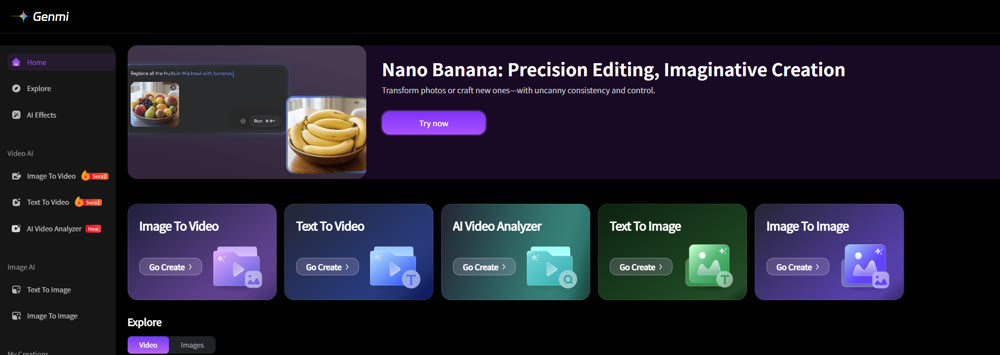
Genmi AI is pioneering a new standard. Built as a unified creative suite, Genmi AI integrates various AI modalities into a single, cohesive environment, eliminating the need for disconnected apps. This integrated platform allows creators to manage the entire production lifecycle in one place. For example, users can leverage advanced image-to-image tools to perfect a character's design before seamlessly transitioning to video generation within the same interface. This approach drastically streamlines production, ensuring that the creative vision remains consistent and intact from the initial idea through to the final render.
Conclusion: Is PixVerse the Right AI Tool for You?
So, what's the final verdict? PixVerse is an undeniably impressive AI video generator, especially for users who prioritize stunning visuals and rapid generation. Its ability to interpret abstract moods and create beautiful, dynamic scenes makes it an excellent choice for creating short, eye-catching clips for social media or conceptual art.
However, its limitations—short video length, occasional logical errors, and lack of 4K support—mean it may not be suitable for professional projects requiring longer formats or absolute coherence.
For creators seeking a more robust and scalable solution, the future lies in integrated platforms. While PixVerse is a fantastic tool for a specific job, exploring a holistic creative suite like Genmi AI can unlock a more powerful and efficient workflow. Ultimately, the best tool is the one that empowers your unique voice. We encourage you to experiment, push the boundaries, and discover the creative partner that brings your imagination to life
Recommended Articles
Google Veo 3.1 Review: A VFX Pro's Verdict on the New Frontier of Video Synthesis
We tested Google Veo 3.1 on audio, continuity, and asset consistency. Discover if this new model is ready for professional production workflows.

Wan 2.6 Review: Why it is the Director's New Choice for Narrative Video
An in-depth review of Wan 2.6. Discover how its multi-shot control and video reference features are revolutionizing cinematic AI video storytelling.
Your Ultimate Guide to Hyper-Realistic AI Video: Mastering the Uncanny
Unlock the secrets to creating photorealistic AI video. Our guide covers advanced prompting, iterative workflows, and the techniques needed for flawless work.