


Mastering Prompt Engineering: A Blueprint for Automated AI Video Creation
Article Summary: This guide provides a comprehensive blueprint for mastering prompt engineering for AI video. It covers deconstructing viral content, creating structured prompts, establishing core rules for quality, and building an automated workflow to scale production efficiently, turning creative ideas into viral videos at scale.

Prompt engineering is the cornerstone and control center of the AI short-form video creation process. It directly dictates the quality of your final content and the efficiency of your production workflow.
I. The Role of Prompt Engineering in AI Video
Prompt engineering applications span the entire AI video production pipeline, enabling fine-grained control and automation over your content.
- Deconstructing Viral Videos & Generating Scripts: Creators can leverage AI tools (like Google's AI Studio) to analyze the links of competitor videos. The system can then automatically "break down the video frame-by-frame, analyze its pacing, and reverse-engineer the prompts." This dramatically lowers the barrier to emulating successful content and making micro-innovations.
- Precise Instructions for Asset Creation: Prompts are the key to guiding text-to-image and image-to-image tools (like Midjourney or Stable Diffusion) to define character appearance, scenes, and static storyboard frames. These assets are then used by image-to-video generators (like Runway or Sora) to create dynamic clips.
- Efficiency and Automation: Once you've validated a successful workflow, prompt templates become the foundation for batch-generating images and videos. A high-quality set of templates can slash production time from hours to mere minutes.
Why a Systematic Approach to Prompts is Crucial
The precision of your prompt system is the deciding factor in whether your AI content can break through the noise and achieve significant viewership.
Precise prompts are the bedrock of quality assurance. They ensure the AI-generated assets maintain character consistency and fluid, realistic motion, preventing viewers from swiping away due to poor image quality or broken character continuity. As one creator noted, optimizing prompts effectively reduced the need for "rerolling" generations, significantly boosting production efficiency.
Prompt Comparison Table (Formatted with Line Breaks)
Left: Fuzzy Prompt - Before
- Prompt:
a woman crying - Result: Lacks detail, style, and atmosphere; the result is highly inconsistent ("gacha" risk).
- Generated Image:

Right: Structured Prompt - After
- Prompt:
Close-up, a young woman named Elena (20s, wearing a worn-out brown leather jacket, determined expression) with a single tear suspended at the corner of her eye, dramatic rim lighting, ultra-photorealistic style, 8K, cinematic color grade. - Result: Rich in detail, consistent character, strong emotional expression, and cinematic quality.
- Generated Image:

II. Automated Script Extraction and Structured Generation
An efficient prompt engineering system begins with the precise deconstruction of viral videos. By using advanced AI tools, we can automate and structure the time-consuming manual process of extracting scenes and writing prompts.
1. Using AI to Rapidly Deconstruct Competitor Videos
We must treat the AI as a professional, "unambiguous" director, demanding it to extract scripts in a structured and precise manner.
- Get the Video Link: Find a viral YouTube Shorts video you want to replicate or adapt.
- Choose an AI Tool: Use the free Gemini Pro model in Google's AI Studio (may require a VPN). This model supports direct input of YouTube video links, automatically analyzing content, deconstructing it into a storyboard, and reverse-engineering production prompts.
- Define the AI's Role: In your initial prompt, assign a strict professional identity to the AI. For instance, define it as an expert with the dual roles of "Storyboard Director" and "Continuity Editor."
- The "Storyboard Director" generates a complete and coherent first draft of the storyboard script.
- The "Continuity Editor" reviews the draft and is responsible for making precise, context-aware corrections and additions to any missing or erroneous shots.
- AI Execution: The AI will then analyze the video according to a set of "non-negotiable Golden Rules" (detailed in Part III) and identify the switch point for each individual shot.
2. Structured Output and Format Standardization
To enable subsequent batch production (generating images and videos), prompts must be output in a machine-readable, structured format, not as large blocks of text.
- Format Requirement: The script must be output in a structured format like a Markdown table or CSV to ensure prompts are clear and independent. The CSV format is particularly useful for later import into batch generation tools.
- Modular Content: Within the structured format, the prompt should be divided into distinct modules, such as: Shot & Composition, Scene Description, and Action & Character Instruction.
- [Advanced] Contextual Correction: When the initial draft has errors or omissions, engage the "Continuity Editor" persona. Require the AI to review and analyze the complete context of the preceding and succeeding shots, extract the character's identity, and output only the single line of table code that needs correction, ensuring it can be directly copied and pasted.
3. Establishing and Reusing Character Identities
In narrative Shorts, maintaining visual consistency for your characters is critical to success. If the generation tool (like Stable Diffusion or Midjourney) can't remember the previous shot, we must ensure every single prompt contains the character's complete information.
3.1 Standardizing Character Identity Tags
- Per "Golden Rule Seven: Intelligent Character Naming & Formatting Protocol," when a character first appears, you must create and standardize their unique "Complete Identity Tag" in the format:
Name (Defining Features).- Naming Principle: The name should be short and representative, while the defining features should include prominent visual traits (e.g., profession, core costume, key accessories, ethnicity/regional characteristics).
- Reuse Requirement: Once this identity tag is created, it must be reused verbatim—completely and without alteration—in every subsequent shot featuring that character. This effectively mitigates the "hallucinations" and "laziness" of AI models during sequential generation.
3.2 In-Prompt Nickname Protocol
To keep prompts clean and efficient, the system also includes an internal nickname protocol:
- [Advanced] Golden Rule Fourteen: In-Prompt Nickname Protocol: Within the other fields of a single shot's prompt (e.g., composition, character position, expression), when referring to the character again, you must and can only use their
Name(the nickname). Absolutely do not re-attach the parenthetical(Defining Features).
Through this series of structured processes, we ensure the conversion from a viral video to an executable, batch-ready prompt is both highly accurate and scalable.
III. Core Rules and Principles of Prompt Creation
The value of a prompt engineering system lies in its built-in set of strict "Golden Rules" designed to combat the inherent uncertainty of AI models. Adhering to these principles is a prerequisite for ensuring shot continuity and generation quality.
1. The Static Snapshot Principle: Focus on "Frame One"
This is the cornerstone of all prompt creation, and its priority is absolute.
- Golden Rule Zero: The Static Snapshot Principle: Your description must focus on the very first static frame (the opening frame) of each individual shot.
- Do Not Describe the Process: Absolutely forbid descriptions of any subsequent actions, plot developments, or emotional changes that occur within that shot. For example, instead of "tears are rolling down her face" or "he is running towards the camera," use descriptions of a frozen moment in time, such as "a single tear is suspended at the corner of her eye" or "he is in a running pose, one leg forward, one leg back."
- Judging a Shot Change: A new shot is only constituted when there is a clear change in cinematic language (e.g., a change in camera position/angle, shot type, scene, or a distinct edit point).
2. The Stateless Generation Principle & Content Independence
Since AI video generation models are typically "stateless" (possessing no memory of previous tasks), each shot's prompt must be independent and self-contained.
- Golden Rule One: Stateless Generation: You must assume that each shot will be processed by a completely separate, memory-less image generation AI. Therefore, every prompt must be 100% complete and self-contained, covering all necessary information about the character, environment, action, etc.
- Complete Environmental Descriptions: Even if the scene is continuous, it is recommended to fully and freshly describe the environment in every single shot, avoiding any form of abbreviation.
- Objective Action and Positioning: Action descriptions must be objective and executable, clearly specifying the relative positions of characters.
3. The Absolutes of Formatting and Content
To guarantee the stability and controllability of your prompts, you must strictly limit the possible values of variable elements.
- Golden Rule Ten: Template Absolutes: Every shot description must strictly and completely adhere to the internal [Description Template] structure.
- Golden Rule Eleven: Expression Constraints: Expressions included in the "Pose & Expression" field must and can only be chosen from a predefined vocabulary, for example: happy, helpless, excited, angry, annoyed, sad, lost, surprised, frightened, shocked.
- Golden Rule Thirteen: Perspective & Shot Type Rules: Values for perspective and shot type must also be chosen exclusively from a predefined vocabulary, for example: eye-level, low-angle, high-angle, long shot, medium shot, close-up.
Note: Any unimportant background characters (passersby) should always be referred to in generic terms to avoid adding unnecessary burdens and confusion for the generation AI.
IV. Modular Construction of Prompt Templates
Breaking down prompts into fixed, modular templates is key to boosting production efficiency and enabling batch production. This allows you to simply swap out the variable story elements when replicating a viral hit, without rewriting the fixed style and quality descriptions every time.
1. Prompt Module Division and Design
A prompt template is typically divided into four core modules:
| Module | Purpose | Example Content | Frequency of Change |
|---|---|---|---|
| Core Subject Description | Character, action, expression, key props |
Name (Defining Features), Pose & Expression, Action Command |
High (changes with story) |
| Environment Description | Scene, time, weather |
city street, warm kitchen, sunny day, summer |
Medium (changes with scene) |
| Cinematic Language | Perspective, shot type, composition, camera movement |
eye-level, close-up, dolly in, orbit shot |
Medium (changes with intent) |
| Image Quality | Style, lighting, color, resolution |
ultra-photorealistic, 8K resolution, soft lighting |
Low/Fixed (for style lock) |
Practical Example: Structured Prompt for a Three-Shot Short Story
Below is a structured prompt example for a three-shot short story, presented in a clear Markdown table format. This structure is ideal for batch processing and management within automated AIGC tools.
| Shot | Core Subject | Environment | Cinematic Language | Image Quality |
|---|---|---|---|---|
| 1 | A young woman named Elena (20s, wearing a worn-out brown leather jacket, determined expression) stands at a bus stop. |
Gloomy city street at dusk, raining lightly, neon signs reflecting on wet pavement. |
Medium shot, eye-level, shallow depth of field. |
ultra-photorealistic style, 8K, DSLR texture, dramatic lighting, cinematic color grade |
| 2 | An old man (70s, kind eyes, holding a large black umbrella) approaches Elena. |
Same gloomy city street, closer view of the bus stop shelter. |
Two-shot, eye-level, focused on their interaction. |
ultra-photorealistic style, 8K, DSLR texture, dramatic lighting, cinematic color grade |
| 3 | The old man offers his umbrella to Elena, who looks up at him with surprise and gratitude. |
Close-up on their hands and the umbrella handle, then tilts up to their faces. |
Close-up, rack focus from hands to faces. |
ultra-photorealistic style, 8K, DSLR texture, dramatic lighting, cinematic color grade |
Explanation:
- Shot: Defines the narrative rhythm and scene transitions of the story.
- Core Subject: Ensures the continuity of characters, clothing, and key actions across shots.
- Environment: Maintains visual consistency of the setting (e.g., "Gloomy city street at dusk").
- Cinematic Language: Provides the necessary shot types and focus changes for visual storytelling, which is crucial for achieving a professional video feel.
- Image Quality: This acts as a "style lock" module, ensuring that all shots maintain consistency in style, resolution, and lighting, preventing visual jarring when the video segments are stitched together.
2. Standardizing Style and Image Quality
To ensure your content has a recognizable style and achieves the highest possible visual fidelity, the contents of the "Image Quality" module must be fixed and held to a high standard.
- Style Lock: Your fixed template should aim for "an ultra-realistic photorealistic style, with the texture of a high-end DSLR camera."
- Quality Target: Explicitly demand "8K resolution visual effect, highly detailed, rich in texture, no noise."
- Light & Shadow Control: Emphasize "ample, soft, and even lighting with a realistic color palette" to ensure the generated images have lifelike colors and accurate white balance.
By appending these high-standard descriptions to the end of every prompt, you can effectively increase the quality of the final generated images and reduce the number of rerolls needed to fix quality issues.
3. Hybrid Language Application: Enhancing Controllability [Advanced]
In practice, relying solely on one language for prompts that are then translated can sometimes lead to instability in the weight and effect of specific technical terms.
- The English Keyword Advantage: Many leading AI models have been primarily trained on English data. For technical and stylistic terms, using precise English keywords often yields more consistent and controllable results than relying on translation.
- Descriptive Part: Use your most comfortable language for creative descriptions of the subject and environment (e.g., "A Labrador retriever standing on a country road").
- Technical Part: Use specific English keywords to lock in cinematic language, image quality, and artistic style, bypassing the uncertainty of translation software.
- A Proven Tactic: Creators using this hybrid method have reported a significant reduction in generation failures, often achieving usable results on the first try and drastically speeding up the image creation process.
V. Building Your Asset Library and Scaling Production
The ultimate goal of a prompt engineering system is to serve efficient content production and a continuous stream of viral hits. Therefore, we must not only establish prompt templates but also build a reusable asset library of successful scripts and IPs.
1. Accumulate a Library of Viral Scripts and IP Assets
Proven scripts and popular IPs are the foundation for micro-innovation.
- Script Asset Accumulation: Through deconstruction and analysis, build a library of market-validated viral scripts (e.g., underdog-gets-revenge plots, rescue stories, suspenseful twists).
- Popular IP Collection: Collect currently trending IPs (e.g., stories from classic literature, K-pop fan fiction, animal fables, or even Squid Game-style thrillers).
- [Advanced] Extracting the Core Viral DNA: Successful creators go deeper to understand the core emotional hook of a viral hit. They analyze what user psychology it tapped into to determine which shots are essential (and shouldn't be changed) and which parts offer room for innovation.
2. The Micro-Innovation Strategy: Recombining Viral Elements
Simply making pixel-perfect imitations will lead to content homogenization and potential platform penalties. The secret to breaking through is micro-innovation based on proven viral elements—a strategy of recombination.
2.1 Element Swapping and Recombination
Micro-innovation shouldn't be random; it should be "standing on the shoulders of giants" by making data-driven tweaks.
- Swap the IP: Take a proven "viral script" and replace its IP with another currently popular one. For example, apply the "underdog gets revenge" plot to AI-generated characters from classic myths or anthropomorphic animal characters.
- Combine and Graft Plots: Merge two different but previously viral plot elements. For instance, combine the "viral opening of a mother cat getting shaved" with the "story of an underdog's triumph after being ridiculed" to create new narrative tension.
- Cross-Niche Adaptation: Adapting high-quality narrative structures to less-saturated niches achieves a "high-level script for a less-saturated audience." For instance, a creator successfully used this strategy to rapidly amass over 200 million views by localizing popular scripts.
2.2 Data-Driven Iteration
After publishing a video, you must analyze its performance data to guide your next micro-innovation.
- Key Metrics: Focus on Viewed vs. Swiped Away (determines the effectiveness of your opening hook) and Audience Retention (determines script pacing and user engagement).
- Optimize the Golden 3 Seconds: If a video's Audience Retention Rate drops below the 80% threshold in the first 3 seconds, the algorithm will reduce exposure. Constantly refining the opening hook is essential for maximizing views [https://www.shortimize.com/blog/how-does-youtube-shorts-algorithm-work].
- Optimize the Ending: If retention drops off a cliff at the end, your conclusion is dragging. A smart tactic is to make the final frame seamlessly loop back to the first, encouraging repeat views and boosting retention.
3. Scaling with Automation Tools: Free Your Hands [Advanced]
Only by converting manual operations into automated workflows can you truly unlock the ability to test more niches and video ideas at scale.
| Stage | Tools & Operations | Efficiency Strategy |
|---|---|---|
| Script/Prompt Extraction | Google AI Studio + Gemini |
Use a script or plugin to export the structured storyboard prompts into a CSV file, avoiding manual copy-pasting. |
| Batch Image Generation | Batch image tools (e.g., Midjourney/SD API) + CSV |
Import the CSV of prompts into a batch generation tool to create multiple images at once, saving time. Costs can be extremely low (some achieve under $0.01/image), reducing testing costs. |
| Video Creation | Batch video generation tools | Reuse image prompts or generate a dedicated "camera movement prompt CSV" in Gemini to import into tools for batch video generation. |
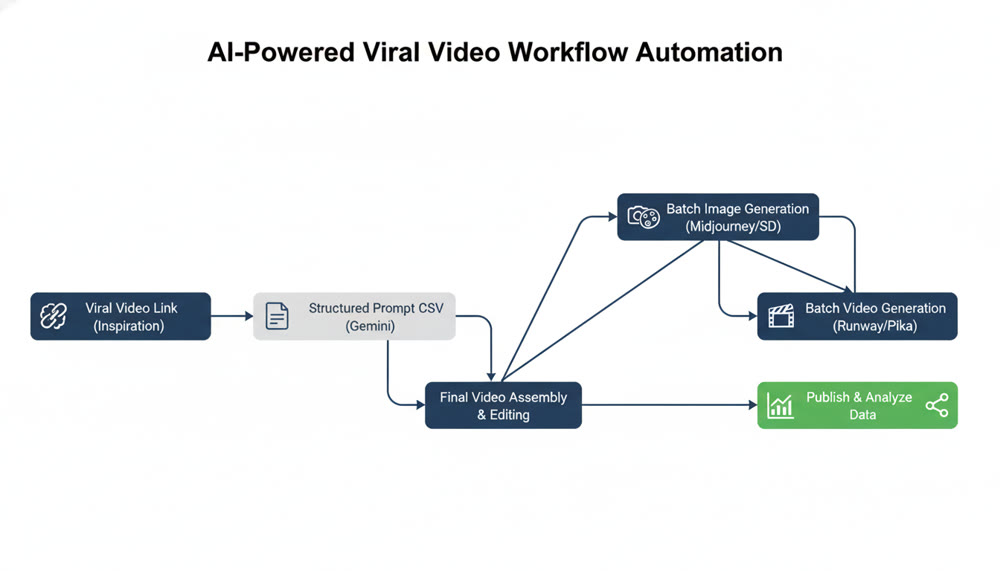
📌📌Tip: Automation is most effective after you've first validated a niche with a viral hit (e.g., 1 million+ views). If the manual workflow is too slow, consider using proven scripts or workflows to start. For those looking to streamline their entire workflow, exploring integrated platforms like a dedicated text-to-video generator can be a game-changer.
4. Preserving Creative Records for YPP and Monetization
To navigate YouTube's originality requirements (especially for AI content) and the YouTube Partner Program (YPP) review process, meticulous record-keeping is essential.
- YPP Threshold: A channel can qualify for YPP by reaching 1,000 subscribers and 10 million public Shorts views in 90 days.
- Keep Originality Records: You must preserve the original records of your video creation process, including accounts and history from various AI tools (e.g., your Midjourney generation history, Gemini chat logs).
- Channel Cleanup: Before applying for YPP, it's wise to clean up your channel by hiding or deleting low-performing, non-essential videos that might raise questions about originality.
- Avoid Homogenization Risk: Platforms are cracking down on highly homogenized, template-driven content. Your automated production must ensure each video has unique variations and innovations to avoid being flagged as automated spam.
The principles and systems outlined above are your blueprint for transforming AI video creation from a game of chance into a scalable, strategic operation. But a blueprint is only as good as the tools you use to execute it.
Ready to put this blueprint into action? Genmi AI is designed to streamline this entire process, integrating powerful generation capabilities with an intuitive workflow. Stop just creating content—start building your content engine. Explore our tools today and discover more strategies on the Genmi AI Blog.
Recommended Articles

Viral AIGC YouTube Shorts: The Ultimate 2025 Guide
This guide covers viral frameworks, key metrics, and tools to grow your YouTube Shorts channel.

The YouTube Partner Program (YPP): A Guide for AI Creators
Master the YouTube Partner Program. Learn eligibility, monetization thresholds, and how AI video tools can fast-track your channel's growth and revenue.

An In-Depth WAN 2.2 Review: Redefining AI Video Motion Control
Explore our WAN 2.2 review. We analyze its advanced motion control, prompt accuracy, and how it compares to other top models in the AI video space.