


A Creator's Playbook for Format-Driven Viral Hits on YouTube
Article Summary: This guide provides a playbook for creating viral, format-driven YouTube Shorts with AI. It covers ideation, two production workflows (text-to-video and image-driven), and advanced automation strategies to help creators scale their content and achieve massive growth on the platform.

In the fast-paced world of AI-generated content (AIGC), two primary paths lead to viral success on YouTube Shorts: narrative-driven blockbusters and format-driven viral hits. While the former relies on intricate storytelling, the latter thrives on a different formula: a streamlined creative process that prioritizes stunning visuals and production efficiency over complex plotlines.
Format-driven videos are engineered to deliver a powerful sensory punch in seconds, maximizing two critical metrics: Click-Through Rate (CTR) and Looping (repeat views). This playbook will guide you through the entire workflow, from ideation to automated scaling.
I. The Universal Workflow: Ideation and Core Concept Development
Before you generate a single frame, you must identify the "hook"—the core element that will instantly capture a viewer's attention.
1. Sourcing Ideas and Viral Elements
Format-driven content has a short lifespan, making rapid iteration and clever adaptation essential for survival.
- Leverage Trending IPs: Tap into existing cultural conversations by focusing on popular intellectual properties (IPs). Think trending movie characters, major music artists, or globally recognized personalities. These IPs come with a built-in audience and immediate recognition.
- Analyze Trending Content: Dedicate time daily to scrolling YouTube Shorts. Use analytics tools like Viewstats or vidIQ to identify videos that have hit tens of millions of views in the last week.
- Deconstruct Viral Elements: Break down successful videos into their fundamental components:
- Visual Spectacles: Transformations, impossible stunts (e.g., diving into lava, jumping from planes).
- Sensory Triggers: ASMR content (cake cutting, satisfying sounds).
- Visual Formulas: Quad-split grids, seamless loops, style transfers, dramatic before-and-after contrasts.
- Novel Perspectives: Miniature scenes, security camera footage, first-person view (FPV).
- Combine and Innovate: Create new concepts by stacking these elements. For example, you could combine a "quad-split" format with a "style transfer" effect featuring rival sports icons like Messi and Ronaldo, all set to a trending audio track.
2. Micro-Innovation Strategy: Keep the Structure, Swap the Elements
The key to innovating within this model is to treat the format as a stable framework while swapping out the creative components.
- Substitute IPs/Characters: Once you've validated a format (like a transformation sequence), apply it to different subjects. If it worked with an animal, try it with a K-pop idol, then a mythological creature, or even a robot.
- Explore New Formats: Keep an eye on new AI tools (like Sora 2 or Veo 3) and the novel visual possibilities they unlock, such as hyper-realistic security camera footage or incredibly detailed ASMR scenes.
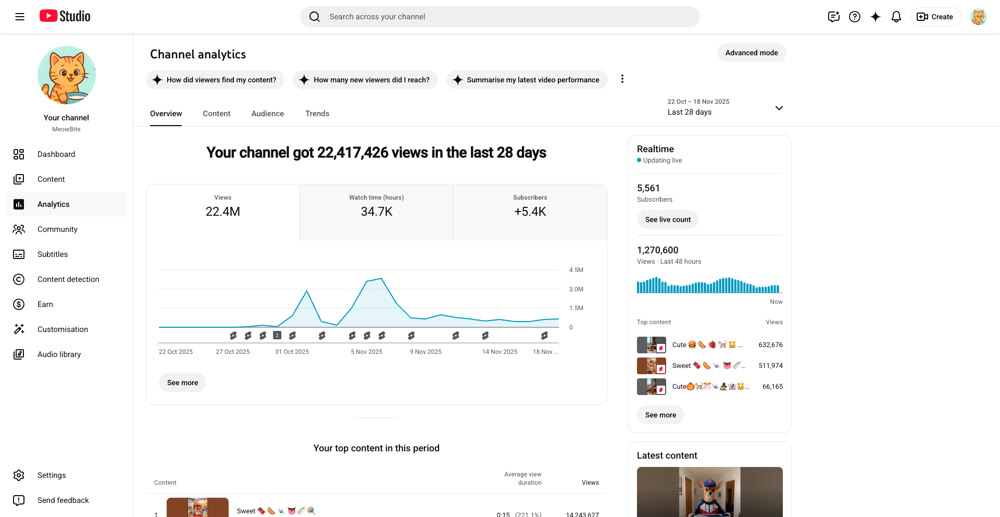
Case Study: AI-Driven Shorts Growth (30-Day Comparison)
| Key Metric |
Before Strategy Implementation |
After Strategy Implementation |
Growth Factor |
Strategy Link |
|---|---|---|---|---|
| Subscribers | 100 | 100,000+ | 1000x | Viral distribution drives massive exposure |
| Total Views |
5,000 | 25,000,000+ | 5000x | Mastering blockbuster formats increases click-through rates |
| Avg. Daily Views |
166 | 833,333 | 5000x | Consistent and high-volume supply of quality content |
| Avg. View Duration |
8 seconds | 15 seconds | 1.87x | Formatted scripts optimize content pacing |
| Content Output Rate (Shorts/Week) |
2 (Manual Production) | 28 (Batch Generation) | 14x | RPA and batch tools enable scalable production |
| Avg. Production Time (Per Short) |
4 hours | 15 minutes | -93.75% | Efficiency gains from AI automation workflow |
Table Interpretation:
This case study demonstrates how a new YouTube Shorts account achieved explosive growth—from zero to over 100,000 subscribers and tens of millions of views—in just 30 days. This was accomplished by adopting the "Format Blockbusters" strategy (ensuring content format aligns with platform preferences) and the "AI Automation" workflow (significantly boosting content production efficiency).
II. Path A: The Direct Text-to-Video Workflow—Chasing Photorealism and Novelty
This approach is ideal for creating videos that rely on the raw power of advanced AI models to generate photorealistic, cinematically complex, or uniquely angled footage (e.g., security camera POV) directly from a prompt.
1. Content Design and Prompt Generation
Because the final video is generated directly by the AI, the quality of your prompt is everything. Precision and clarity are non-negotiable.
- Tool: Gemini AI Studio (Gemini Pro/2.5 Pro)
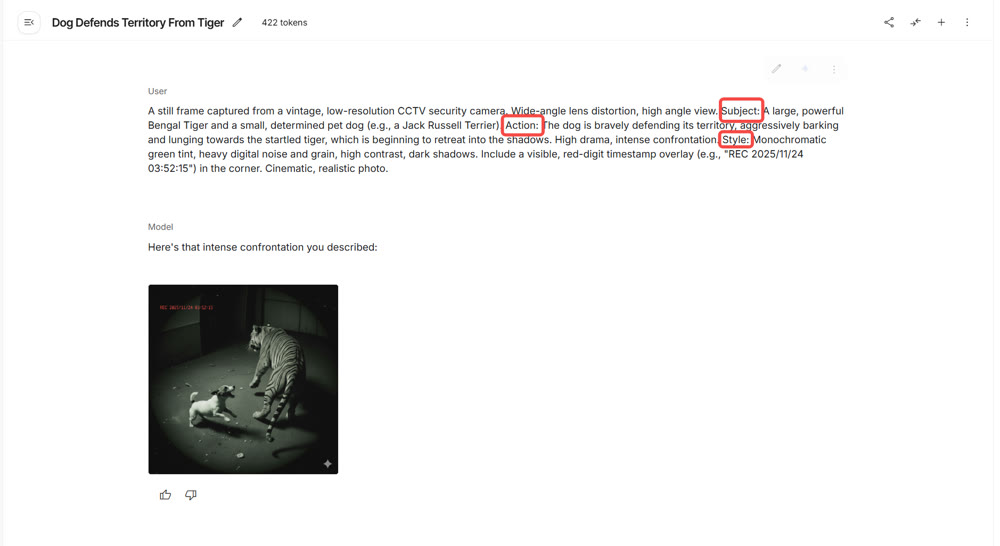
- Core Action: Use Gemini 2.5 Pro in AI Studio, leveraging a custom prompt template, to act as a "Sora-level video scene architect."
- Steps:
- Define Scene & Perspective: Establish your core viral element, such as "animal rescue from a security camera's perspective" or "first-person view of an impossible challenge."
- Generate Detailed Prompts: Use an AI tool like Gemini to create comprehensive, self-contained video prompts. The prompt must detail the subject, action, environment, shot type, and perspective, with a strong focus on dynamic movement and sensory details. For an ASMR video, for instance, you'd specify "close-up shot" and "crisp cutting sounds." This is where tools designed for high-quality text-to-video generation become indispensable for executing your vision.
2. Video Generation and Selection
This is the make-or-break stage that determines your video's visual impact.
- Tool Selection: Sora 2, Veo 3, or other high-performance AI video models.
- Steps:
- Direct Generation: Submit your detailed prompts to your chosen AI model.
- Material Review: Critically evaluate the output for realism and fluidity. Pay close attention to any visual artifacts, especially in scenes with significant motion.
- [Advanced] Batch Processing: To increase your chances of getting a perfect shot, use automation software or custom scripts to run multiple prompts in parallel, generating a larger pool of assets to choose from.
3. Editing and Optimization
Even AI-generated clips need a skilled editor to control pacing, sound, and the all-important loop effect.
- Tool: CapCut.
- Key Focus:
- The Golden 3 Seconds: Ensure the first three seconds deliver an intense visual hook or create immediate suspense. Your target CTR should be over 80%.
- Sound Design: Sound is crucial for format-driven videos. For ASMR, rescue, or thriller content, meticulously match sound effects (dog barks, glass shattering, chewing/slicing sounds) to enhance immersion.
- Seamless Looping: For ultra-short videos, design the last frame to blend perfectly with the first. This encourages viewers to watch on a loop, driving watch time well over 100%.
When designing any high-volume content strategy for YouTube Shorts, the fundamental principle remains viewer retention. Specifically, the "Golden 3 Seconds" rule is non-negotiable. As the official YouTube Creator Blog highlights, successful Shorts are those that "hook the viewer and signal what the video is about" immediately, often within the first few seconds . This principle is the foundation for designing our AI-driven 'Format Blockbusters'—each script must be engineered for immediate engagement. By adhering to these platform-specific best practices, we ensure that the content generated by AI is not just fast, but also fundamentally optimized for success. For more official insights on mastering short-form video, you can refer to the official guide here: YouTube Creator Blog: Five Tips to Master Shorts.
III. Path B: The Image-Driven Workflow—Mastering Character Consistency and Visual Formulas
This path is best suited for content requiring a consistent character across multiple scenes or relying on editing techniques like image-to-image transitions (e.g., K-pop transformations, quad-split reveals).
1. Creating Consistent Characters (Reference Images)
Maintaining a consistent look for your IP (like a K-pop star or a fantasy character) is the top priority in this workflow.
- Tools: Midjourney, DALL-E 3, or other advanced image generators.
- Steps:
- Generate Reference Images: Use one of the tools above to generate one or more high-quality "seed" images based on a detailed description (e.g., "woman with pink hair on a beach, photorealistic").
- Build a Reference Library: Import these reference images into your batch-processing workflow, ensuring the file names or tags correspond precisely to the character names in your prompts.
Bringing these static characters to life often involves powerful image-to-video models that can animate your creations while preserving their core features.
2. Editing, Pacing, and Publishing
Editing is the lifeblood of a format-driven video, weaving disparate visual elements into a tight, hypnotic final product.
2.1 Download Assets and Music
- Video Downloader: Use a YouTube video downloader to save reference clips.
- Music Sourcing: Identify trending audio using apps like Shazam. To avoid copyright issues, consider using an AI music generator like Suno to create a similar track or pull from a royalty-free library like NCS (NoCopyrightSounds).
2.2 Assembly and Rhythm Optimization
- Tool: CapCut.
- Key Focus:
- Fast Pacing: Speed up all clips to around 1.2x to create a more dynamic feel. Trim any static frames at the beginning of each clip to ensure seamless flow.
- Style Transfer Effects: For "morphing" videos, use CapCut's masking and keyframe features to create gradual transitions between different art styles, building visual suspense.
- ASMR Details: For sensory-focused videos, sound is paramount. Precisely sync sound effects—a dog bark, a car screech, a knife slice—to the on-screen action.
2.3 Thumbnail and Publishing
- Thumbnail: While less critical for Shorts, an optimized thumbnail helps. Instead of copying a competitor, capture the most impactful frame from your video or design a simple graphic in Canva.
- Publishing: Maintain a consistent posting schedule (1-2 Shorts per day is a good starting point) using the YouTube Studio publisher.
IV. Advanced Strategies and Common Pitfalls
1. FAQs and Solutions
| Issue | Solution |
|---|---|
| Inconsistent Characters | Use reference images and consistent naming in prompts. For complex shots, generate multiple options and select the best one. |
| Noticeable AI Artifacts | Avoid overly complex motions. Use shorter clips (1-2 seconds) and rapid cuts to mask imperfections. |
| Low Initial Views | The algorithm takes time. Post consistently for at least 1-2 weeks. Analyze high-performing videos and iterate on their successful elements. |
2. [Advanced] Automation and Scaling Strategies
For format-driven content, automation is the key to scaling your operation and capitalizing on fleeting trends.
2.1 Batch Prompt Generation
Use AI agents to transform creative ideas into executable prompt libraries.
- Tool: Gemini AI Studio.
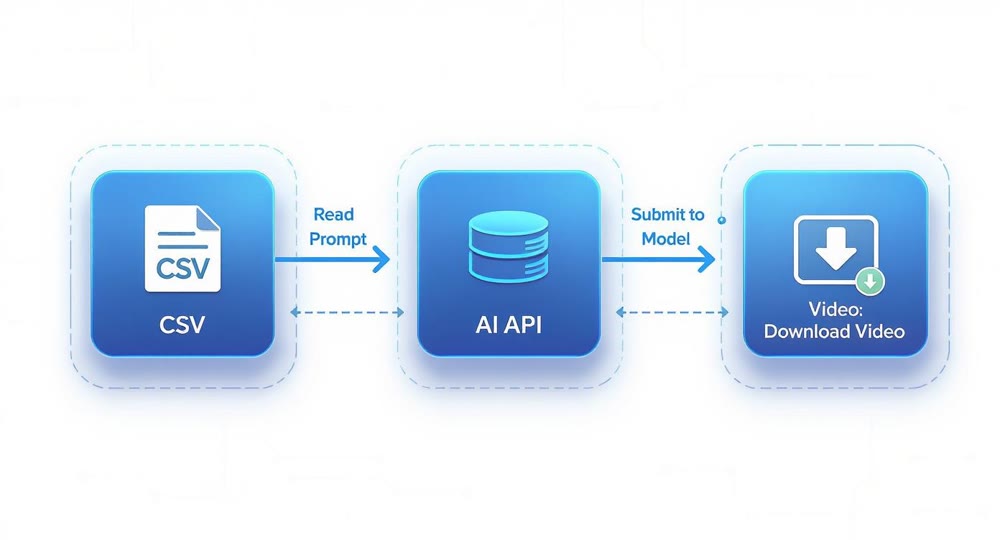
- Action: Design a prompt template that includes variables for character, style, action, and perspective. Instruct the AI to output a structured dataset (CSV/JSON) of prompt variations for batch processing.
2.2 Batch Asset Production
Leverage automation tools for multi-threaded, unattended asset generation.
- Image Batching Tools: Use custom scripts or specialized software that supports reference images to ensure character consistency.
- Video Batching Tools: Employ RPA (Robotic Process Automation) software or web-based batching tools to automate video generation.
- Workflow: Import the CSV file from the previous step into your batching tool and let it run. This unlocks the potential to turn one great concept into thousands of video variations.
2.3 Integrated Toolchains
Connect different stages of your production pipeline for maximum efficiency.
- Workflow Automation: Use tools like n8n or Automa to automate repetitive tasks like prompt generation, asset submission, and file downloads.
- TTS/Music APIs: Integrate services like ElevenLabs or other text-to-speech APIs to quickly generate voiceovers or copyright-free music.
But remember: automation is an amplifier, not a magic bullet. Creators who find massive success with this model do so by efficiently producing high-quality content. If you can't manually craft a successful video first, automating the process will only scale your failures. First, validate your creative formula, then scale it with technology.
Ready to stop theorizing and start creating? The strategies in this playbook provide a clear path to viral success on YouTube Shorts. But having the right tools makes all the difference. Genmi AI is engineered to streamline this entire process, helping you turn powerful ideas into stunning videos faster than ever. Explore our platform and start building your next viral hit today.
📹 Go Long: Ready for 10-minute videos? Read our AI YouTube Long-Form Video Guide.
Recommended Articles
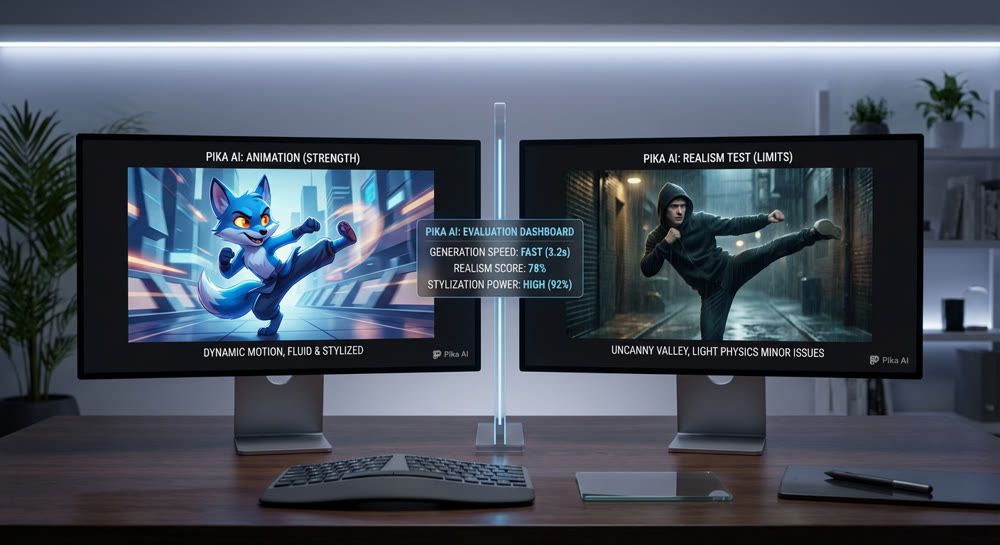
An Expert Pika AI Review: Fast Animations vs. Professional Realism
Our expert Pika AI review evaluates its text-to-video speed, realism, and features. Is this fast animation tool ready for your professional workflow?
Hedra AI Review: A Hands-On Test of Its Video Performance
Our in-depth Hedra AI review tests its lip sync, character animation, and full-body motion. See our hands-on results and find out if it's right for you.
AI Video Making: A Practical Guide to Creating Your First Moving Scene
Unlock the power of AI video making. This guide walks you through the steps to create stunning moving scenes from text, even if you're a complete beginner.