


YouTube Penalties for AIGC Content: Your Guide to Compliance and Recovery
Article Summary: An expert guide for AIGC creators on navigating YouTube's rules. Covers common penalties like YPP rejection and 'reused content,' and provides actionable strategies for compliance, appealing strikes, and breaking through traffic plateaus to ensure long-term channel growth and monetization.

As AIGC technology transforms content creation for YouTube Shorts, building a sustainable channel means playing by the rules. While powerful tools like Genmi AI's text-to-video generator can accelerate your creative workflow, running afoul of YouTube’s policies can lead to severe consequences, including content removal, Community Guideline strikes, or even rejection from the YouTube Partner Program (YPP).
This guide breaks down the most common penalties AIGC creators face and provides effective strategies for prevention and appeal.
I. The Unbreakable Rules: YouTube's Absolute Red Lines
These are high-risk areas within YouTube's Community Guidelines. No matter how viral or well-produced your content is, violating these rules can lead to immediate channel termination or YPP disqualification. Do not test these boundaries.
1. Child Safety and Endangerment
This is YouTube's highest enforcement priority, and appeals are rarely successful.
- Reason for Penalty: Content that endangers minors, draws unwanted attention to them, or places them in harmful situations. This applies not only to real children but also to anthropomorphic, child-like characters (e.g., mythology-based "baby" characters, K-pop "chibi" animations, or cartoon animal "babies").
- Specifics: Obvious endangerment (abandonment, trafficking, abuse), implicit harm, threats, sexual suggestion, ridicule, or featuring minors in violent or graphic scenarios.
- Risks & Examples:
- Many creators found that their early viral content featuring animated "mythology babies" or "Indian story-time with kids" later triggered Community Guideline violations, forcing them to delete or hide the videos.
- One creator initially kept videos featuring children in dramatic stories, believing they weren't in "danger." However, as platform standards tightened to include any depiction of minors receiving "unwanted attention, scolding, or bullying," they ultimately removed the entire series.
- 💡 Avoidance Strategy:
- Avoid All Child-Like Characters: If you can't be 100% certain your content is compliant, the safest approach is to avoid using any child or child-like characters in your creations.
- Proactive Cleanup: If you have existing videos that fall into this category, it's wise to gradually hide or delete them. However, avoid mass-deleting videos during a period of high platform scrutiny, as this can also trigger alarms.
2. Highly Repetitive and Low-Effort Content
Following recent crackdowns, YouTube has intensified its fight against highly similar, templated, and automated content.
- Reason for Penalty: The content lacks originality and meaningful distinction, appearing programmatic or mass-produced. This policy applies to all content, not just AIGC.
- Risks & Examples:
- Low-Effort AI Formats: Creators have been warned about niches with a low barrier to entry and high homogeneity, such as simple AI-stylized image transitions or multi-panel grid videos.
- Automation vs. Originality: We've seen manually created videos get taken down while automated channels with ten accounts remain untouched. The key isn't automation itself, but whether the final content offers unique value and variation.
- Homogeneity Takedowns: Recently, some channels focused on mythology or K-pop stories were removed for violating the "spam, deceptive practices, and scams" policy. The likely cause was excessive imitation of trending formats without adding unique creative elements.
- 📌 Avoidance Strategy:
- Inject Variation: Even when recreating a viral format, make significant changes to character design, clothing, accessories, environments, and shot composition.
- Use AI as a Tool, Not a Crutch: AI should empower your creativity, not replace it. Don't just make minor tweaks. Ensure your final product is distinct and innovative.
3. Grotesque, Gory, or Defamatory Content
This type of content is likely to provoke user disgust and mass reporting, often leading to immediate channel termination with a low chance of a successful appeal.
- Reason for Penalty: Shocking, grotesque, violent, or bloody content, as well as defamatory portrayals of characters, especially those with dedicated fan bases (e.g., K-pop idols).
- Specifics: Depictions of eating insects, trypophobia-inducing visuals, bodily fluids, or themes of betrayal (often termed "NTR" in online communities). In the K-pop niche, defaming or creating "NTR" scenarios with idols can trigger massive fan-led reporting campaigns.
- Risks & Examples:
- Early viral formats (like bizarre, grotesque baby-animal hybrids) are now considered high-risk and should be avoided.
- One creator faced a channel takedown risk for a script that involved turning a kitten into meatballs.
- ✨ Avoidance Strategy: There's no need to resort to shock value. The market is full of positive, uplifting concepts that can go viral. Always conduct an ethical review to ensure your content is aligned with community standards.
II. Monetization Blockers: Overcoming YPP Rejection
For creators aiming to monetize through the YouTube Partner Program (YPP), getting rejected is a common setback. Fortunately, there's a clear path to appeal.
1. YPP Application Rejected
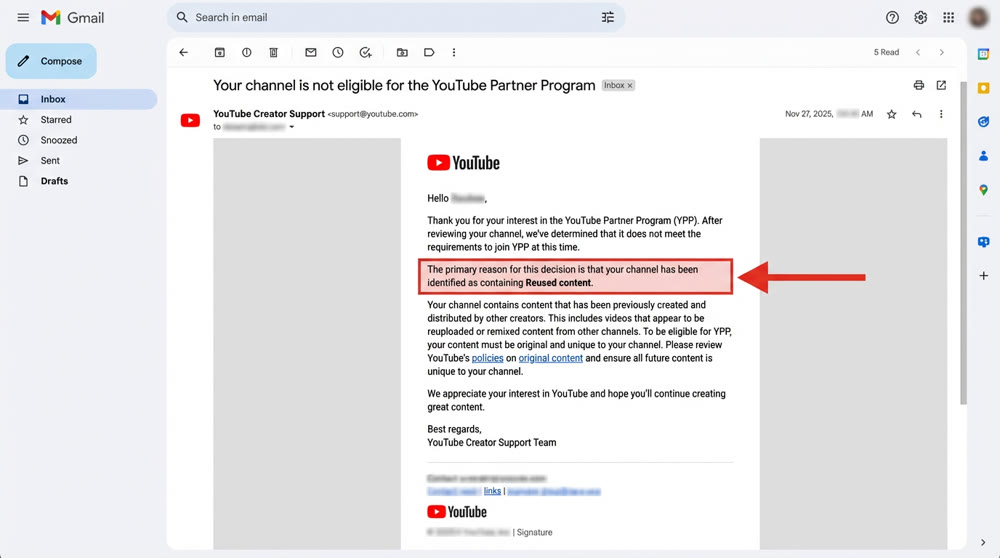
The most common reasons for YPP rejection are "Reused Content" and copyright infringement.
- Pre-Application Prep (For New Creators): Before you even hit the YPP thresholds, keep a record of your creative process. This includes accounts for tools used (like Seedream or Midjourney) and creation history, which will be invaluable if you need to appeal.
- Pre-Application Channel Cleanup:
- Hide/Delete: Remove or hide low-performing or off-niche Shorts and live streams that don't contribute to your channel's core identity.
- Focus & Optimize: If your channel's growth was driven by a specific type of Shorts, focus on retaining and optimizing those videos for the review process.
- The Appeal Process:
- Identify the Reason: Carefully read the rejection email or the notification in your YouTube Studio.
- Address the Issue: Make tangible changes to your content strategy. For example:
- Add On-Camera Presence: Include a "face-cam" segment of yourself in your videos to prove originality.
- Add Descriptive Text: Use on-screen text to narrate or explain the story, even without a voiceover.
- Recording Your Appeal Video:
- Deadline: You must submit your appeal video within 21 days of the rejection notice.
- Content: The video must explain how your content is original and show your creation process, including your source files and tool usage.
- Length: Edit the video to meet YouTube's required length (typically under 5 minutes).
- Outcome: If the appeal is successful, your YPP will be activated. If you choose not to appeal, you can re-apply after 30 days.
- Case Studies: A creator in our community was rejected for "Reused Content." He deleted his old, low-quality videos and started adding a face-cam segment and text narration to new uploads. He reapplied a month later and was approved. Another creator skipped the appeal, spent a month creating new content that followed best practices (face-cam, text), and was approved instantly upon reapplying.
Creator Success Stories: Navigating Penalties and Plateaus
Understanding how others have overcome common YouTube challenges can provide invaluable guidance. The following anonymized case studies highlight practical strategies for addressing YPP rejections, channel strikes, and view stagnation.
| Case | Channel Niche | Initial Problem | Action Taken | Outcome |
|---|---|---|---|---|
| A | K-Pop Storytelling Shorts |
YPP rejected for "Reused Content" |
Added face-cam intros; kept detailed production logs (Seedream prompts, editing timeline) |
Appeal successful in 7 days |
| B | Mythology Lore Shorts |
Channel strike for "Child Safety" violation |
Removed all videos with child-like characters; pivoted to adult-themed fantasy lore |
Strike expired; channel growth resumed in new niche |
| C | Sci-Fi Shorts |
Stuck at ~10k views per video |
"Reskinned" old scripts with a trending "cyberpunk" aesthetic and faster pacing |
Next video hit 1.5M views |
2. AdSense Account and Verification Issues
AdSense problems, such as registration discrepancies or suspended accounts, can prevent you from getting paid.
| Problem Type | Common Cause | Appeal / Solution |
|---|---|---|
| Tax Form Name Mismatch |
Using a nickname or non-legal name on your Google account that doesn’t match the legal name (ALL CAPS) on your AdSense application |
1️⃣ Check & Correct: In Google AdSense → Payments info Check the name under Settings Ensure it is your full legal name in ALL CAPS and matches your AdSense payment profile |
| AdSense Account Suspended |
Old account may be dormant Or the suspension was triggered by a system flag |
1️⃣ Contact YPP Support: AdSense support is slow Go to: YouTube Studio → Monetization tab Click the Help (?) icon → Email Creator Support YPP support handles AdSense issues faster |
| PIN Not Received | Address is incomplete (e.g. missing phone number) Or international mail delivery issues |
1️⃣ Add Phone Number: Put your phone number in Address Line 2 2️⃣ Contact Post Office: Visit your local standard mail dept Ask about international letters |
- ✨Advanced Strategy:
- AdSense Diversification: It's recommended to link no more than 2-3 YouTube channels to a single AdSense account. If you manage multiple YPP channels, consider registering a separate AdSense account using a family member's information. This prevents the "guilt by association" risk, where one channel's violation could freeze the earnings of all connected channels.
- Changing AdSense Accounts: In YouTube Studio, navigate to the Monetization tab, find your current AdSense information, and click the Change button to link a new account.
III. Navigating Copyright and Community Strikes
Copyright and community strikes are direct threats to your channel's longevity and monetization. The key is to focus on creating truly unique content, a process where a versatile tool like Genmi AI can be a powerful ally in generating original visuals and concepts.
1. Copyright Infringement & Content ID Claims
- Reason for Penalty: Using copyrighted music, movie clips, or TV show footage without permission. For example, using commercial music in Shorts or clips from shows like America's Got Talent (AGT).
- Consequences:
- Content ID: After you join YPP, the copyright holder can place a Content ID claim on your video, diverting your ad revenue to them.
- Strike/Takedown: The official copyright holder for AGT has issued strikes to many channels using their clips, with smaller channels sometimes being terminated directly.
- Note: Using commercial music in Shorts before joining YPP often does not result in a penalty.
- Response & Avoidance:
- Clean Up Footage: If you've used clips from shows like AGT, hide or delete them immediately. For videos with high view counts, consider using YouTube's built-in blurring tool to obscure the copyrighted material.
- Music Copyright:
- ✨ Use the official YouTube Audio Library.
- ✨ Generate original music using AI tools like Suno.
- ✨ Use royalty-free remixes of popular songs, such as the "Golden (Kpop Demon Hunters) Remix" shared within creator communities, which are modified to avoid Content ID detection.
2. Channel/Video Takedown
If your content severely violates community guidelines—for instance, by being classified as "Spam, Deceptive Practices, and Scams" or receiving a high volume of user reports—your channel may be terminated.
- Case Study: Recently, K-pop and mythology-themed story channels have been removed under the "spam and deceptive practices" policy. This is often linked to grotesque plot points or defamatory character portrayals that trigger mass user reporting.
- Appeal Channels:
- If you receive a copyright or community guideline strike, there are dedicated support teams you can contact (consult your creator community for the best contact methods).
- There are also specific support groups for channel termination appeals.
- General Appeal Steps:
- Log in to YouTube Studio.
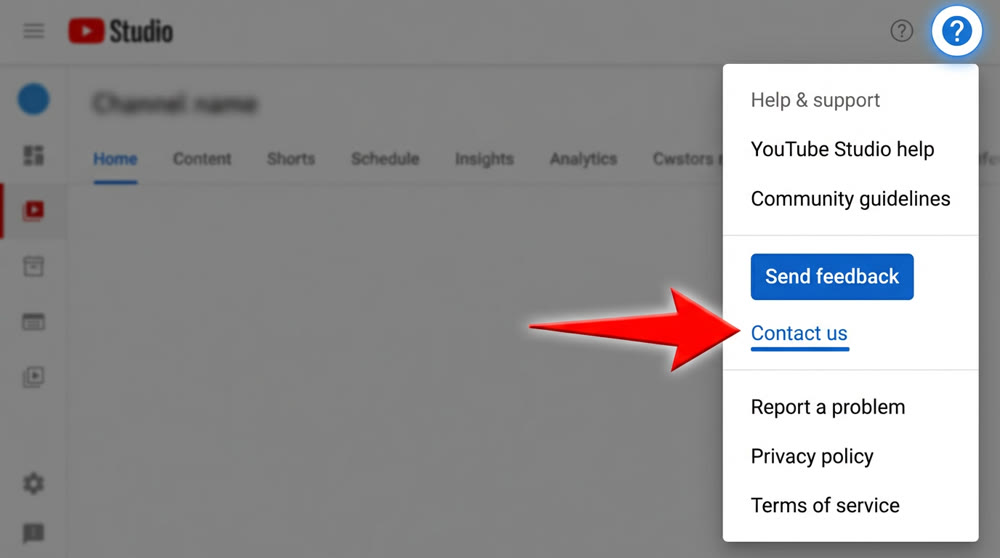
- Click the Help icon (?) in the top right.
- Click Contact us.
- Briefly describe your issue (e.g., "Question about creator award eligibility") and choose the option to email the Creator Support team.
- Paste your well-prepared appeal letter and send it.
- Wait for the support team to review your case (usually 1-2 business days).
IV. The Invisible Walls: Tackling '0 Views' and Traffic Plateaus
Getting "0 views" or getting stuck at 10k-50k views isn't an official penalty but a common effect of YouTube's algorithm. It's a major hurdle for new creators trying to validate a viable workflow.
1. The "0 View" Problem on New Channels
- Reason: This is typically due to a new channel being in a "sandbox" period, using a flagged IP address, creating content that is too similar to others, or inadvertently violating a policy.
- Diagnosis & Solution:
| Diagnostic Area | Solution |
|---|---|
| Account Issues | 1️⃣ Quickly Pivot If you get 0 views on 3–5 consecutive uploads, start a new channel or use a different account. The cost is zero. 2️⃣ Warm-Up Basics Fully set up your channel profile (avatar, bio, name). Some creators fixed the issue by changing the channel language to match their target region |
| Content Issues | 1️⃣ Test Traffic Upload a simple original video (e.g., phone recording of a landscape or pet). If it gets hundreds/thousands of views, your account is fine, the issue is your AIGC content. 2️⃣ Check for Violations Make sure your AIGC content isn’t flagged for low originality or other policy issues |
2. Breaking Through the 10k-50k View Plateau
This is one of the most common frustrations for creators, where videos consistently fail to break past a 50k-view ceiling.
- Analysis: Based on an analysis of thousands of videos, hitting this wall is 50% due to the script and 50% due to relative quality (i.e., how competitive your video is).
- The Viral Breakthrough Formula:
| Core Element | The Problem It Solves | Breakthrough Strategy & Example |
|---|---|---|
| Shell | Is your IP, art style, or overall aesthetic outdated or too niche? |
1️⃣ Reskin Your Content: Use the same script but with a new "shell." Swap a niche character set (e.g., mythology-based) for a trending one (e.g., K-pop idols). Change the art style from surreal to anime. 2️⃣ Chase Trends: A friend quickly adopted a K-pop IP, and two of their videos surpassed 10 million views in two days. Learn more in our guide to finding viral AI niches. |
| Script | Is your story structure, shot design, or pacing not engaging enough? |
1️⃣ Adopt Winning Scripts: Find top-performing scripts from trend leaderboards and adapt them to your own niche. 2️⃣ Innovate the Core: Extract the "narrative core" of a viral script and replace the variables. Example: in a "rescue" video, change the "character," the "peril," and the "method of rescue." |
| Quality | For a given shell and script, how polished and fast is your production? |
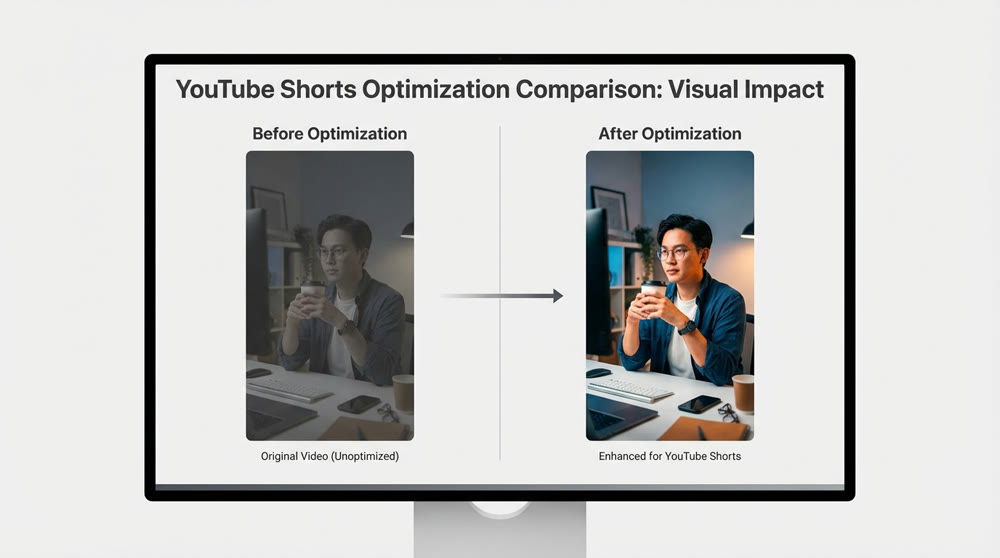
1️⃣ Speed is an Advantage: Be one of the first to produce high-quality content when a new trend emerges. 2️⃣ Sweat the Details: Enhance color saturation, tighten pacing, add impactful sound effects to make your video immersive. One creator optimized color grading and took a video from 26k views to 34 million. |
- Navigating the Channel Lifecycle: Even viral channels in the general entertainment Shorts space have a peak lifespan of only 1-3 months. Plan ahead with strategies like running multiple channels, increasing the niche focus and value of your content, or transitioning to long-form videos (using Shorts for traffic and long-form for deeper value and revenue).
The YouTube landscape is challenging, but not insurmountable. By understanding the rules, creating with intention, and staying adaptable, you can build a thriving channel. The key is to pair your strategic knowledge with powerful creative tools.
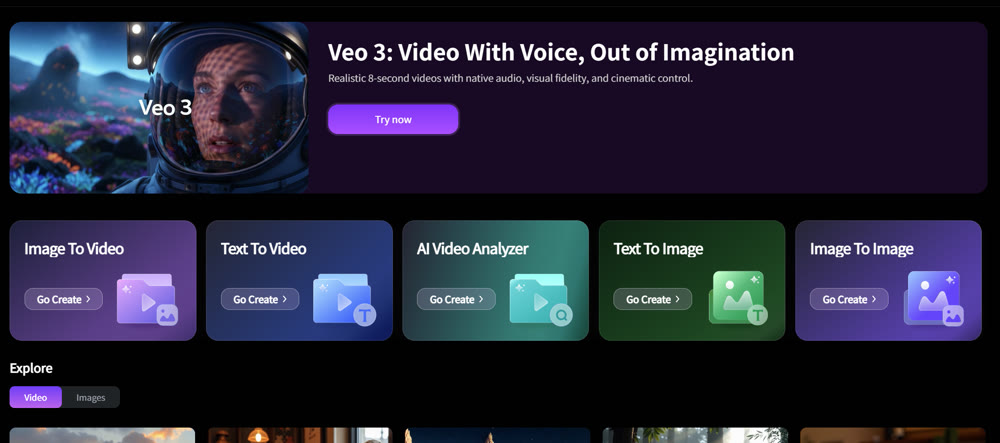
Ready to create stunning, compliant content that stands out? Explore Genmi AI today and unlock the next level of AIGC-powered video creation.
At Genmi AI, we work with thousands of AIGC creators every day. This guide is built on the collective experience of our community, distilled into actionable advice to help you succeed. Our expertise isn't just in building cutting-edge AI tools, but in understanding the real-world challenges creators face.
Recommended Articles
Google Veo 3.1 Review: A VFX Pro's Verdict on the New Frontier of Video Synthesis
We tested Google Veo 3.1 on audio, continuity, and asset consistency. Discover if this new model is ready for professional production workflows.

An Expert Pika AI Review: Fast Animations vs. Professional Realism
Our expert Pika AI review evaluates its text-to-video speed, realism, and features. Is this fast animation tool ready for your professional workflow?
A Hands-On PixAI Review: The Go-To Tool for Anime Art?
Our in-depth PixAI review evaluates its features for anime art, including image quality and editing tools.