


Mastering YouTube Publishing: The AIGC Creator's Guide to SEO & Algorithm Hacking
Article Summary: A comprehensive guide for AIGC creators on mastering YouTube publishing. Covers channel setup, SEO strategies for Shorts and long-form videos, algorithm insights, and keyword research to maximize views and growth. Includes advanced techniques for competitive analysis and optimizing video performance.

On YouTube, the world's leading video platform, gaining traction is no accident. For creators leveraging Artificial Intelligence Generated Content (AIGC), understanding the platform's recommendation engine, mastering efficient publishing workflows, and implementing sophisticated YouTube SEO Strategy are the keys to breaking through the noise and achieving sustainable monetization. This isn't just a battle of content creation; it's a test of how deeply you understand the rules of the game.
I. Solidifying Your Foundation: Environment and Channel Setup
Before you even begin creating and publishing content, establishing a secure and stable operational environment is critical—especially if you're managing multiple accounts or operating across different regions.
1. Network Isolation and Verification
Ensuring each YouTube channel operates on an independent, clean network is fundamental to avoiding viewership restrictions and platform penalties.
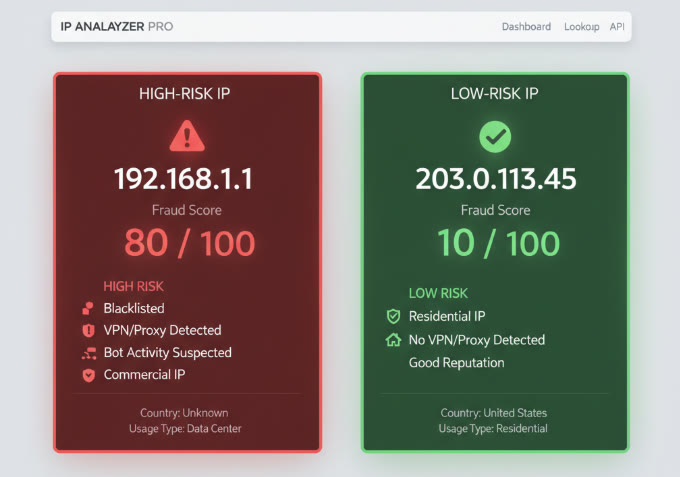
- IP Reputation Check: Always use tools like Scamalytics or IPQualityScore to check your IP's fraud score or blacklist status. If the risk is high, switch nodes or network providers immediately.
The quality of your IP directly impacts your channel's health and discoverability. As illustrated in the screenshot below, a robust IP reputation is non-negotiable for YouTube creators. The left side shows an IP with a high fraud score of 80, flagged as high-risk, which can easily lead to account throttling. Conversely, the IP on the right, with a fraud score of just 10, represents an ideal, clean choice for maintaining channel stability and avoiding algorithmic penalties.
- Using Fingerprinting Browsers: For managing a matrix of multiple accounts, we recommend using fingerprinting browsers like AdsPower or GoLogin to achieve true environment isolation. Each account should be strictly paired with a unique browser profile and a dedicated node.
- Proxy Configuration Details: When setting up a proxy IP in a fingerprinting browser, Socks5 is typically the protocol of choice. You'll need four pieces of information (Host, Port, Username, Password, often in an
A:B:C:Dformat). After entering them, click "Check Proxy" to confirm the IP's status is clean.
💡 Pro Tip: Some creators have experienced their channels being throttled (stuck at 0 views) due to IP issues. If you see zero views for 3-5 consecutive days, your first step should be to change your network environment or create a new test channel. You don't need to splurge on expensive dedicated IPs initially, but you must ensure they are within a safe, reputable range.
2. Account Registration and Security Management
For beginners, overcoming the hurdle of Google account registration is the first step.
- Account Acquisition Methods:
- Self-Registration: Use a relatively clean node and Google Chrome.
- Purchase Pre-Verified Accounts: You can find sellers offering pre-verified accounts, sometimes with perks like a Seedream subscription, for a minimal cost (often just a couple of dollars). These can sometimes have better initial standing than brand-new, self-registered accounts.
- Purchase Established Channels: If your budget allows, acquiring an existing channel is also an option.
- Activating Features: After registration, immediately enable Intermediate and Advanced features for your YouTube channel. Intermediate features usually require phone number verification (a number from your region works fine), while Advanced features can be unlocked via video verification or by consistently uploading content for about 15 days.
3. Basic Channel Branding and Organization
Initial channel branding doesn't need to be perfect, but completing the basics is crucial for platform indexing and audience recognition.
- Core Elements: Ensure your channel avatar (a headshot, cute pet, or brand logo is recommended; 98x98px, <4MB) and channel name are simple, memorable, and reflect your content niche.
- Channel Description (Bilingual Recommended): Your description should include a tagline, basic info, the value you provide to viewers, and your update frequency. A bilingual version can help reach a broader audience.
- Creating and Managing Multiple Channels: You can create multiple channels under a single Google account to separate Shorts and long-form content or to test different niches. Here's how:
- Open YouTube Studio and click Settings.
- Go to Channel -> Advanced settings -> Manage YouTube Account.
- Click Add or manage your channel(s) and then Create a channel.
- Content Grouping: Once you have a collection of videos, organize them into playlists. Use phrases or questions that align with user search intent as playlist titles. This helps guide viewers to more of your content and increases total watch time.
II. Algorithm Priorities: A Winning Strategy for Different Content Types
YouTube's recommendation logic is algorithm-driven, centered on whether your content satisfies user needs and increases their time on the platform. Shorts and long-form videos are evaluated on different key metrics, requiring targeted optimization.
1. YouTube Shorts Core Metrics (The Sprint)
Shorts are a "sprint." The YouTube Shorts Algorithm prioritizes explosive, short-term data, especially whether users stick around and rewatch.
| Core Metric | Key Data Requirement |
Algorithm Importance & Role |
|---|---|---|
| Click-Through Rate (CTR) |
Typically requires 80%+ |
Highest priority. Determines how many users click your video. Directly tied to the video's “shell” (IP, style, visual quality). |
| Average Watch Time & Percentage Viewed |
15s video: aim 21s+ 30s video: aim 33s+ |
Measures engagement & completion. 160%+ means users re-watched. Strong positive signal to the algorithm. |
| Hook in the First 3 Seconds |
Build suspense or anticipation from second 0 |
The first 3 seconds decide swipe behavior. Visuals must be eye-catching. Use strong sensory impact to stop scrolling. |
| Content Differentiation / Innovation |
Avoid highly homogenous or templated content |
Algorithm penalizes over-templated videos. Even manual videos may be removed. Differentiation defines niche competitiveness. |
| SEO | Relatively secondary factor | In Shorts, CTR & Watch Time matter more. Content performance outweighs SEO signals for discoverability. |
Successful Shorts typically experience a traffic surge within 1-6 hours of release, with their audience retention rate curve significantly exceeding the 100% baseline, as shown in the figure below.
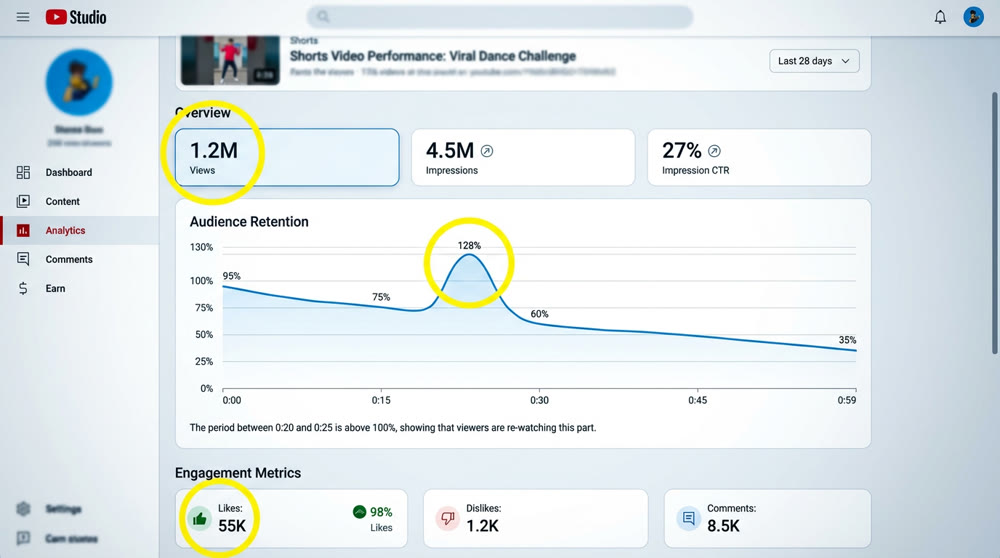
🚨 Risk Alert: Shorts distribution often hits an invisible "wall" or performance plateau, typically around 50,000 views (which corresponds to about 25,000 monetizable plays). The key to breaking past the 10k-view barrier lies in optimizing your content's "shell," script, and overall competitive quality—not just in blind originality.
2. Long-Form Video Core Metrics (The Marathon)
Long-form videos are a "marathon." The algorithm focuses more on content depth and long-term value.
- Watch Time and Retention: Long-form content is judged on whether viewers watch it through to the end, or even replay sections. This is a primary indicator of content quality for the platform.
- Distribution Cycle: The distribution cycle is much longer. Beyond the initial push, long-form videos rely on search traffic, suggested videos, and the channel's accumulated authority for sustained views.
- Thumbnails and SEO: These two elements are absolutely vital for a long-form video's initial click-through rate (CTR) and discoverability. A great thumbnail and precise AIGC YouTube Optimization in your SEO can generate continuous search and recommendation traffic.
- Ad Revenue Potential: Long-form videos (over 8 minutes) can have unlimited mid-roll ads inserted, giving them significantly higher monetization potential than Shorts. For instance, a video with 2 million views could earn around $200 as a Short but nearly $4,000 as a long-form piece.
III. The Publishing Workflow: Optimizing for Maximum Initial Performance
An efficient and optimized publishing process ensures your content gets the best possible start in the crucial initial distribution phase.
1. Video Upload and Configuration
Using official platform tools for content management is standard practice.
- Upload and Management Tool: Always use the official YouTube Studio for uploading videos, managing content, analyzing data, and monitoring revenue.
- How to Publish Shorts:
- Mobile: Open the YouTube app, tap the "+" icon, and choose "Create a Short" or upload a vertical video. This is the only way to select a custom frame for your Shorts thumbnail.
- Desktop: Upload your video via Studio. The system will automatically classify it as a Short if it's in a vertical aspect ratio (9:16) and under 60 seconds.
- Thumbnail/Title Optimization and CTR: The thumbnail and title are the "shell" that determines whether a user clicks.
2. Optimizing Your Content's "Shell" and "Core"
| Optimization Suggestion | Key Element | Creation Tool |
|---|---|---|
| Create Suspense | Familiar elements + suspense to spark curiosity |
Canva / Gaoding Design / AI Tools |
| Visual Impact | Use images, emojis, numbers in titles Avoid excessive text |
AI tools can create high-quality HD thumbnails |
| High Definition | Dimensions ≥ 2048×1152px Ensure clarity on large screens (TVs, big displays) |
- |
- Shorts "Thumbnails": You can only adjust this on the YouTube mobile app before publishing. Be sure to scroll through the video and select the most visually arresting frame.
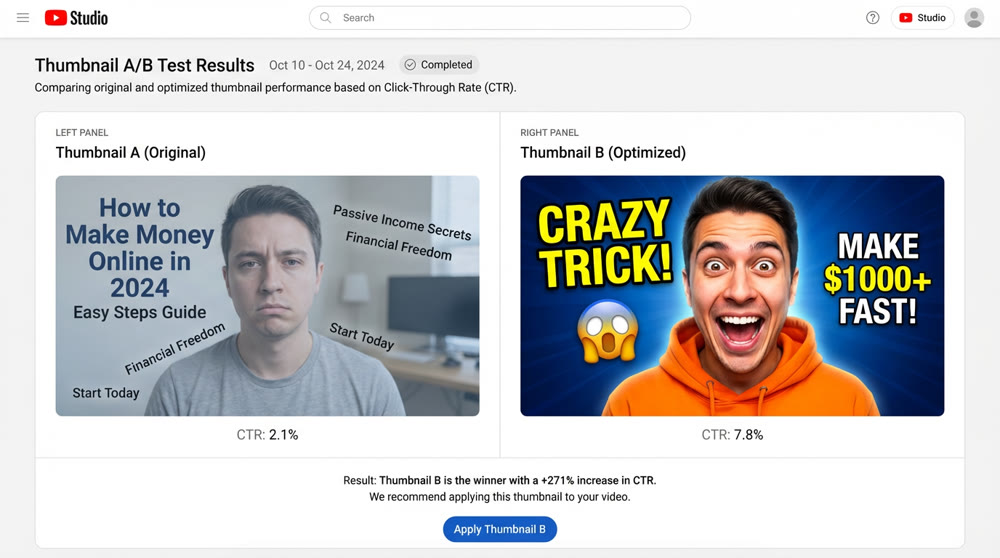
Before optimization, CTR was 2.1%; after optimization, CTR was 7.8%. A good cover image can directly increase the initial exposure conversion rate of a video by more than 3 times.
- Title Crafting: Titles should be concise, attention-grabbing, and include relevant hashtags. Example: "Learn this sick dance in 10 seconds! 🔥 #Shorts".
- Target Audience and Regional Adjustment: The "core" of your content (script, story, subject matter) is the primary factor determining your audience's geographic distribution.
- Content Drives the Audience: To attract viewers from a target region, you must create content they love. Language-learning or commentary-style videos naturally segment audiences by country.
- Language Tagging as a Tool: A simple way to shift your audience geography is to include another language in your title and description (e.g., Spanish, Japanese). However, you must weigh traffic volume against revenue potential. An English-only channel might rapidly gain views in Southeast Asia and qualify for the YPP (YouTube Partner Program) faster, while a Japanese/English channel might attract a higher-value audience from Japan but with slower initial YouTube Channel Growth.
| Audience Distribution Trend |
Characteristics | Revenue Per Mille (RPM) |
Virality Difficulty |
|---|---|---|---|
| Southeast Asia / Developing Regions |
Dense population Easily satisfied Small screen devices |
Lower RPM (India Shorts ≈ $0.01 – $0.05) |
Low barrier Easy to go viral |
| US, Japan, Europe / Developed Countries |
Dispersed population Intense competition Large screen devices |
Higher RPM (English Shorts ≈ $0.7 – $1.2 / 1000 interactions) |
High barrier Difficult to go viral |
3. Optimizing Your Publishing Time
Choosing the right time to publish can help you avoid competing with top creators and maximize your video's initial exposure.
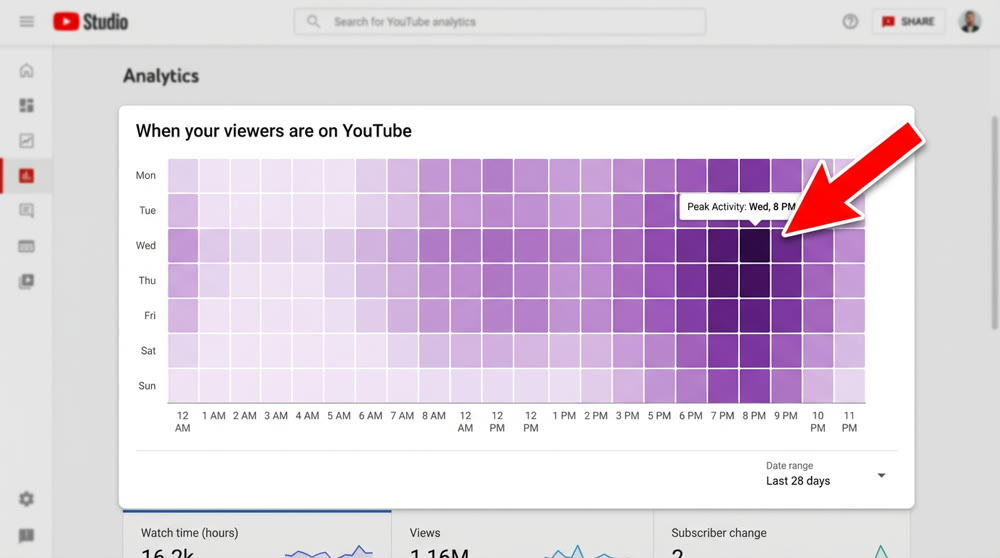
- Audience Active Hours: In YouTube Studio, go to Analytics -> Audience and look at the "When your viewers are on YouTube" chart. Publish during the "dark purple" peak hours.
- Avoid Publishing on the Hour: Choose an unusual minute to publish (e.g., 8:07 PM, 9:22 PM). This helps you sidestep the flood of notifications from major creators who almost always publish on the hour or half-hour.
- Maintain a Consistent Schedule: It's best to publish daily. If that's not feasible, a regular schedule (e.g., three times a week) won't hurt the performance of individual videos but will help build an audience habit.
IV. [Advanced] Keyword Research and SEO Strategy
While SEO's impact on a Short's initial viral push is secondary, it's indispensable for long-form videos and for acquiring sustainable traffic through search. Even for Shorts, optimizing your title, description, and tags will boost your search visibility over time.
1. Learn from the Best: Benchmarking Competitor Strategies
Successful creators have a deep understanding of keywords and tags. Analyzing their video performance and trends is a critical part of refining your own content strategy.
- Data-Driven Analysis: Use tools like TubeBuddy to get insights into the tags and performance metrics of your competitors. Learn from their successes and identify opportunities for improvement.
- Extracting Competitor Channel IDs: A pro move is to view the source code of a competitor's channel page and search for
channelId. This ID is invaluable for using automated tools to programmatically pull comprehensive data on all their content, bypassing the limitations of YouTube's web interface.- Leverage Professional Tools: Use professional SEO tools to discover trending topics and high-value keywords.
| Tool Name |
URL | Key Functions & Use Cases |
|---|---|---|
| TubeBuddy | Chrome Web Store |
Keyword Explorer Discover high-performing keywords & tags Analyze search volume, competition, relevance Bulk Processing Batch update video metadata & add cards Competitor Analysis Analyze competitor tags, descriptions & performance |
| Google Trends | Google Trends |
Trend Analysis Analyze global & local search trends Find trending keywords for video creation |
| Exploding Topics | Exploding Topics |
Trending Searches Provides latest popular search keywords & topics Discover fast-growing / early-stage viral themes |
| Answer The Public | Answer The Public |
Audience Question Mining Find what users are asking online Create answer-focused content to boost engagement |
| Keyword Tool | Keyword Tool |
Long-Tail Keyword Suggestions Generate up to 750 long-tail keywords Support multi-language & regional SEO research |
2. Dimensions of Keyword Analysis
When selecting keywords, you need to balance their search value with their competitiveness.
- Search Volume, Competition & Relevance: A keyword browser (like the one in TubeBuddy) analyzes these three metrics. You should create content around high-volume keywords and optimize your video's title, description, and tags accordingly.
- Capitalizing on Trending Topics: Focus on topics in their growth phase or those that have suddenly gone viral. Use tools like Exploding Topics or Google Trends to monitor these opportunities and publish content before your competition to capture early exposure.
3. Matching Content to Keywords
Integrating SEO into the earliest stages of content creation ensures a high degree of alignment between your video and viewer search intent.
- Guiding Your Content Plan: Use popular keywords and audience search behavior to guide your future video topics. For example, use a tool like AnswerThePublic to find common questions your audience is asking and create videos that provide the answers.
- Holistic Optimization: Use your SEO keywords to optimize your video's title, description, and tags. A clear, comprehensive description helps the YouTube algorithm better understand your content, allowing it to recommend your video to a more precise and interested audience.
In the world of YouTube, continuous learning and hands-on practice are the only paths to achieving real results. The rapid evolution of AI tools has dramatically increased content production efficiency. But validating a complete content production and publishing workflow, and using data-driven Video Publishing Best Practices to break through traffic plateaus, remain challenges that require creators to get their hands dirty and constantly experiment.
Ready to streamline your AIGC workflow and focus more on growth? The challenges of content creation—from ideation to final video—are exactly what modern AI is built to solve. With Genmi AI's AI video generator, you can transform simple ideas into compelling visuals, or use the powerful image to video feature to bring static concepts to life. Stop wrestling with production and start mastering the strategies that truly drive growth. Explore Genmi AI today and accelerate your journey to YouTube success!
Recommended Articles
12 Best Free AI Video Generators No Watermark: Latest Expert Picks
Discover the top 12 free AI video creators without watermarks. Our hands-on review covers Genmi AI, HeyGen, and more for professional, clean video production.

An Expert Review of PicsArt AI: Simple Creations or Professional Powerhouse?
Our in-depth PicsArt AI review tests its performance on realism, style, and complex scenes. Is it powerful enough for your professional workflow?

Viral AIGC YouTube Shorts: The Ultimate 2025 Guide
This guide covers viral frameworks, key metrics, and tools to grow your YouTube Shorts channel.