


From 0 Views to Viral: A Data-Driven Troubleshooting Guide for AI-Generated YouTube Shorts
Article Summary: This guide provides a data-driven framework for creators to diagnose and fix underperforming AI-generated YouTube Shorts by analyzing key metrics like CTR and AVD, identifying channel throttling, and optimizing script and production quality to break through view ceilings.

In the world of AI video creation, it’s easy to get stuck. When your YouTube Shorts flatline, are you dealing with channel throttling, a saturated niche, or is the content itself just not cutting it? To break through the noise and scale effectively, you need a data-driven diagnostic approach.
Drawing from deep community insights and YouTube's own recommendation logic, this guide provides a clear framework to diagnose and fix underperforming AI-generated content.
I. The Diagnostic Flow: Pinpointing the Root Cause
To figure out why your Shorts aren't performing, we need to investigate three distinct layers: account/environment issues (throttling), content competitiveness (hitting a view ceiling), and creative execution (script and production flaws).
This table outlines the diagnostic process:
| Diagnostic Layer | View Count Range | Core Problem | Key Diagnostic Metrics | High-Level Solution |
|---|---|---|---|---|
| I. Account/Environment Issues | 0 - 100 views | Account is flagged, IP health issues detected, Severe content violations present, Videos suppressed or blocked Channel performance throttled |
Impressions in YouTube Studio's "Reach" tab, 7-day trend analysis, Check impressions drop rate, Monitor top-performing content |
Check IP/account health, Switch to a new channel, Align content with community guidelines, Ensure content originality, Test with small pilot uploads |
| II. Creative Execution Issues | 100+ views (with impressions) | Video fails to hook viewers in the first seconds, Fails to retain attention, Low click-through rate (CTR), Short average view duration, Pacing or visuals not compelling |
Viewed vs. swiped away rate (CTR), Average Percentage Viewed (AVD), Audience retention graphs, Compare first 3 seconds performance, Analyze drop-off points |
Optimize the first 3 seconds (hook), Increase screen brightness, Enhance pacing and visual clarity, Test multiple thumbnail variations, Refine title and description |
| III. Content Competitiveness Issues | 10k - 50k views | Content in a highly competitive niche, Niche may be in decline, Views plateau despite strong engagement, High CTR and AVD but limited reach, Audience saturation or format fatigue |
Strong metrics (high CTR, high AVD), Compare with top-performing niche content, Identify engagement drop patterns, Analyze competitor content, Monitor trend shifts |
Innovate on format and presentation, Pivot to a new niche or IP, Elevate script quality, Enhance production and visuals, Experiment with different video lengths or styles |
II. Decoding the Algorithm: The Two Metrics That Matter Most
As YouTube officially states in its Creator Academy, "the goal of our recommendation system is to help viewers find videos they want to watch and keep watching." For Shorts, this is primarily reflected in two core metrics: 'Select View Rate' and 'Average Watch Time'.
YouTube’s recommendation algorithm considers hundreds of factors, but for Shorts, two metrics overwhelmingly determine whether your video breaks into a larger traffic pool.
1. Viewed vs. Swiped Away Rate (CTR)
- What it is:
- The percentage of viewers who choose to watch your Short after it appears on their screen, versus those who immediately swipe away.
- Why it matters:
- This is your video's "first impression." If viewers swipe away within the first 0-3 seconds, YouTube’s algorithm concludes the content can't capture attention and will stop showing it to more people.
💡 Data-Driven Diagnosis:
- CTR Below 70%-75%: This signals a "hook failure." The problem lies in the first three seconds of your video.
- Optimization Tip: You must create immediate tension or set a clear expectation. Get straight to the point and ensure your visuals are bright and clear. One creator saw their "viewed" rate jump from 69% to 78.9% simply by removing a one-second montage at the beginning of their video.
- CTR Above 80%: Your initial hook is working. The "packaging" of your video (your IP, style, and visual quality) has passed the first test. If views are still low, the problem is likely with audience retention or overall competitiveness.
| Before Optimization | After Optimization | Result |
|---|---|---|
| Video opening included a 1-second logo Transition effect present Intro delayed main content |
Removed the 1-second effect Main content started immediately Hook emphasized from frame 0 |
Click-Through Rate (CTR) increased from 69% to 78.9% |
| Overall picture was dark Applied a 'cinematic' filter Color palette muted Visuals lacked brightness |
Brightened overall picture Increased color saturation Adjusted contrast and highlights Colors more vivid |
Click-Through Rate (CTR) increased from 71% to 82% |
2. Average Percentage Viewed (AVD)
- What it is: The average duration viewers watch your Short, expressed as a percentage of its total length.
- Why it matters: This metric is directly tied to YouTube's business model. Longer watch times mean more opportunities for YouTube to serve ads and a better experience for the viewer, which the platform rewards.
💡 Data-Driven Diagnosis:
- "Cliff-Drop" AVD Curve: If your audience retention graph shows a sharp, sudden drop, it points to a "script or pacing failure." You must analyze the retention curve to pinpoint the exact moment viewers are leaving.
- Optimization Tip: Examine the frame where the drop occurs. Are you failing to deliver on the hook? Is the pacing too slow? Is an AI character's unnatural expression or movement breaking immersion?
- High AVD, Low Views: If your 30-second Short has an AVD over 100% (meaning people are re-watching it) but you're still stuck in the 10k-50k view range, you're facing a "content competitiveness" problem.
- 📌 Case Study: A creator’s 28-second video had an average view duration of 29 seconds—a fantastic result. However, it plateaued at 4.6 million views. The analysis suggested that while the format was a proven winner, the audience had seen it too many times. The original viral formula had run its course, signaling a need for a new creative angle.
III. Diagnosing Account & Environment Issues: The "0 View" Problem
When your videos are consistently getting zero or single-digit views, your first suspect shouldn't be the content—it should be your account or environment.
1. The Core Test: Check Your Reach Data
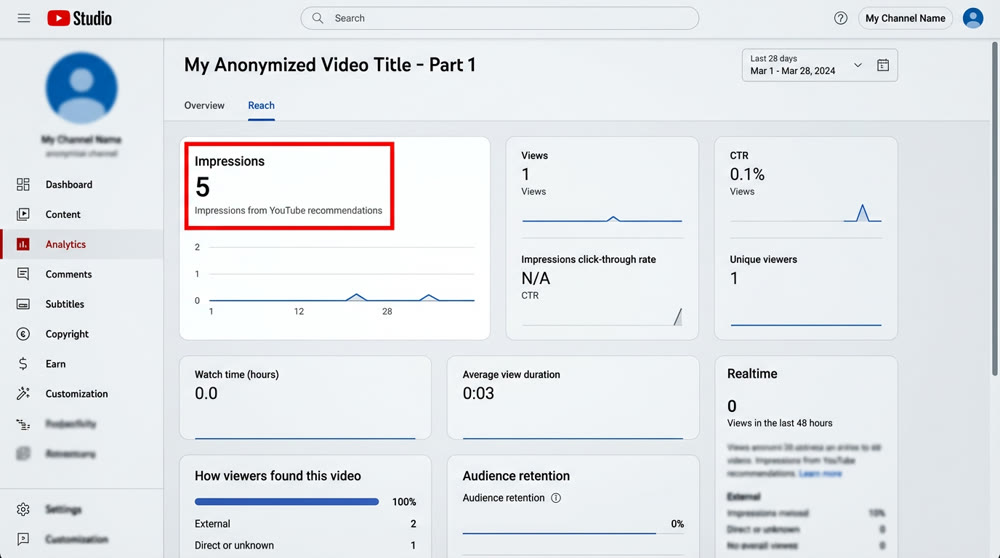
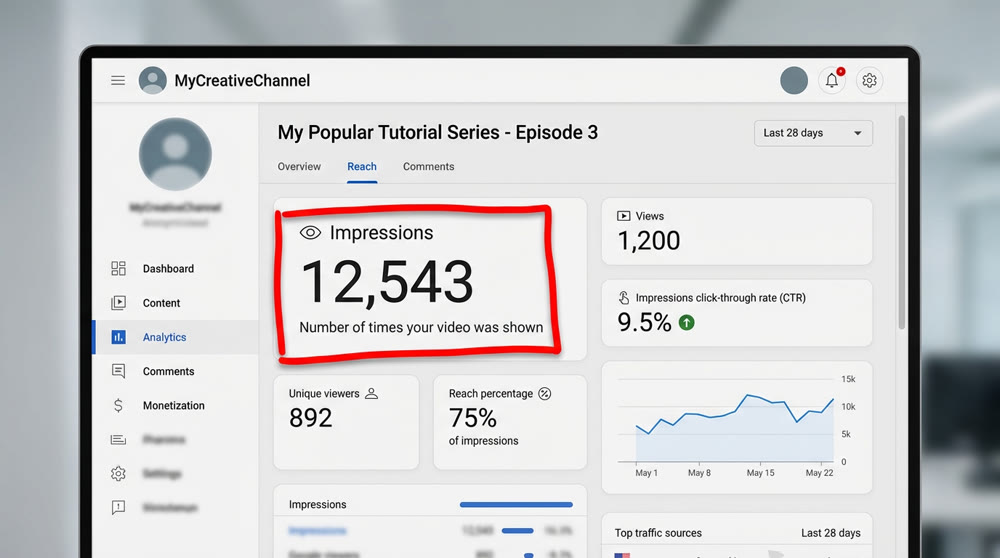
The most direct way to distinguish between bad content and channel throttling is to check the "Reach" tab in YouTube Studio:
Navigate to YouTube Studio > Analytics > Content > Shorts.
Click on a specific video and go to its Reach tab.
Check the "Impressions" number.
| Impressions Data | View Count | Diagnosis | Action Plan |
|---|---|---|---|
| 0 Impressions | 0 views | High probability of channel throttling. Your account or IP is likely flagged. Content may be suppressed automatically. Monitor channel analytics for anomalies. |
Immediately switch to a new, clean channel to test. Verify account status and IP health. Test with a small, original video. |
| <10 Impressions | 0 views | The channel itself may be fine, but the content might have triggered a policy filter. Low originality or repetitive content may cause suppression. Check for guideline violations. |
Post a simple, original test video (e.g., of a pet or landscape) Monitor if impressions start counting. Adjust video format or length. |
| 100+ Impressions | 10+ views | The channel is fine. The problem is your content's low CTR. Audience is swiping away early. Visuals or hook may be weak. Check thumbnail performance. |
Focus all your energy on optimizing the first 3 seconds and the video's title/concept. Improve thumbnail and opening visuals. Test alternate hooks and pacing. |
The image below shows a comparison of the data performance of a typical account with limited traffic and the data performance of a normal account with normal traffic.
AI content can easily look generic, so you need to learn how to prevent YouTube Shorts homogenization to trigger the algorithm.
2. The Channel Health Test
If you post videos for 3-5 consecutive days and they all get 0 impressions and 0 views, create a new channel immediately. Use a simple, universally appealing video (like a quick clip of a cat or a scenic view) to test its baseline reach. If that video gets a few hundred or thousand views, your old channel was throttled.
IV. Breaking the 10k-50k View Ceiling: Refining Production & Script
Once you've confirmed your channel is healthy and getting impressions, but you're stuck in the "10k view curse," the problem is almost always content quality—specifically, your script and its execution.
1. Choosing the Right Script: Plot-Driven vs. Performance-Driven
When adapting viral live-action videos into AI content, choosing the wrong type of script is a common path to failure.
| Script Type | Weakness for AI | Diagnosis | Optimization Strategy |
|---|---|---|---|
| Performance-Driven | The story's success relies heavily on the nuanced body language, Micro-expressions and gestures of a human actor, Emotion conveyed through subtle timing, Voice inflections and pauses, Cannot be easily replicated by AI |
AI struggles to replicate this subtlety, Leading to poor audience immersion, Low Average View Duration (AVD), Viewers drop off quickly, Engagement metrics remain low |
Stop immediately. Do not try to replicate these. Instead, focus on "plot-driven" videos, Hook should be in the story itself, Test simple narrative structures, Prioritize clear, engaging plots over performance nuance |
| Plot-Driven | The story's hook comes from a major twist, A suspenseful situation, Or a strong visual payoff, Events unfolding logically, Audience curiosity drives engagement |
Audience focus is on "what happens next," Which AI can replicate effectively, Stable Average View Duration (AVD), CTR remains consistent, Audience retention is predictable |
Ensure the story's logic is crystal clear, Build towards a visually compelling climax, Maintain pacing and plot twists, Use concise visual cues, Optimize titles and thumbnails for maximum hook |
2. Fixing Production Details: Visuals & Consistency
Even with a great plot, small production flaws can kill your CTR and audience retention.
- ✨ Dim or Muddy Visuals: Dark scenes often lead to lower CTR. People are drawn to bright, vibrant images.
- Optimization Technique: Avoid setting your AI generations in dark environments. Use tools like Seedream 4.0 or an integrated solution like Genmi AI's image-to-video generator, which is designed to produce bright, color-saturated visuals that pop on the screen.
- ✨ Inconsistent Characters: In a story-based video, if your character's face or clothing changes from one shot to the next, it breaks viewer immersion instantly.
- Optimization Technique: Use tools that offer character locking features, such as Midjourney's
--crefparameter, GPT's GEN_id, or Seedream's "Smart Reference" function.
- Optimization Technique: Use tools that offer character locking features, such as Midjourney's
- ✨ Inefficient Workflows: A beginner can spend 8-10 hours creating a single AI story video, leading to burnout and quality compromises.
- Advanced Technique: Automate your storyboard and prompt generation using AI Agents. By feeding a storyboard template into Google AI Studio (Gemini Pro), you can automate the most time-consuming part of the process. A streamlined workflow, powered by a tool like the Genmi AI text-to-video engine, can dramatically reduce production time to as little as 1.5 hours per video.
For instance, you can use the following template in conjunction with Google AI Studio (Gemini Pro) to quickly generate scene-specific prompts:
Prompt Template for AI Storyboard:
Act as a professional storyboard artist for AI video generation. Based on the following script scene, generate 5 detailed prompts for an image generator.
Script Scene: [Insert your script scene description here]
For each prompt, describe:
- Shot Type: (e.g., Extreme close-up, Medium shot, Cowboy shot)
- Subject & Action: (e.g., A young woman with blonde hair, looking shocked)
- Environment: (e.g., A futuristic neon-lit alley, raining)
- Style: (e.g., Photorealistic, 8K, cinematic lighting, style of Blade Runner 2049)
- Character Consistency ID: (e.g., Use reference GEN_id: XYZ123)
3. Escalating Competitiveness: Breaking the Final Barrier
When your CTR and AVD are excellent, but you're still capped under 50k views, your content simply isn't competitive enough within its niche.
- Diagnosis: Your video lacks a decisive edge over similar content, or your channel has hit the natural ceiling for a broad, saturated niche, and the algorithm is no longer favoring it with massive reach.
- Breakthrough Strategies:
- Change the "Packaging": Keep the core script but change the visual IP or style. For example, switch from a fantasy theme to a K-pop aesthetic, or from surrealism to an anime style.
- Micro-Innovate: Don't just copy-paste a viral hit. Recombine viral elements by changing the character, the setting, or the central conflict. This "variable replacement" signals novelty to the algorithm. To dive deeper into what makes a video go viral, explore our breakdown of the Viral AI YouTube Shorts Formula.
- Prioritize Speed: Be the first to jump on new trends, topics, and IPs to capture that crucial first-mover advantage.
Ready to Turn Your Ideas into High-Performing AI Videos?
Diagnosing content issues is the first step. The next is having a tool that empowers you to execute your vision without compromise. Genmi AI is built to solve the very production challenges that hold creators back—from ensuring vibrant visuals and consistent characters to streamlining your entire workflow. Stop wrestling with flawed tools and start creating content that captivates your audience from the first frame to the last.
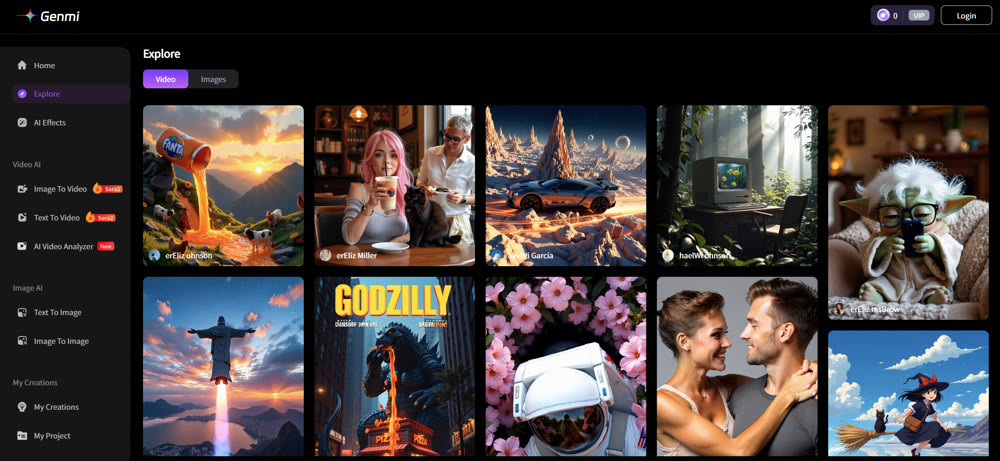
Explore Genmi AI today and start your journey to viral success.
Recommended Articles
Fotor AI Image Generator Review: My Honest Test on Its Capabilities and Limits
We tested the Fotor AI image generator for a week. Read our honest review on its text-to-image quality, editing tools, and limitations for creators.
PixVerse AI Video Generator Review: An Honest Look at Its Quality in 2025
Is PixVerse the right AI video tool for you? Our in-depth 2025 review tests its features, quality, and speed to help you decide if it's worth the hype.
From GB to MB: An Expert Guide on How to Compress a Video on iPhone
This expert guide details free and precise methods to compress your videos on your iPhone, saving space and making them easier to share.