


An In-Depth Craiyon AI Review: The Right Creative Tool for You?
Article Summary: This article provides a comprehensive, hands-on review of the Craiyon AI tool, evaluating its performance, features, and limitations. It offers practical insights for creatives to determine if Craiyon meets their artistic and professional workflow requirements and explores advanced alternatives for video creation.
In a creative landscape demanding constant innovation, are you searching for a tool that can rapidly translate your abstract ideas into compelling visuals? The challenge for many artists, marketers, and designers is the gap between concept and creation—a gap that AI tools promise to bridge. This article provides a comprehensive Craiyon AI review, moving beyond a surface-level look to offer a hands-on analysis of its capabilities, limitations, and practical applications in a professional workflow.
By reading this detailed evaluation, you will gain a clear understanding of Craiyon's performance with both simple and complex prompts, its true value proposition between the free and Pro versions, and where it stands against more advanced alternatives. This will empower you to decide if Craiyon is the right fit for your creative toolkit.
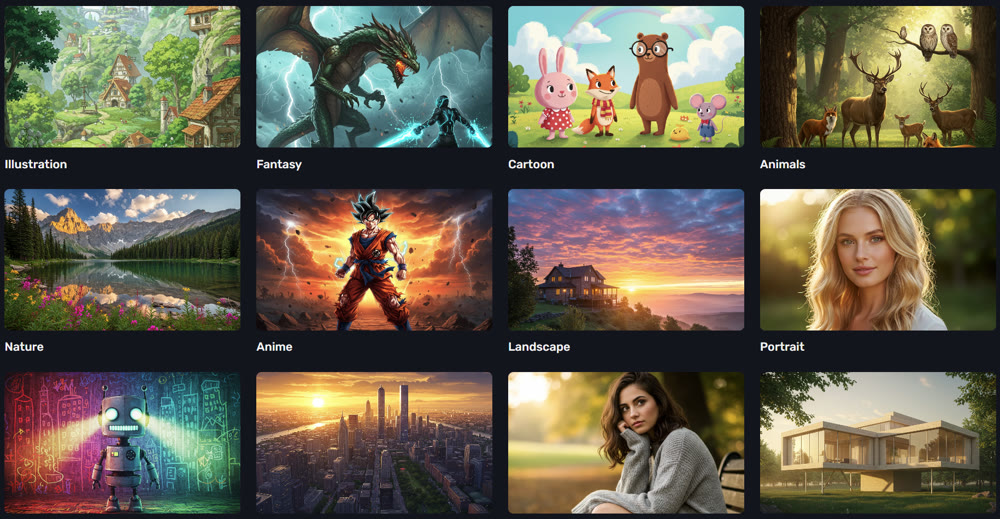
First Impressions: A Streamlined Entry into AI Art
My initial interaction with Craiyon was marked by its accessibility. The platform features a clean, uncluttered interface that invites immediate experimentation without the friction of a mandatory sign-up. The homepage showcases a gallery of user-created art, providing a quick glimpse into the tool's stylistic range. This frictionless start is a significant advantage for users who want to test the waters of AI-assisted art without commitment.
The process is as straightforward as described: you provide a text description, select a style, and let the AI begin its work.
Putting Craiyon to the Test: A Hands-On Walkthrough
To evaluate its performance, I tested Craiyon with a series of distinct prompts, analyzing its ability to handle nuance, detail, and abstraction.
Step-by-Step Process:
- Define the Concept: I started with a clear idea: "A photorealistic macro shot of a honeybee on a lavender flower, morning dew on the petals."
- Input the Prompt: I entered the description into the text box on the Craiyon homepage.
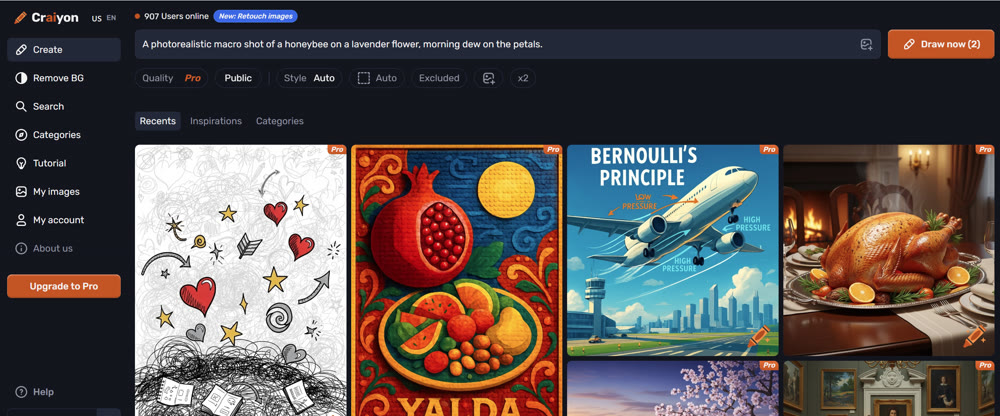
- Initiate the Art Creation: I clicked the "Draw" button to begin the process.
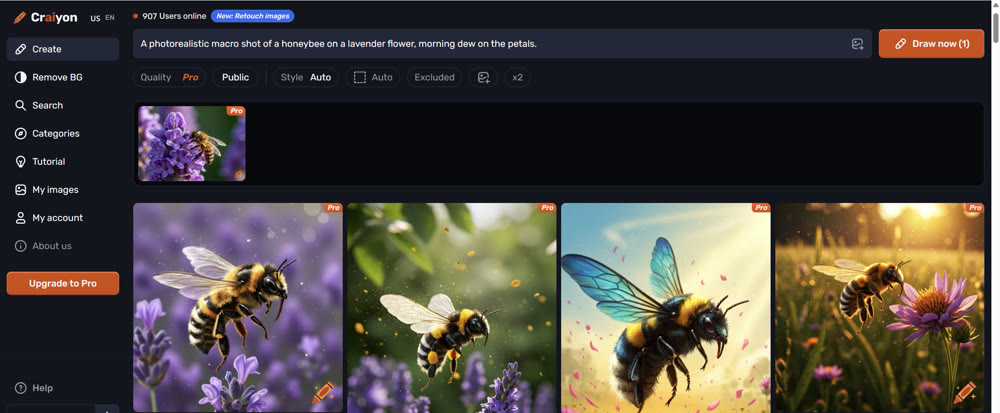
- Analyze the Output: The free version produced a set of images. While they captured the general theme—a bee and a purple flower—the details were indistinct. The "morning dew" was largely absent, and the bee's anatomy was often imprecise, a common challenge for many AI art platforms. The Pro version, however, yielded a much more refined composition with better lighting, focus, and a clearer depiction of water droplets.

Next, I tested an abstract prompt: "The feeling of nostalgia captured as a physical object, glowing softly in a dusty attic." This is where the tool's interpretive ability was truly tested. The results were fascinating, producing various dreamlike artifacts and glowing orbs among old furniture. It demonstrated a solid grasp of abstract concepts, making it a useful tool for brainstorming and conceptual art. This comprehensive Craiyon AI review shows that while it excels at ideation, fine-tuning specific details remains a challenge.
For users who want extreme simplicity, the AiEase free image generator is a zero-barrier entry point.
Evaluating the Pros and Cons
| Feature | Strengths | Weaknesses |
|---|---|---|
| Speed | Rapidly produces multiple image concepts in seconds, ideal for high-volume brainstorming. |
High server traffic can lead to failed attempts or long wait times, especially when changing styles. |
| Creativity | Excellent for overcoming creative blocks by offering unexpected interpretations of a prompt. |
Final art may include elements not mentioned in the prompt, potentially diluting the core message. |
| Cost | A permanently free version is available for basic use. The Pro plan is affordable at $6/month. |
The free version's output is often blurry; the platform heavily encourages upgrading to the Pro version. |
| Accuracy | Handles common themes and scenes effectively. |
Struggles with complex details, such as correct anatomy (hands, insect legs) or brand-specific elements. |
📌 Best Practices for Using Craiyon
- Be Iterative: Start with a broad prompt and progressively add details. Use the "Negative Words" feature in the Pro version to exclude unwanted elements.
- Leverage for Ideation: Use Craiyon as a starting point to generate mood boards or initial concepts rather than as a tool for final, polished artwork.
- Verify Details: Always double-check the output for inaccuracies, especially when creating art for instructional or technical content.
Exploring Advanced Creative Frontiers with Genmi AI
While Craiyon serves as an excellent entry point for static images, the future of AI-powered content is in motion. For professionals seeking to elevate their storytelling, platforms like Genmi AI offer a more powerful and versatile suite of tools. Where Craiyon's capabilities end, Genmi AI's begin, allowing you to not only craft stunning visuals but also bring them to life.
Genmi AI empowers creators to transform text prompts directly into video, opening up new avenues for marketing, filmmaking, and digital art. Furthermore, you can use its advanced features to animate static images into dynamic scenes, adding a layer of engagement that static pictures cannot match. By leveraging powerful models like the industry-leading Sora and the innovative Kling, Genmi AI provides the technology to produce unparalleled visual narratives with cinematic quality and remarkable coherence. This makes it an indispensable asset for those who need to move beyond static compositions and into the realm of dynamic storytelling.
Conclusion
In summary, the Craiyon AI tool is a valuable asset for quick ideation and overcoming creative blocks. Its free version offers a risk-free way to explore AI art, while the affordable Pro plan provides higher-quality visuals suitable for brainstorming and internal presentations. However, its limitations in detail accuracy, occasional performance issues, and lack of advanced customization mean it may not suffice for projects requiring high fidelity or commercial-grade originality.
Through this analysis, you have learned how to best leverage Craiyon's strengths while being mindful of its weaknesses. For creators ready to push the boundaries of what's possible, exploring more advanced platforms that integrate video and superior model architecture is the logical next step.
Ready to transform your creative workflow from static images to captivating video narratives? Explore the advanced capabilities of Genmi AI and discover how its powerful video and imaging tools can bring your most ambitious stories to life.
Recommended Articles
Haiper AI Review: Is This the Tool Motion Designers Have Been Waiting For?
Is Haiper AI ready for professional workflows? We test its image-to-video capabilities, analyze motion quality, and compare it with top industry alternatives.

An Expert Review of Dreamina AI: Does It Live Up to the Hype?
Our honest, hands-on Dreamina AI review tests its video, image, and avatar tools. Discover its pros, cons, and if it's right for your creative workflow.

Cracking the Code: The 4 Core Factors Driving YouTube Shorts Discovery
Unlock more views on YouTube Shorts. Learn the 4 key factors driving the algorithm, from viewer personalization to video performance, and start going viral.