


How to Craft Creative AI Ad Videos for Commercial Visuals
Article Summary: This guide empowers marketers to leverage AI video tools for high-end commercial campaigns. It covers essential prompting strategies, image-to-video workflows for product fidelity (using streetwear as a key example), and post-production tips, offering a cost-effective alternative to traditional commercial shoots.
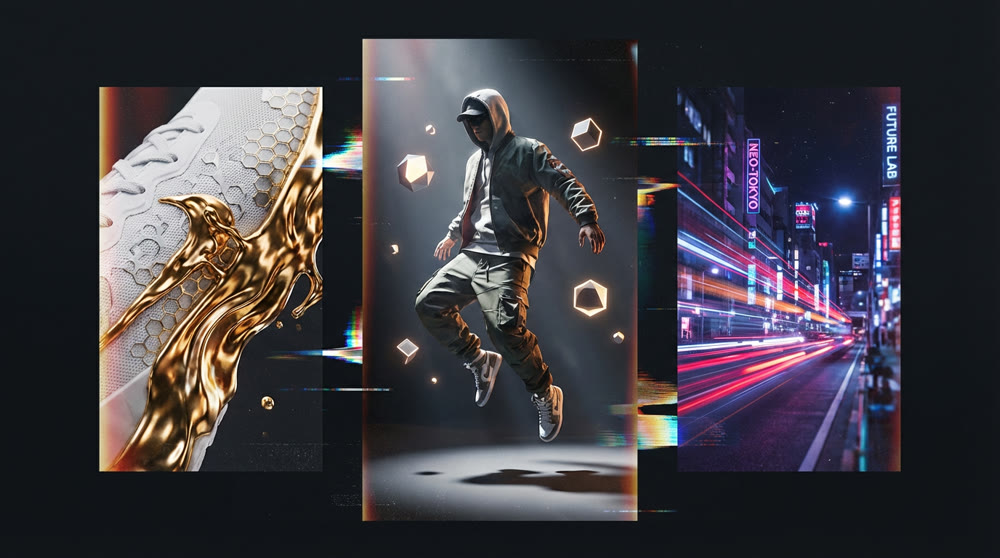
In the hyper-competitive ecosystem of modern retail, speed and aesthetic appeal are paramount. Traditionally, brands looking for high-quality, creative commercials faced exorbitant costs for exotic locations, professional models, and large production crews. Today, a significant paradigm shift is occurring in content creation. By leveraging advanced AI ad video technology, marketers and art directors can now produce stunning commercial assets without ever picking up a physical camera.
This guide delves into the practical application of these AI tools for broader commercial use, using Sneakers/Streetwear Visuals as a primary case study to demonstrate the technology's full potential. We will explore how to bypass the limitations of traditional filmmaking to produce high-fidelity, brand-aligned video assets. You will learn specific prompting strategies, workflow integrations, and methods to maintain product consistency—ensuring your digital content stands out in a crowded feed.
The Evolution of Digital Commercial Aesthetics
Commercial aesthetics are rapidly shifting away from static imagery. Whether for tech gadgets, beauty products, or fashion, the industry thrives on visual innovation. AI tools like Runway Gen-2 and OpenAI's Sora are not just shortcuts; they are stylistic instruments that allow for "impossible" visuals—aligning perfectly with the "glitch" and "futuristic" vibes popular in modern marketing, especially in streetwear culture.
Unlike traditional CGI, which requires weeks of rendering, these tools offer rapid iteration. You can visualize a product floating in zero gravity or being featured in a neon-lit Tokyo alleyway in minutes. The focus shifts from "how do we shoot this?" to "what can we imagine?"
📌 Best Practices for Product Fidelity
One of the biggest challenges when crafting AI Ad Videos is maintaining the likeness of the physical product. A text-only prompt might result in a product that looks cool but doesn't look like your product. To combat this, we must rely on Image-to-Video capabilities rather than pure text instantiation.
The Hybrid Workflow:
Photography First: Start with a high-resolution, professional photo of the product (e.g., a sneaker, perfume bottle, or electronic device).
Motion Mapping: Upload this image to your AI video tool as a reference frame.
Prompting for Movement: Use the text prompt to describe the environment and action, not the product itself.
Example Workflow (Sneaker Case Study):
Input: Studio shot of a limited-edition high-top sneaker.
Prompt: "Camera zooms out slowly, smoke swirling around the object, dramatic cinematic lighting, 4k resolution, slow motion."
Result: The shoe remains identical to the photo, but the atmosphere comes alive, creating a broadcast-ready commercial shot.
📢 Marketing: Need better ads? Try these best AI ad generators to boost clicks.
🛠️ Step-by-Step Tutorial: Creating Ads with Sora 2 Pro on Genmi
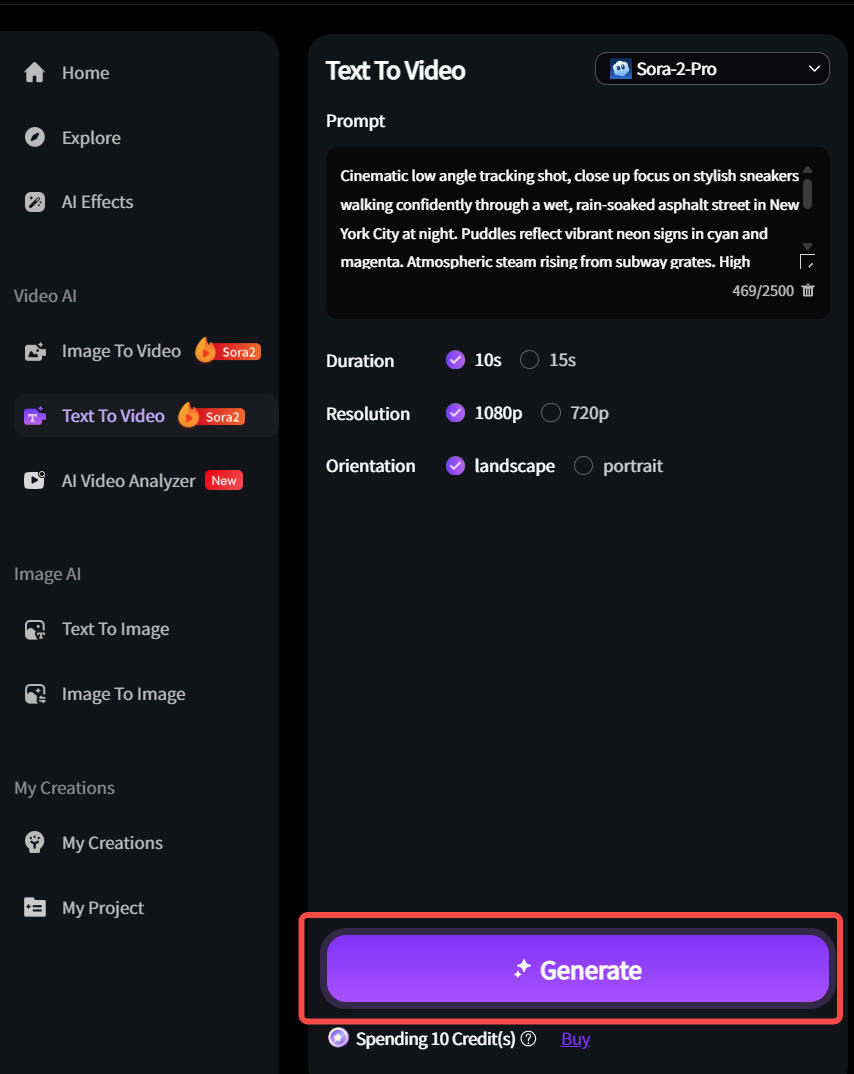
Theory is important, but execution is where value is created. Below is a practical walkthrough of how to generate a high-end commercial video using the Sora 2 Pro model within the Genmi AI interface. We will use the "Urban Explorer" vibe discussed earlier as our target output.
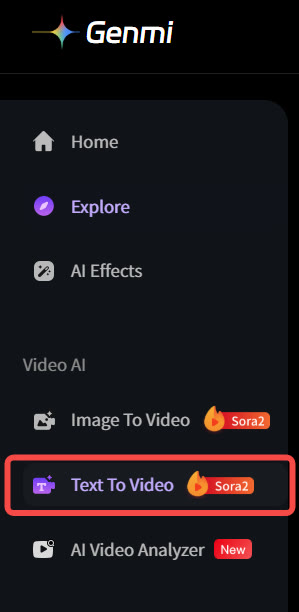
Step 1: Select the Advanced Model
Navigate to the video generation dashboard. In the model selection dropdown, specifically choose "Sora 2 Pro". This model is optimized for complex lighting and temporal consistency, making it the superior choice for commercial-grade outputs compared to standard models.
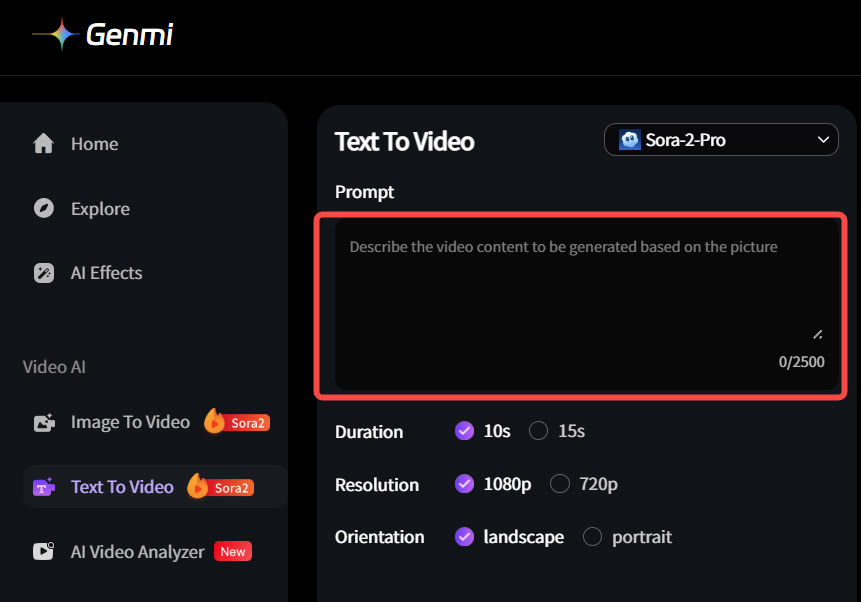
Step 2: Input Your Cinematic Prompt
In the text input field, enter your detailed prompt. As seen in the example, clarity is key.
Pro Tip: Start with the subject and action, then layer in environmental details and technical camera specifications.
Example Input: "Cinematic film still, a woman walking on the street, neon lights, reflection, 8k, highly detailed..."
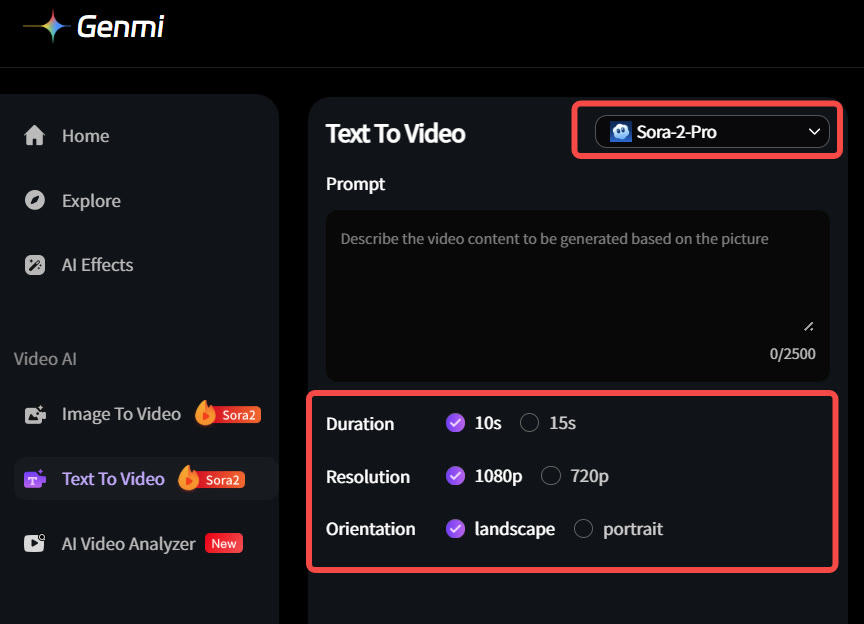
Step 3: Configure Generation Parameters
Before hitting generate, fine-tune your settings. Ensure your Aspect Ratio is set to 16:9 for standard video platforms. You may also adjust the Duration (e.g., 5s or 10s) and Motion Intensity here. These settings dictate how dynamic the final clip will be.
Step 4: Generate and Review
Click the "Generate" button. The system will process the request, interpreting your text and parameters into a fluid video clip. Once complete, the video will appear in your history. Review the lighting, physics (e.g., how the neon reflects on the wet pavement), and character motion to ensuring it meets your brand standards.
✨ Key Tips for Cinematic Prompting
To achieve a professional look for Commercial Visuals, the workflow must go beyond simple descriptions. The goal is to piece together coherent narratives that resonate with the audience.
Below are specific prompt structures designed to yield high-end results, using streetwear vibes as a template for dynamic visual storytelling:
Scenario A: The "Urban Explorer" (Vibe: Gritty, Realistic & Atmospheric)
- Detailed Prompt:
"Cinematic low angle tracking shot, close up focus on stylish sneakers walking confidently through a wet, rain-soaked asphalt street in New York City at night. Puddles reflect vibrant neon signs in cyan and magenta. Atmospheric steam rising from subway grates. High contrast, moody lighting, shallow depth of field with soft bokeh in the background. Shot on Arri Alexa Mini, 50mm lens, photorealistic texture, 8k resolution, volumetric fog, street photography aesthetic."
- Application: Use this for "lifestyle" clips where the focus is on the durability, comfort, and environmental context of the product. This technique works equally well for outdoor gear, automotive commercials, or waterproof apparel.
Scenario B: The "Hyped Drop" (Vibe: Abstract, High-Energy & Conceptual)
- Detailed Prompt:
"Surreal product showcase, a high-top sneaker floating in zero gravity, slowly deconstructing into thousands of colorful fabric particles and liquid chrome droplets. Dynamic camera rotation around the object. Studio lighting with rim lights highlighting the edges. Background is a clean, dark void. 3D render style, Octane render, hyper-detailed textures, fluid motion simulation, vibrant electric blues and oranges, slow-motion impact, 4k quality."
- Application: Perfect for teaser campaigns, "Coming Soon" announcements, or brand identity videos where you want to build anticipation and convey innovation without revealing the full product details immediately.
💡 Practical Techniques: Editing and Upscaling
Raw output from AI models often comes in lower resolutions (like 720p) or lower frame rates. To make these clips viable for a TV or social media commercial spot, post-processing is non-negotiable.
- Interpolation: Use tools like Topaz Video AI to increase the frame rate from 24fps to 60fps for that buttery smooth slow-motion effect often seen in premium commercials.
- Upscaling: Enhance the resolution to 4K to ensure crispness on large monitors and digital billboards.
- Sound Design: AI video is silent. The emotional impact comes from the audio—bass-heavy beats, city ambience, and foley sounds (footsteps, swooshes) are essential to sell the illusion of reality.
✂️ All-in-One: Generate and edit in one place. Check out our Clipfly AI review.
Comparative Analysis: Traditional vs. AI Production
To understand the strategic value, we must look at the resource allocation differences.
| Feature | Traditional Commercial Shoot | AI-Assisted Production |
|---|---|---|
| Budget | High ($10k - $100k+) | Low ($50 - $500 subscription/software) |
| Turnaround Time | Weeks to Months | Hours to Days |
| Location Scouting | Physical travel required | Infinite virtual locations via prompting |
| Product Fidelity | 100% Accurate | High (requires Image-to-Video techniques) |
| Creative Limits | Bound by physics and logistics | Bound only by imagination |
Table Analysis: While traditional shoots ensure perfect product representation, AI production offers unmatched flexibility and speed, making it ideal for social media content velocity.
🚀 Streamlining the Workflow with Genmi AI
While mastering individual tools is valuable, professional production often demands an integrated ecosystem that can handle every stage of the creative pipeline—from static ideation to final motion. This is where Genmi AI distinguishes itself, offering a robust suite of tools specifically tuned for the high-aesthetic demands of fashion and commercial advertising.
For the initial concept phase, where mood boards define the campaign's "vibe," the ability to generate high-fidelity concept art is indispensable. It allows art directors to visualize complex lighting setups—like neon-soaked cityscapes or minimalist concrete voids—before committing to a motion path. Once a visual style is established, designers can seamlessly move into refine and variation workflows. This capability is particularly useful for testing different colorways of a product or shifting the background environment without losing the structural integrity of the original composition.
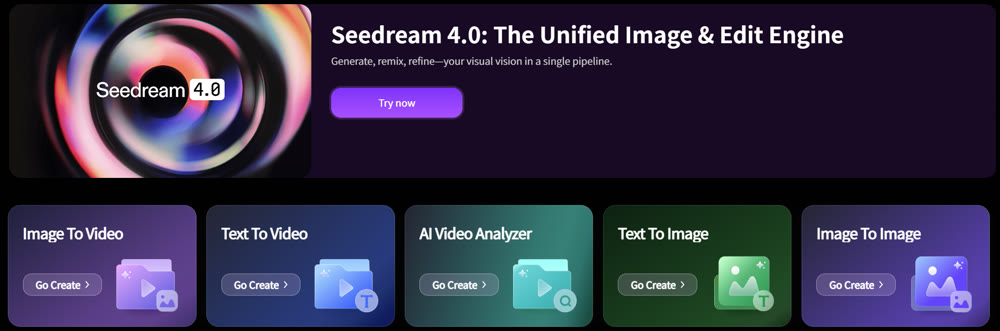
When it comes to motion, flexibility is key. For completely new narratives—such as a futuristic cyberpunk runway show where the atmosphere matters more than a specific SKU—creators can leverage advanced algorithms for transforming scripts into dynamic scenes. This feature excels at interpreting the subtle nuances of texture and atmospheric lighting described in your prompts.
However, for specific product drops, retaining the exact look of the physical item is non-negotiable. As highlighted in our "Hybrid Workflow" section, the most effective strategy is to bring static product photos to life. This function ensures that critical branding elements—logos, stitching, and material textures—remain 100% accurate while adding that essential layer of cinematic movement. By consolidating these diverse capabilities, the Genmi AI platform provides a cohesive environment that significantly accelerates the journey from a rough idea to a polished, market-ready commercial.
Conclusion
The era of static imagery for commercial marketing is fading. For modern brands, the ability to visualize concepts rapidly is a competitive moat. By mastering the specific prompting languages and post-processing workflows of tools like Runway, Sora, and Genmi AI, brands can elevate their visual identity. It is no longer about who has the biggest budget, but who has the most vivid imagination and the technical skill to execute it.
Start small: take your best-performing product photo, animate the background, and test the engagement. The future of commercial marketing is in motion.
Recommended Articles
Artlist AI Review: A Creator's Co-Pilot or Just Hype?
Is Artlist AI's video and image generation any good? Our 2026 review tests the latest AI creative tools, quality, and performance for professional creators.

YouTube Monetization Unlocked: A Deep Dive into YPP and Shorts Revenue for AIGC Creators
Unlock YouTube monetization with our deep dive into YPP, Shorts revenue, and RPM. Learn AIGC strategies to grow your channel and maximize earnings. Start now!
From Views to Value: Your 2025 Playbook on How to Monetize TikTok
Ready to turn your TikTok creativity into cash? This guide reveals proven strategies, from brand deals to AI-powered content, to help you monetize your account.