


ImageFX Review: Is Google's Creative Tool Ready for Professional Workflows?
Article Summary: This article provides an in-depth review of Google's ImageFX, evaluating its capabilities for professional workflows. It covers accessibility, photorealistic rendering quality, and critical limitations regarding customization, while offering practical tips and introducing robust alternatives for commercial-grade creative work.
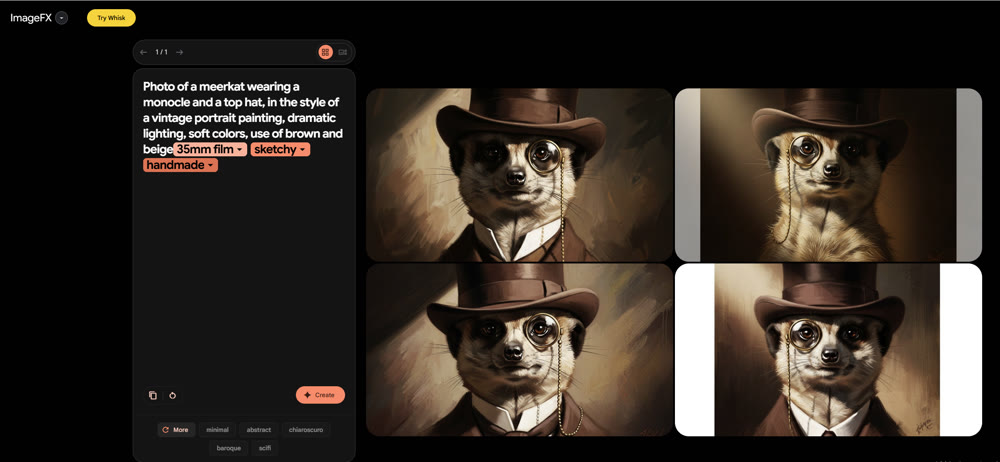
When Google unveiled ImageFX, the digital art community buzzed with anticipation. As a content strategist constantly seeking efficient creative pipelines, I was intrigued by the promise of a streamlined, high-fidelity visual synthesis tool directly from the tech giant. Is it merely a fun experiment, or does it hold genuine value for commercial design?
To answer this, I spent 72 hours rigorously testing the platform. My goal was to move beyond surface-level experimentation and evaluate its utility for graphic design, mood boarding, and concept art. This article dissects its capabilities, from interface accessibility to render fidelity, helping you decide if it deserves a spot in your professional toolkit.
What Sets ImageFX Apart?
Powered by the Imagen 3 model, ImageFX distinguishes itself through extreme accessibility. Unlike complex node-based systems that require a steep learning curve, this tool offers a frictionless entry point. You simply log in with a Google account and begin the creation process immediately.
The most notable feature during my testing was the "Expressive Chips." Instead of forcing you to rewrite an entire prompt to change a color or style, the interface highlights key variables (like "photorealistic" or "cinematic") and offers a dropdown menu of alternatives. This makes the iteration process significantly faster than standard text-based prompting.
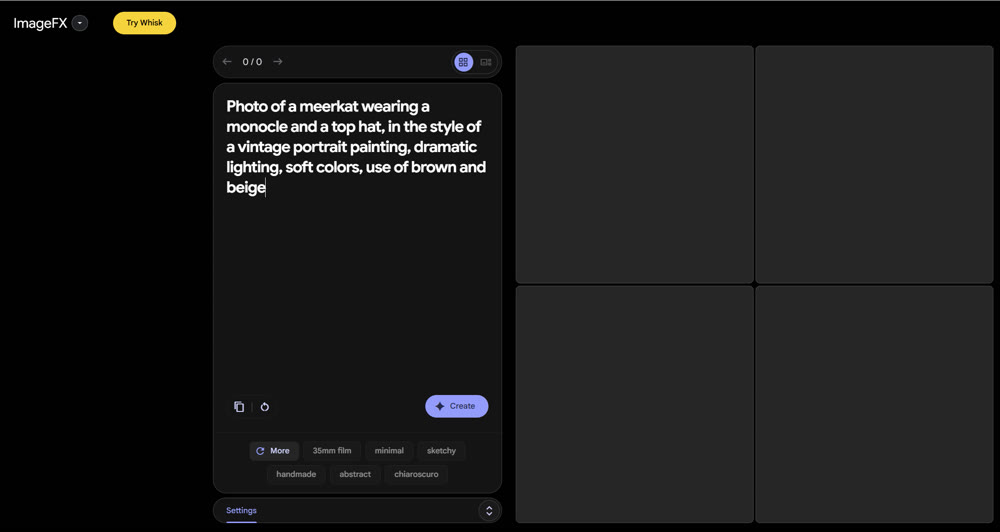
However, simplicity comes at a cost. The platform lacks granular controls—there are no options for aspect ratio adjustments, negative prompts, or specific resolution settings. This limitation became a recurring theme throughout my assessment.
Field Test: Analyzing Output Quality
To truly gauge the capabilities of this tool, I moved away from generic requests and tested it against three specific professional use cases: Interior Design, Conceptual Art, and Complex Character Interaction.
1. Photorealism and Texture (Interior Design)
My first test focused on lighting and material accuracy, crucial for architectural visualization.
The Prompt:
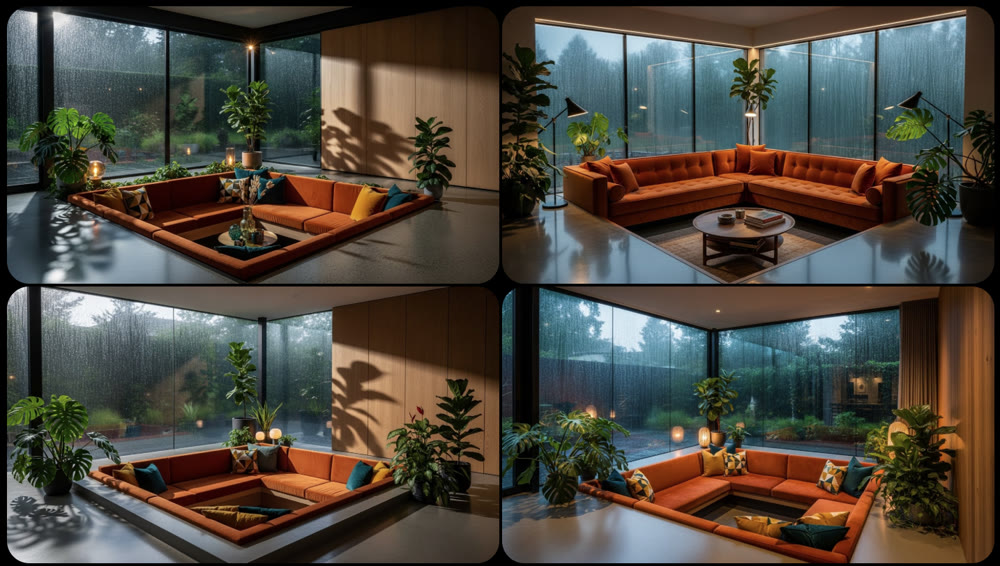
Mid-century modern sunken conversation pit, velvet burnt orange sofa, rain streaks on floor-to-ceiling windows, moody atmospheric lighting, indoor plants casting soft shadows, architectural photography, 8k resolution.
The Verdict:
The results were surprisingly competent. The model handled the texture of the velvet sofa and the reflection of the rain on the glass with high fidelity. The lighting looked natural rather than artificially "baked in." For rapid visualization of interior concepts, ImageFX proves to be a strong contender.
2. Stylized Concepts (Sci-Fi Environments)
Next, I tested its ability to handle abstract color palettes and "vibes."
The Prompt:
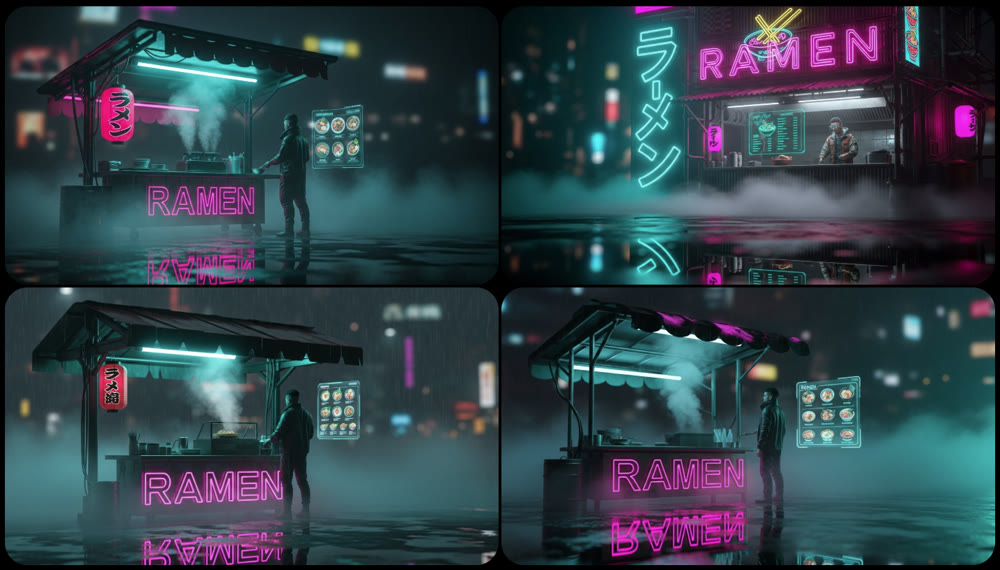
Cyberpunk street food vendor, neon ramen sign reflecting in wet pavement, heavy volumetric fog, teal and magenta color palette, holographic menu floating in mid-air, cinematic bokeh, high contrast.
The Verdict:
This is where the tool shines. The ImageFX review process revealed that the model excels at "style transfer." It captured the cyberpunk aesthetic perfectly, balancing the neon saturation with the dark environmental tones without oversaturating the image.
3. The Stress Test: Multiple Subjects
Finally, I attempted a complex scene requiring spatial coherence between two distinct characters.
The Prompt:
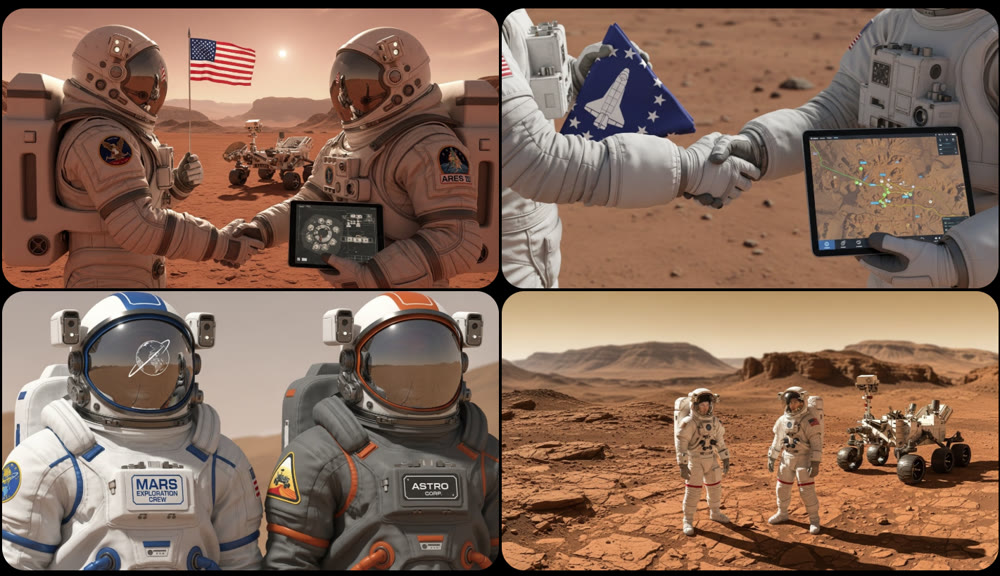
Two astronauts shaking hands on the surface of Mars, one holding a flag and the other holding a tablet, detailed space suits with distinct patches, a rover visible in the blurred background.
The Verdict:
Here, the consistency began to fracture. While the lighting remained good, the interaction (the handshake) was physically awkward, and the "distinct patches" were rendered as gibberish. The background rover blended strangely with the terrain.
The hardest part of storytelling is continuity. This AI character consistency masterclass explains how to use reference images effectively.
📌 Critical Observations and Limitations
While the output quality can be stunning, several friction points hinder professional adoption:
- Inconsistent Object Permanence: In scenes with multiple subjects, anatomy and object interaction often defy physics.
- Zero Customization: The inability to change the aspect ratio from a square (1:1) makes the assets difficult to use for web banners (16:9) or social media stories (9:16) without heavy post-editing.
- Resolution Caps: Professionals need high-res assets for print or large displays. ImageFX does not currently offer upscaling options.
✨ Key Tips for Better Results
If you plan to use ImageFX, follow these strategies to maximize quality:
- Lean into the "Chips": Use the suggested keywords to explore variations rather than manually typing new prompts.
- Focus on Atmosphere: The model is better at mood and lighting than it is at complex narrative action.
- Keep it Simple: Prompts with fewer than three distinct subjects tend to yield the highest fidelity.
🚀 Elevating Your Visuals with Genmi AI
While Google's tool offers a fun sandbox for quick ideation, professional projects often demand a level of precision and control that simple interfaces cannot provide. This is where Genmi AI bridges the gap between casual experimentation and commercial production.
For creators who need to create high-fidelity visuals from scratch, Genmi AI offers advanced parameter controls that ensure your aspect ratios and resolutions fit your project requirements perfectly. Furthermore, the creative process rarely ends with the first render. The platform's robust capabilities allow you to refine and transform existing assets, giving you the power to correct specific details—like that awkward astronaut handshake—without losing the overall composition.
By centralizing these professional-grade tools, the Genmi AI platform provides a comprehensive ecosystem designed for creators who require consistent, high-quality results rather than randomized outputs.
Conclusion
ImageFX is a commendable entry into the AI space, particularly for users who want a barrier-free way to visualize ideas quickly. Its strength lies in its speed and the intuitive "Expressive Chips" system. However, for serious content creators, the lack of control over resolution, aspect ratio, and complex subject coherence limits its viability for final production assets.
If you are looking for a tool to sketch out a mood board, ImageFX is worth a try. But if your goal is to produce market-ready creative assets with precise control, you will likely need a more advanced solution like Genmi AI to achieve the professional polish your brand requires.
Take Control of Your Creativity
Don't let limited tools dictate the quality of your work. While experimentation is the first step of the creative journey, having the right infrastructure is what allows you to cross the finish line. Explore platforms that prioritize creator control and consistency to turn your wildest concepts into tangible, high-resolution reality.
Recommended Articles
Kling 2.6 Review: A Filmmaker’s Verdict on Its Audio-Visual Capabilities
A professional filmmaker's review of Kling 2.6. Discover its real-world audio-visual synchronization capabilities through hands-on testing and analysis.

Nano Banana Pro: A Comprehensive Review of Google DeepMind’s Image Tool
Explore Nano Banana Procapabilities, from high-resolution visuals to advanced multi-image editing. Read our detailed review and workflow insights.
Mastering AI Visual Creation: An In-Depth Look at Leonardo.Ai for Creative Enthusiasts
Explore our in-depth Leonardo.Ai review. Discover its strengths, prompt adherence, speed, and how it compares to other AI image creation tools.