


AI Model Selection: The Ultimate Guide for AIGC Content Creators
Article Summary: This guide helps AIGC creators select the best AI models. It covers key criteria for image and video models, including quality, efficiency, cost, and advanced techniques for maintaining character consistency to build a scalable content workflow.
Choosing the right AI model is the cornerstone of any AIGC content creation workflow. It’s a decision that directly impacts your final video quality, production efficiency, and even its viral potential. With the AI landscape evolving at breakneck speed, the capabilities between models vary dramatically. As a creator, you must make strategic choices based on your specific content needs and budget.

This guide will break down how to select the perfect AI models for your AIGC projects, focusing on three key areas: critical decision-making factors, top model recommendations, and advanced techniques to scale your production.
I. Key Dimensions for Choosing an AI Model
First, shift your mindset from "Which model is the best?" to "Which model is right for my specific needs?" To answer that, evaluate your project against these four core dimensions:
1. Content Requirements vs. Model Strengths
- Content Style: Are you aiming for hyper-realistic, cinematic visuals (like a historical drama or an animal documentary), an exaggerated 3D animation (like a Pixar-style K-pop story), or a 2D anime style? Different models excel at 2D versus 3D aesthetics.
- Motion Complexity: Does your video involve intricate body movements, fast-paced action, or scenes that require a high degree of AI inference? For example, complex transformation sequences or dance choreography might demand specialized models like Kling 2.5.
- Audio-Visual Sync: If you're creating text-to-video content or digital human replicas, do you need the model to handle lip-syncing or autonomous camera movements (features seen in models like Sora 2 or Veo 3)?
2. Visual Quality and Controllability
- Output Resolution: While many prompts might include "8K photorealistic," most models have a fixed native output resolution (e.g., 720p or 1080p). Prioritize models that minimize quality loss and produce vibrant, well-lit outputs to enhance your final video's visual appeal. (If you are running out of prompt ideas, the massive OpenArt prompt library is a great place to find high-quality references.)
- Character/Style Consistency: For serialized content, especially narrative-driven stories, model controllability is non-negotiable. You need a model that can lock in a character's appearance and style using a reference image or precise prompts, preventing their look from breaking down between shots. This is a core challenge where an integrated toolchain can make a massive difference.
- Prompt Adherence: How well a model follows your text commands directly impacts the accuracy of the generated output. This is crucial for storyboards that require precise composition and action descriptions.
3. Efficiency, Cost, and Usability
- Production Efficiency: Story-driven short-form videos require numerous shots. Choosing tools that support batch processing and API access can dramatically boost your production speed.
- Cost Considerations: On a tight budget, prioritize cost-effective tools (like Seedream’s subscription plans or Zhipu Qingyan's unlimited generation packages) or API platforms.
- Ease of Use: 💡 Beginners should start with user-friendly tools that have a low learning curve (like Seedream 4.0) to first validate a workflow. Once you've established a viable model, you can graduate to more advanced tools like Midjourney or Stable Diffusion.
4. Specific Feature Needs
- Transitions and Transformations: If your video requires smooth scene transitions or "morphing" effects, the model must support Start/End Frame control.
- Secondary Creation Capabilities: If you need to blend or modify existing images, or make micro-adjustments to facial expressions, you’ll need a model that excels in these specific areas.
II. Image Generation Models: Recommendations and Use Cases
The image generation model sets the foundation for your character’s appearance, the scene's mood, and the overall art style. Advanced creators often combine multiple models to achieve the best results.
| Model Name | Core Strengths | Best For | 📌 Notes & Pro-Tips |
|---|---|---|---|
| Seedream 4.0 | Bright visuals Globally accessible Canvas editing Beginner-friendly |
Quick ideation Beginner projects High-brightness assets |
Leans toward 2D aesthetic Great for animated/cartoon-style videos |
| Banana | Rich details Strong prompt adherence Excellent 3D/realistic output |
Photorealistic content High-detail projects Complex prompts |
Outputs may appear darker Great for high-quality base images |
| GPT / DALL·E | Image blending Modification fine-tuning Supports prompt analysis |
Micro-adjusting images Close-ups Facial expression control |
Ideal for reference analysis Prompt optimization |
| Midjourney (MJ) | Unmatched visual quality Top-tier artistic control |
Establishing strong visual IP High-end artistic styles |
Advanced: Use --sref for style locking --cref for character consistency |
Model Quality/Style Comparison
To help you intuitively understand the unique characteristics of different AI image generation models, we've created a "Model Quality/Style Comparison" section. Here, we use the exact same Prompt to generate images from Seedream 4.0, Banana, and Midjourney, displayed side-by-side. This serves as a key reference for evaluating and selecting the best model for your project.
Prompts: A futuristic, minimalist home office setup at dawn. A sleek, ergonomic desk with a holographic display showing architectural blueprints. A large window overlooks a serene cityscape shrouded in a soft, misty morning light. A single potted succulent sits on the corner of the desk, and a comfortable, modern chair is tucked in. The overall atmosphere is calm and inspiring.
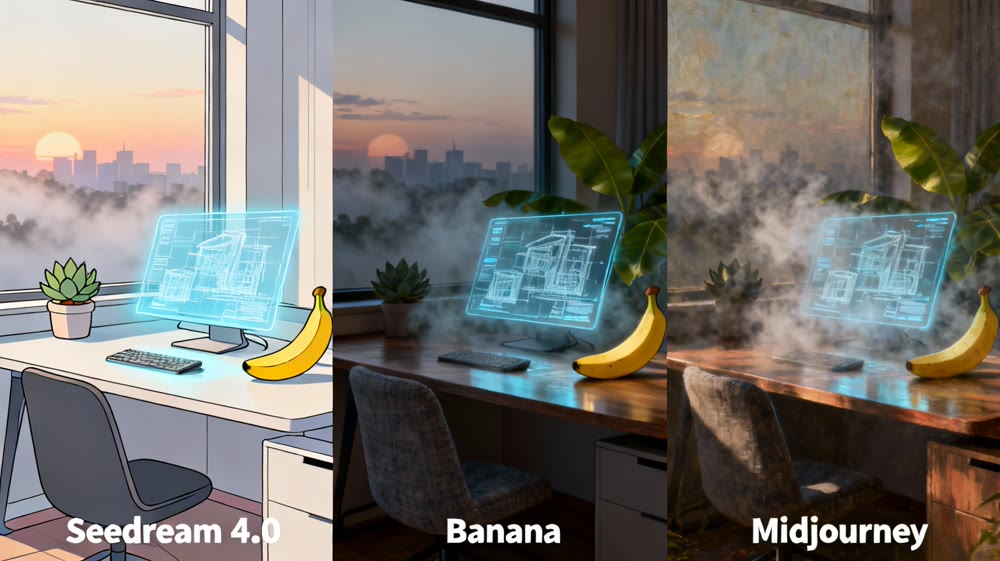
This comparison clearly reveals significant differences in each model's:
Style
- Seedream 4.0:
Tends towards bright, vivid, 2D animation or flat design aesthetics, ideal for lively, friendly, and easily shareable content. - Banana:
Excels in rich details and outstanding 3D/realistic output, producing cinematic and lifelike images perfect for high-quality photorealistic content. - Midjourney:
Known for unmatched visual quality and top-tier artistic control, creating works with unique artistic tension and sophisticated aesthetics, best for strong visual IP and artistic creation.
Lighting
- Seedream:
Images typically have uniform, bright lighting, conveying a clear and cheerful feel. - Banana:
Often presents deeper, higher-contrast lighting for enhanced realism and depth, simulating natural or professional illumination. - Midjourney:
Achieves artistic mastery in lighting, using subtle light to create unique atmospheres and moods, crucial to its overall artistic quality.
Details
- Seedream:
Handles details simply and symbolically. - Banana:
Excels in microscopic details, providing high precision for textures and elements. - Midjourney:
Demonstrates excellence in overall composition and intricacy, with details serving its holistic artistic vision for a highly harmonious visual effect.
🧊 3D Revolution: No modeling skills needed? Explore the best AI 3D model generators.
III. Video Generation Models: Recommendations and Use Cases
Video generation is where your content comes to life. Your choice of model will vary greatly depending on whether you need fluid motion, seamless continuity, or dramatic transformation effects. The complexity here is why integrated platforms like Genmi AI's video generator are gaining traction, as they help streamline this step.
1. Single Image-to-Video and General Motion Scenes
These scenarios involve converting static storyboard images into dynamic, continuous clips.
| Model Name | Core Strengths | Best For | ⚡ Pro Tips / Usage Notes |
|---|---|---|---|
| Kling 2.5 Turbo | Top-tier performance Well-rounded Stable output |
Storyboard shots Moderate action High motion continuity |
Reliable first-try results Good default choice Minimal tweaking |
| Hailuo 02 | Excellent motion handling Strong scene extension Comparable to Kling |
Complex action Scene extensions Moderate difficulty |
Add "realism" to prompt Reduces cartoonish feel Works with layers |
| VidU Q2 Cinema | Strong motion & extension Cinematic feel High visual impact |
Epic scenes Visually striking shots Cinematic storytelling |
Adjust motion timing Use for striking visuals Fine-tune camera angles |
| Seedream 3.0 Pro | Solid all-around High cost-to-value Reliable for low-motion |
Minimal movement Non-critical quality Testing/practice |
Include "coherent, fluid" Add "no extra characters" Improves consistency |
| Sora 2 / Veo 3 | Text-to-video A/V sync Autonomous camera work |
Security cam style Found footage vlogs Realistic POV |
Focus on scene description Let model handle motion Good for POV |
| Zhipu Qingyan | Extremely low cost Unlimited generation Quick iteration |
Minimal movement tests Frequent trial & error Bulk experimentation |
Fast testing Watch for distortions Good for bulk trials |
For a deeper dive into how these top-tier models stack up, you can explore our detailed comparison of the best AI video generation models available today.
2. Start/End Frame Control and Transition Scenes
The Start/End Frame feature is crucial for creating a smooth, dynamic transition from one image to another, making it essential for transformation sequences or ensuring scene continuity. This is a key step in turning a series of static images into a compelling narrative, a process that a dedicated image-to-video generator is built to handle.
| Model Name | Core Strengths | Best For | 📌 Tips & Precautions |
|---|---|---|---|
| Kling 2.1 | Stands in a class of its own Delivers best results Competitive price |
Transformation effects Scenes needing precise transition control |
— |
| Hailuo 02 | Strong performance Slightly less detailed than Kling Reliable output |
Transformations Moderate complexity shots Transitions |
— |
| VidU Q2 Cinema | Powerful effect High visual impact Good for cinematic transitions |
Transformations Epic or high-contrast shots Transitions |
— |
| Runway | Excellent for start/end frame generation Natural transitions Smooth morphing |
Smooth morphing videos Transformation effects Scene blending |
If an image is flagged/fails, upload to asset library Minor edits help succeed |
IV. Advanced Considerations: Cost, Efficiency, and Automation
Ultimately, your model selection must serve your goals for efficiency and cost control, especially for content like YouTube Shorts that demands high-volume, frequent production.
1. Boosting Efficiency with Automation
Once you've validated a successful content formula, it’s time to use tools to scale up production:
- Script Automation: Use Google AI Studio with custom prompts to deconstruct viral videos frame-by-frame, generate new scripts, and reverse-engineer prompts.
- Batch Image Generation: Leverage API aggregators and scripts to submit prompts to image models in bulk.
- Tools/Operations: Use third-party API platforms like Yunwu or custom tools for Sora/Banana batch generation.
- Batch Video Generation: Employ RPA software or specialized batch submission tools to feed your images and video prompts to image-to-video models.
- Tools/Operations: Community-built tools for Zhipu Qingyan are popular for testing due to its low cost.
2. Cost Analysis and Tool Strategy
| Stage | Tool Recommendation | Cost/Strategy | Notes |
|---|---|---|---|
| Prompting | Gemini AI Studio | Free | Powerful & free, Supports YouTube video analysis |
| Batch Images | Yunwu API (Sora/Banana) | Extremely low (Sora fractions of a cent) |
Mass production, Controllable cost |
| Video Generation | Zhipu Qingyan | Low (~$7/month unlimited) |
Beginner-friendly, High-frequency testing, Great value |
| High Performance / Start/End Frame |
Kling, Runway | Paid subscription | Shared accounts or temporary subscriptions reduce cost |
3. ✨ Advanced Techniques for Character Consistency
For narrative-driven videos, character consistency is paramount. This requires a combination of model choice and reference image techniques:
- Fixed Prompt Identity: Create a unique "full identity" for your character in a tool like Gemini (e.g., "Name + defining features") and reuse it verbatim in every single storyboard prompt.
- Reference Images & Style Codes:
- Midjourney: Utilize the
--cref(character reference) and--sref(style reference) parameters. You can even bundle viral cover images into a style board to generate a style code, which can then be layered onto your own prompts. This allows you to maintain consistency while iterating on a proven style.- Seedream: Use the "Smart Reference" feature to lock in a character's facial features.
- Know When to Avoid Reference Images: If your goal is to significantly alter or innovate on an original image, avoid using Seedream's reference image feature, as its underlying logic can sometimes constrain creative freedom.
To illustrate the profound impact of these techniques, consider the dramatic difference in character portrayal when --cref or similar reference methods are (or aren't) applied:
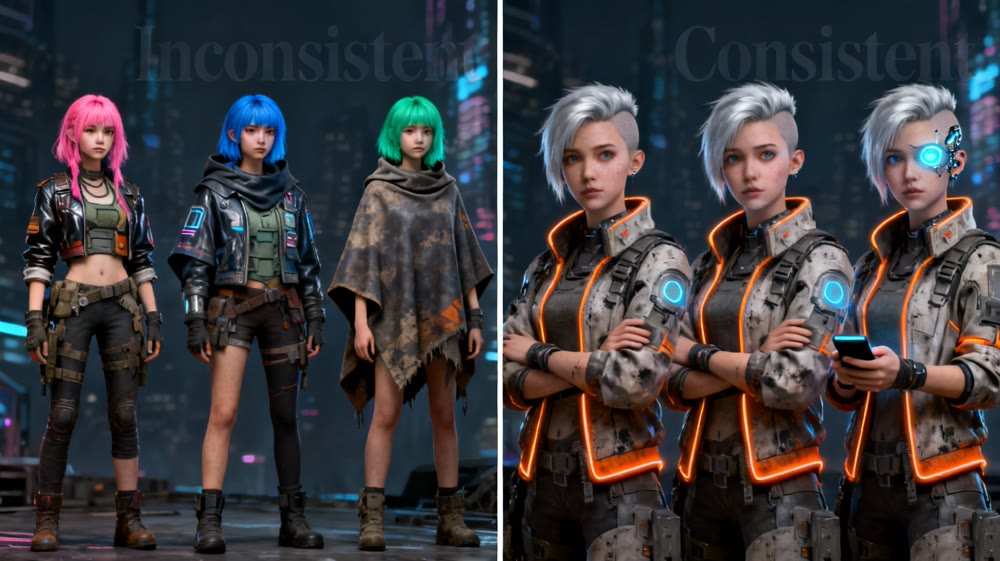
Figure: Before-and-after comparison demonstrating character consistency with and without advanced reference techniques like Midjourney's --cref.
V. Enhance Your Experience: A Real-World AIGC Workflow in Action
Theory is valuable, but practice is where insights truly come alive. To demonstrate how strategic AI model selection can transform your creative process, let's walk through a real-world scenario: our team's journey in creating a scalable series of "Pixar-style K-pop story" Shorts. This case study will highlight how strategic model selection and an integrated workflow turned concept into captivating content.
Our Case Study: Crafting "Luna's Digital Dream" - A Pixar-Style K-pop Series
Our goal was to produce a high-volume series of short, engaging animated clips featuring a K-pop idol, Luna, in a fantastical, Pixar-esque world. This demanded not only beautiful visuals but also rock-solid character consistency and smooth, dynamic animation for dance and transformation sequences.
1. Character & Style Conception: The Foundation
First, we needed to define Luna's look and the overall aesthetic.
- Model Used: Midjourney V6.0
- Process:
- We started by gathering reference images: a mix of Pixar character designs for their distinct animation style and contemporary K-pop idol aesthetics for hair, fashion, and charisma.
- Using Midjourney's
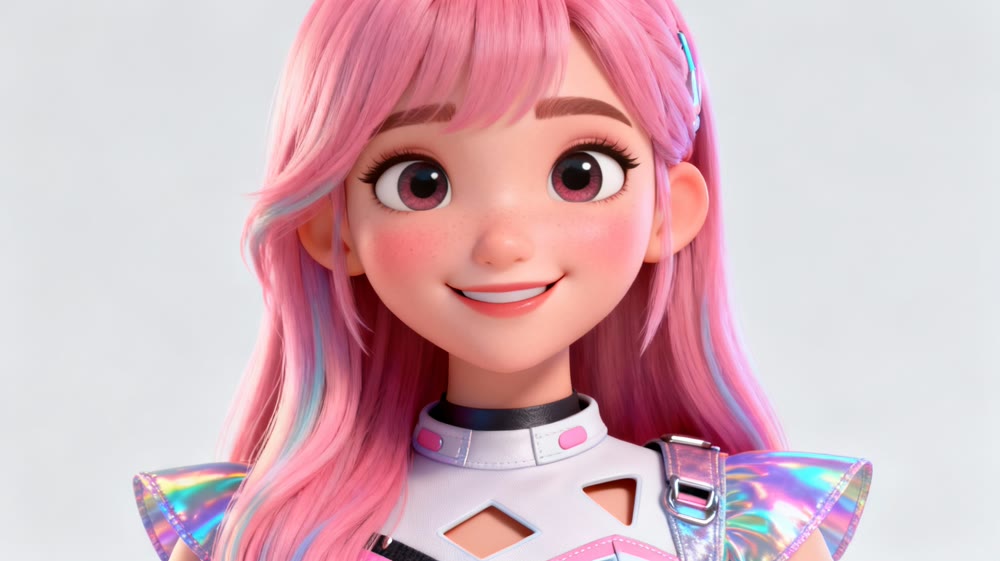
--srefparameter, we layered these style references to generate a unique style code that perfectly blended the two worlds.- Crucially, we then used Midjourney's
--crefparameter, feeding it a carefully selected portrait of our desired protagonist, Luna, to lock in her facial features and overall character design across all subsequent image generations. This ensured she always looked like her.
2. Scripting & Bulk Scene Generation: Building the Storyboard
With Luna's identity established, it was time to generate the core visuals for each scene.
- Models Used: GPT-4 (for script/prompt generation) + Banana API (for image generation)
- Process:
- Our story outline was fed into GPT-4, which helped us break down each Short into 50 individual storyboard prompts, meticulously describing actions, expressions, and camera angles.
- Given Banana's strong performance with rich details and realistic 3D aesthetics (which we could adapt to a Pixar-esque feel with careful prompting), and its API accessibility for batch processing, we used the Banana API to quickly generate all 50 static images for each Short. This was essential for high-volume production.
3. Bringing Motion to Life: Animation & Dynamic Effects
The final and most critical step was animating these static images. We used a hybrid approach to balance quality, cost, and specific animation needs.
- Models Used: Seedream 3.0 Pro (for cost-effective basic scenes) + Kling 2.1 (for high-impact sequences)
- Process:
- For standard dialogue scenes, simple character movements, or static shots, we leveraged Seedream 3.0 Pro. Its solid all-around performance and high cost-to-value ratio made it ideal for these less demanding segments, helping us control overall production costs.
- However, for the defining moments – Luna's complex K-pop dance choreography and a magical transformation sequence – we turned to Kling 2.1. We specifically utilized its Start/End Frame control feature. This allowed us to precisely dictate the beginning and end poses/states, ensuring incredibly smooth, high-fidelity transitions and dynamic motion that delivered maximum visual impact, essential for viral Shorts content.
Unify Your Workflow and Create at Scale
Navigating the fragmented world of AI models—juggling image generators, video tools, upscalers, and editing software—can be overwhelming and inefficient. The real key to scaling your AIGC content isn't just picking the right models; it's about building a seamless, repeatable workflow that brings them all together.
Instead of wrestling with disconnected tools, what if you could manage character consistency, generate dynamic video from images, and maintain a coherent style all in one place?
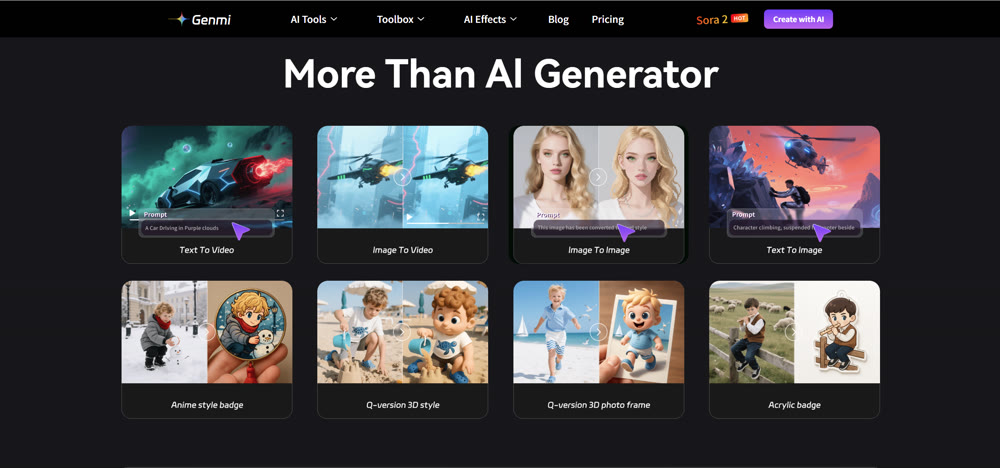
This is where Genmi AI comes in. We're building an integrated platform designed to solve these exact challenges. Move beyond the trial-and-error and start creating high-quality, consistent AI content with confidence and speed.
Ready to streamline your AIGC production? Explore Genmi AI today!
Recommended Articles
Hedra AI Review: A Hands-On Test of Its Video Performance
Our in-depth Hedra AI review tests its lip sync, character animation, and full-body motion. See our hands-on results and find out if it's right for you.

The YouTube Partner Program (YPP): A Guide for AI Creators
Master the YouTube Partner Program. Learn eligibility, monetization thresholds, and how AI video tools can fast-track your channel's growth and revenue.
From Prompt to Masterpiece: A Beginner's Guide to Your First AI Image
New to AI art? Learn how to craft the perfect prompt and generate stunning images from text. Our guide makes it easy for beginners to start creating today.