


From Prompt to Viral Hit: The Ultimate Guide to Creating AIGC YouTube Shorts
Article Summary: A comprehensive guide to creating viral AIGC YouTube Shorts. It details a four-stage workflow, from niche selection and prompt engineering to editing and optimization, supported by case studies, key metrics, and actionable strategies for creators to achieve massive growth and monetization.

We are building a professional knowledge base for YouTube Shorts creators. This definitive guide breaks down the complete workflow for taking an AIGC short video from a simple idea to a viral hit, analyzing the core elements and case studies behind breakout content.
I. The Core Stages of the AIGC Shorts Creation Workflow
AI-powered short video production is no longer about simply stitching clips together. It’s a highly efficient, precise, and automated process. The key is to leverage AI for the most demanding parts: deconstructing viral hits and mastering prompt engineering.
1. Niche Selection & Competitive Analysis
Before you create anything, setting your direction is the critical first step that determines success or failure.
Find Your Target Niche: The key is to find niches with sufficient volume (high traffic) and an active lifecycle. Focus on content categories that have historically generated hundreds of millions of views and have still produced viral hits (10M+ views) within the last month.
Methods for Discovering Traffic: Creators can use several channels for discovery:
>* Scroll the Shorts Feed: Use a fresh or logged-out account to endlessly scroll the Shorts feed. This helps you understand the platform's currently trending visual elements and formulas, free from your personal filter bubble.
>* Refresh the Homepage: Repeatedly refreshing the YouTube homepage’s Shorts shelf in a browser is another effective way to discover emerging niches.
- Analyze Third-Party Data: Use tools like Viewstats to filter the top 100 Shorts from the last 7 or 28 days. Combine filters for country and content type to quickly pinpoint what’s currently exploding.
Distill the Viral Core: Once you find a viral video, you must "distill its core IP and script framework." Deeply understand the user psychology it taps into and how the first 3-second "hook" is designed. This insight will guide your subsequent micro-innovations and adaptations.
2. Automated Prompting & Storyboarding
This is where you gain the most leverage for achieving high efficiency and quality in your AI workflow.
AI Script Generation Tools:
We highly recommend using Google AI Studio. It can directly analyze a YouTube video link to automatically deconstruct it frame-by-frame, generate a script, analyze its pacing, and reverse-engineer the prompts. This dramatically lowers the difficulty of breaking down viral content.
Precision Scripting (The Ironclad Rules):
To ensure your image or video generation tools can accurately interpret each frame, you must follow strict prompt engineering rules when creating your storyboard script:
Stateless Generation:
Every shot's description must be 100% complete and self-contained. Do not rely on context from the previous or next shot. Image generation AIs process each prompt independently and have no "memory" of the sequence.
Consistent Character Identity:
When a character first appears, create a unique and "complete identity tag" (e.g., Name (descriptive features)). You must reuse this identifier verbatim in all subsequent shots to ensure character consistency.
Static Action Snapshots:
Describe each scene like a photographer capturing a still photo. Describe a frozen moment in time. Avoid verbs that describe a process (e.g., "is running towards the camera"). Instead, use static descriptions (e.g., "is in a running pose, one leg forward, one leg back").
Strict Output Formatting:
The final script must be exported in a strict, pre-defined format like a Markdown table or CSV. This allows you to directly copy-paste it into batch processing tools for the next stage.
Your Free Toolkit is Here
To help you get started, we've created a ready-to-use storyboard template that follows these ironclad rules. It's designed to help you structure your AIGC prompts for maximum viral potential.
➡️ Click Here to Download Your Free Prompt Engineering Template (PDF)
3. Asset Generation & Tool Selection
Turning your script into visual assets requires a focus on efficiency and consistency.
Character & Scene Design (Text-to-Image):
- Tool Choice: Midjourney (MJ) and Jiemeng (Doubao) are popular choices for generating high-quality images.
- Character Consistency: For story-driven content, maintaining a consistent character appearance across different shots is critical. This is typically achieved using reference images, a model's smart reference feature (like in Jiemeng), or by reusing a fixed set of character descriptors in your prompts.
- [Advanced] Batch Generation: Once you've validated a niche, use batch generation scripts to create images for multiple shots at once. This massively boosts production efficiency, with costs potentially as low as ~$0.0035 per image.
Motion Generation (Image-to-Video):
- Tool Choice: Depending on your needs, you can use a variety of powerful image-to-video tools like Runway, Pika Labs, Keling, or Pixverse.
- Motion Realism: The priority is ensuring the subject's movement adheres to the laws of physics and avoids stiffness or obvious AI artifacts. Adding phrases like "smooth, fluid video, realistic motion" to your prompts can significantly improve the output.
- Start/End Frame Effects: Runway is particularly well-suited for generating videos that require smooth transitions or transformation effects in the first and last frames.
For those on a tight budget, there are actually some excellent free AI video generators with no watermark that are perfect for beginners.
4. Editing & Publishing Optimization
Once your assets are generated, the final edit and publishing strategy determine the user experience and the algorithm's willingness to promote your content.
Editing Tools & Pacing Control:
- Tools: We recommend CapCut for assembling clips, adding sound effects, and finding background music (BGM).
- Pacing Optimization: Shorts demand tight pacing. Speeding up all clips by 1.2x can create a feeling of urgency. Cut any static or slow moments at the beginning and end.
- Sound & BGM: Viral soundtracks and sound effects are key for emotional impact. You can "isolate the audio" from a competitor's video to reuse it or use AI-generated music.
Content Publishing & Optimization:
- Thumbnail: Your Shorts thumbnail must be selected and set within the YouTube mobile app. The thumbnail, title, and description are fundamental to improving your "Viewed vs. Swiped Away" rate.
- Publishing Cadence: Maintain a consistent daily upload schedule (1-2 videos recommended). Avoid publishing multiple videos at the same time, as this can throttle your reach.
- [Advanced] Seamless Loop: Design the last frame of your video to perfectly match the first frame. This can trick viewers into rewatching unconsciously, dramatically increasing your watch completion rate (which can exceed 100% on Shorts).
For AI channels, you need a specific strategy to monetize AI Shorts with the Partner Program, as review standards are tightening.
II. The Key Elements of a Viral Video
Going viral isn't an accident. It's the result of content quality, data feedback, and the competitive landscape. Understanding YouTube's recommendation algorithm and its key metrics is essential.
1. The Three-Pillar Framework for Success
Based on real creator experience, a video's success depends on three core pillars:
| Pillar | Description | Key Role |
|---|---|---|
| Shell (IP & Quality) | The external presentation of the content, including the IP, visual style, character design, and image clarity. |
Determines if users "choose to view" the video. |
| Script (Story) | The internal logic of the content, including the story structure, shot design, narrative pacing, and emotional core. |
Determines if users "stay to watch" and "finish watching." |
| Relative Quality (Competitiveness) |
The differentiation and advantages your content has over competitors in the same niche. |
Determines if your content stands out and gets massive reach compared to others with similar IPs and scripts. |
To break through a viewership plateau (e.g., the '50k view curse'), creators must innovate on their Script and Relative Quality.
2. Core Data Metrics
The core logic of the YouTube Shorts algorithm is to match users with Shorts they are most likely to watch and enjoy. To measure this, the system focuses on these key metrics:
Viewed vs. Swiped Away (% of viewers who chose to view): After seeing your video, how many people chose to watch it versus swiping away or tapping "Not Interested."
- Importance: This metric directly determines whether your video gets pushed into larger traffic pools.
- Success Threshold: Creator experience shows that viral hits in the tens of millions of views often require a "Viewed vs. Swiped Away" rate of over 80%.
📌📌 To validate this, we can look directly at YouTube's own philosophy.
As stated by YouTube's official Creator Insider channel, "The Shorts algorithm follows the audience. The primary signal we look for is simple: are people choosing to watch and enjoy this content?"
This official statement directly reinforces the critical importance of the 'Viewed vs. Swiped Away' metric. Your primary goal is to create a Short that people choose to watch all the way through, signaling to the algorithm that it's a piece of content worth distributing more widely.
Average View Duration & Average Percentage Viewed: How long viewers stay on your video. This reflects the content's appeal and stickiness.
- Benchmarks: For a 15-second Short, an average view duration over 21 seconds or an average percentage viewed above 140% (meaning viewers rewatched it 1.4 times on average) indicates strong viral potential.
Emotional Feedback: The platform also measures user enjoyment through Likes/Dislikes and post-watch surveys. Creators can encourage this with simple calls to action ("Like and comment if you enjoyed!").
3. Boosting Efficiency & Iterative Review
Continuous optimization and efficient production are the keys to stable, long-term success.
Efficiency Tools & Strategies:
- Batch Generation: Once you've validated a niche, immediately switch to automated scripts and batch generation tools. This can increase your daily output from 1-2 videos to 3-5+, accelerating your testing and iteration speed.
- [Advanced] Automated Workflows: A few top creators have developed custom Gemini plugins or RPA tools to automate the entire process from script design to image generation. This allows them to mass-produce content, avoid manual burnout, and test different niches with incredible efficiency.
Data Review and Optimization:
>* Analysis Focus: In YouTube Studio Analytics, look at both your best and worst-performing Shorts to identify the differences.
>* Optimize the "Hook": If your "Viewed vs. Swiped Away" rate is poor (below 80%), your first 3 seconds or thumbnail is the problem. Focus on improving the impact of your opening shot or story hook.
Optimize the Ending: If your viewership graph shows a sharp drop-off at the end, your conclusion is too slow. Shorten it or use a seamless loop to improve retention.
Don't be afraid to fail! Many viral hits are born from numerous tests and iterations. One creator turned a video with a few million views into a 20-million-view hit simply by optimizing based on data analysis. That is the power of data.
III. Case Studies: Common AIGC Short Formats
The current YouTube AI content landscape is largely in a "script-driven opportunity" phase, but pockets of "format-driven opportunities" still exist. AIGC Shorts can be broadly divided into "script-driven" (story-focused) and "format-driven" (visual-focused) categories.
1. Script-Driven Viral Hits (Story-Based)
These hits focus on narrative and emotion. The goal is to get users hooked on the story you've designed.
| Trait | Description |
|---|---|
| Shot Structure | More shots, relatively longer duration (20-30s), requiring complex storyboarding. |
| Core Driver | Story-driven, relying on narrative tension and emotional resonance (e.g., ridicule, comeback, rescue, suspenseful twists). |
| Production Barrier | Relatively high. Requires detailed script deconstruction, character design, and maintaining consistency across shots. |
| Market Window | Longer. The content is less likely to become dated, but it requires continuous script innovation. |
Case Studies & Field Experience:
Indian Lore / K-pop Stories: This is one of the highest-traffic story niches right now. Creators in our community have achieved millions of views by meticulously replicating and adding micro-innovations to popular Indian lore stories. One creator achieved hundreds of millions of views by adapting a successful script from a completely different niche into the "Indian Lore" style.
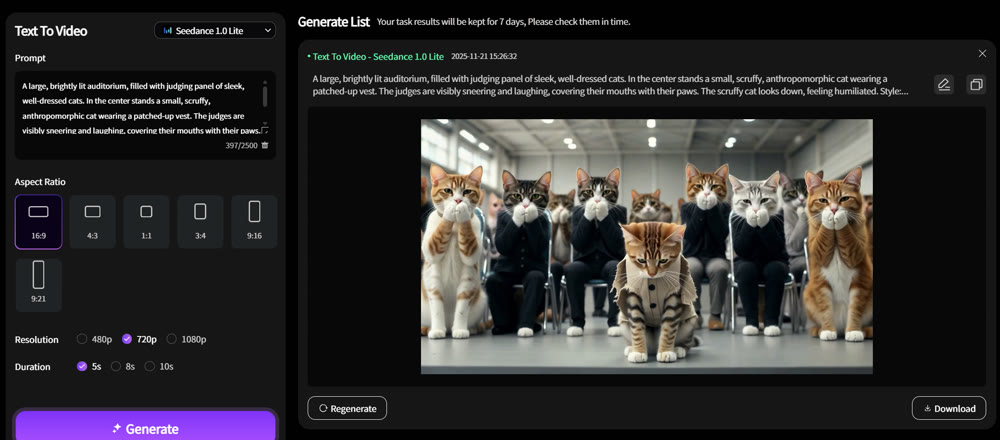
Recombining Story Cores: Experienced creators don't just replicate; they create new hits by combining proven IPs (e.g., Cristiano Ronaldo/Messi, anthropomorphic cats, AI characters from folklore) with proven plotlines (e.g., the "ridicule-and-comeback" formula). A powerful text-to-video generator can help you rapidly prototype these new combinations.
2. Format-Driven Viral Hits (Sensory-Based)
These hits rely on visual spectacle and sensory stimulation. The goal is to dazzle the viewer into a state of mesmerized rewatching.
| Trait | Description |
|---|---|
| Shot Structure | Fewer shots, shorter duration (5-15s), no complex script. |
| Core Driver | High density of sensory information. Achieves virality through extreme characters/scenes (giants, monsters), exaggerated actions (transformations, dancing), or novel perspectives (CCTV, first-person view). |
| Production Barrier | Relatively low, but requires high familiarity with tools and a strong sense of visual appeal. |
| Market Window | Short. The window of opportunity closes quickly, but the feedback is fast, making it ideal for beginners to grow a channel and qualify for YPP. |
Case Studies & Field Experience:
AI Animal Alert/Rescue: These videos gain traction by evoking empathy and emotional connection, using close-up shots and hyper-realistic visuals to enhance immersion.
Transformation / Multi-Panel Grids: Classic format-driven hits, like AI talent show transformations or Squid Game-style four-panel reveals. This format increases the amount of visual information in a short time, boosting completion rates.
[Advanced] Micro-Innovation: You can find new pockets of traffic by combining existing elements (e.g., dual-video stylization + a K-pop IP + a four-panel grid) or by leveraging new tools (e.g., using Google's Veo to create CCTV-style footage).
Start Creating, Start Winning
Don't be limited by perceived barriers. Many successful creators started with low-barrier, fast-feedback formats before moving on to more complex, story-driven content. The most important thing is to jump in, get your hands dirty, and adapt as you go.
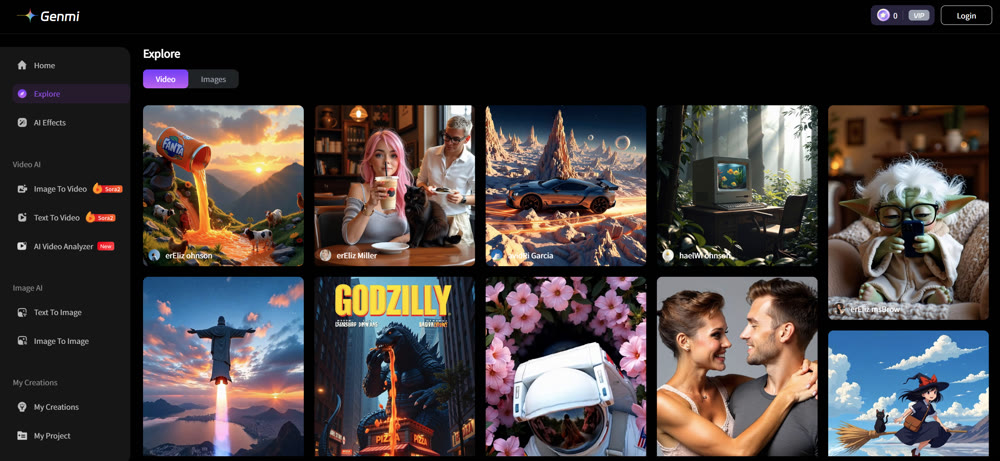
The workflow might seem complex, but tools are making it easier every day. With a platform like Genmi AI, you can streamline your entire creation process, from generating initial concepts to producing stunning final videos. Stop just analyzing and start creating.
Recommended Articles
Craiyon AI Review: The Right Creative Tool for You?
Explore our in-depth Craiyon AI review. Discover its strengths, weaknesses, and whether this popular AI art tool is the right fit for your creative projects.

AI for YouTube Shorts: The Playbook for Format Blockbusters
Learn to create format-driven viral YouTube Shorts with AI. Our guide covers ideation, text-to-video workflows, and automation for massive growth.
OpenAI Sora: A Deep Dive into the AI Video Generator's Capabilities, Limitations, and Future
Discover OpenAI Sora, a groundbreaking text-to-video model. Analyze its strengths, limitations, and the exciting potential of its future version, Sora 2.