


From Chaos to System: How to Engineer a Scalable Content Production SOP for YouTube Shorts
Article Summary: This guide details a Standard Operating Procedure (SOP) for engineering a scalable YouTube Shorts content factory. It covers scientific topic selection, AI-powered prompt engineering, batch production workflows, and data-driven optimization to transform creative efforts into repeatable, high-quality viral video production.

Systematizing your YouTube Shorts creation process with a Standard Operating Procedure (SOP) is the key to achieving scalable, high-quality output. The core principle is to transform one-off creative successes into repeatable processes and reusable digital assets. By engineering your workflow, you move from inconsistent inspiration to a predictable content factory, powered by AI tools like Genmi AI's video generator.
Case Study: The Transformation of Channel 「MeowBite」
To validate the practical effectiveness of this engineered YouTube Shorts creation SOP, we tracked key data for an internal test channel, 「MeowBite」, before and after adopting the SOP. The results demonstrate that the engineered workflow not only significantly boosted production efficiency but also achieved breakthrough improvements in content quality and viral hit output.
| Metric Dimension |
Before Transformation (Traditional Manual Creation) |
After Adopting SOP (Engineered Content Factory Mode) |
Improvement / Significance |
|---|---|---|---|
| Single Video Production Cycle |
8–10 hours / video |
1.5 hours / video |
5–7x increase in efficiency |
| Monthly Video Output |
4–6 videos | 20–25 videos | 4–5x increase in capacity |
| Average Select View Rate (SVR) |
60% – 70% | 80% – 85% | Significantly above industry average |
| Average Watch Time / Completion Rate |
20 seconds / 50% | 30–40 seconds / 70% – 90% (some >100%) |
Audience engagement depth significantly increased |
| Average Views | 50,000 – 100,000 views | 2 Million+ views | Achieved exponential growth (20x+ increase) |
| Million+ Views Viral Hits |
0 | 2 | From none to viral, achieved widespread sharing |
| Core Challenges | Creative burnout, high repetition, production bottlenecks, difficulty replicating hits |
Focus on strategy & data analysis, AI assists creativity & production |
Shifted creation focus from “manual labor” to “intellectual work” |
📌 Summary: The practice of 「MeowBite」 demonstrates that by standardizing, AI-powering, and data-driving the YouTube Shorts creation process, content production can effectively transform from inefficient manual labor into a high-output, high-quality "content factory," enabling continuous viral hit production and subscriber growth.
👉👉These remarkable results are not accidental; they are the direct outcome of a meticulously engineered process. This process kicks off with:
I. Scientific Topic Selection & Deconstruction (The Content Positioning SOP)
The goal of this SOP is to shift from the intuitive art of "finding inspiration" to the rational science of "finding structure." It’s about decoupling the core content formula from its visual variables.
1. Assessing Niche Potential and Deconstructing Viral Hits
Your creative journey must begin by ensuring you're investing energy in high-volume, active niches. This requires using data tools (like the YouTube App or https://www.viewstats.com) to identify verticals that have historically generated hundreds of millions of views and still produce viral hits in the tens of millions within the last month.
Once you've benchmarked a successful video, the SOP dictates an immediate "viral core deconstruction." Identify the video's central explosive elements and the "hook" in the first 3 seconds. Understand the core user psychology it taps into.
2. Structural Abstraction and Building a Variable Library
After deconstructing the core elements, the engineering work begins. This involves abstracting the viral script into a reusable formula and building a library of content assets:
- Abstracting a Universal Script Structure: Convert a specific story into a universal formula. For example, a narrative about a rescue could be broken down into the classic "three-act structure": Peril + Rescue + Resolution. A story about an underdog could be: Mockery + Comeback + Triumph. These structures form your "Script Formula Library."
- Creating a Library of Swappable Variables: Based on these formulas, abstract the replaceable "variables." This includes:
- Archetypes: Mythological figures, K-Pop idols, historical characters.
- Settings: Open sea, high altitude, deep caves.
- Conflict & Resolution Types: Different forms of danger and methods of rescue.
- SOP Execution: Creators follow the "fixed structure, variable content" SOP. For instance, use the "Peril (high altitude) + Human Ladder Rescue + Successful Outcome" structure but swap the character from a cat to a human baby.
- Deliverable Example: The resulting assets include proven formulas like "Rescue Structures," "Underdog Structures," and a corresponding "Successful Variable Swap Library" to guide future large-scale content creation.
II. AI Scripting and Prompt Engineering (The Precision Production SOP)
This SOP leverages AI to translate high-level creative ideas into an unambiguous, batch-executable production blueprint. It’s where raw ideas meet precision engineering. For a deeper dive into this, check out our Prompt Engineering Blueprint for AI Video.
1. Automated Script Generation and Precise Prompt Delivery
- AI Tool Integration: Use tools like Google AI Studio (https://aistudio.google.com/) by feeding them a link to a benchmark video. The model can automatically deconstruct it frame-by-frame and generate a storyboard script.
- SOP Output: The final output must be a structured CSV or a Markdown table code block. This format is crucial for direct import into batch-processing tools in the next stage.
💡 Ready-to-Use Resource: To streamline your structured scripting process, download our CSV Script Template. This template provides all the essential columns for efficient, AI-driven content generation, helping you maintain consistency and clarity from the outset.
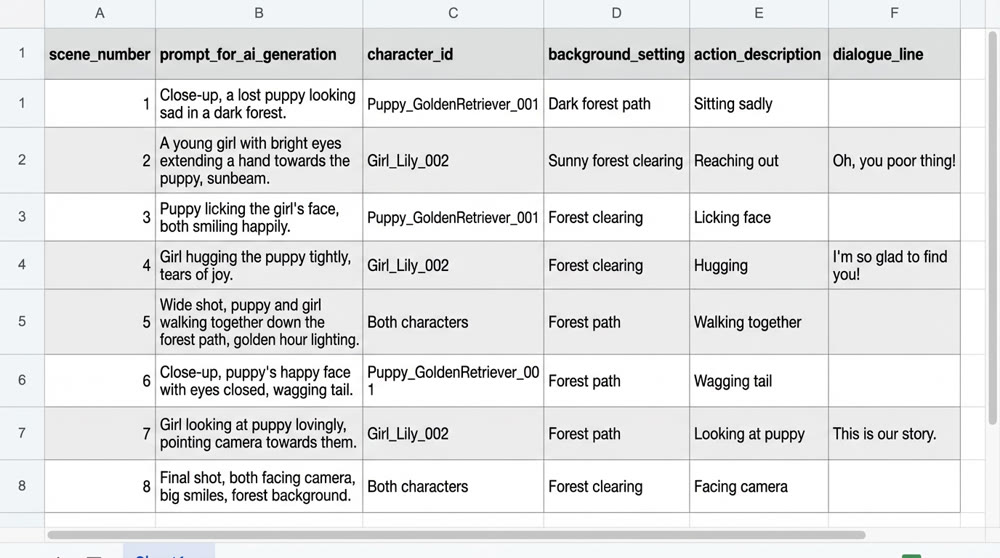
2. 💡 Enforcing the "Ironclad Rules" of Prompting
Engineering your prompts is the guarantee of quality and efficiency. Creators must adhere to strict "Ironclad Rules" to ensure stable and consistent output from AI models:
- 📌 The Self-Contained Principle (Memoryless Generation): This is the highest-priority rule. Every prompt for every scene must be 100% complete and self-contained. Never rely on the context from a previous prompt. The AI has no memory of the last scene you generated.
- 📌 The Consistent Character Protocol: When a character first appears, create a unique and complete "identity tag" (e.g., "Zephyr, a stoic warrior with a silver scar over his left eye, wearing weathered leather armor"). You must reuse this exact identity tag, word for word, in all subsequent prompts featuring that character to ensure consistency.
- 📌 The Static Snapshot Rule for Poses: When describing an action, think like a photographer capturing a still moment. Describe a frozen instant, not a process. Avoid verbs like "running towards" and instead use "is captured mid-stride." This ensures visual precision.
- Advanced SOP: Package these rules into a custom prompt template for your AI model (e.g., a "Gemini Storyboard Assistant"). This ensures every generated script automatically adheres to these high standards, enabling stable, high-volume prompt output.
III. Efficiency Gains and Asset Creation (The Iterative Optimization SOP)
This is the final engineering phase that transforms your creative project into a sustainable business operation. Through automation and data feedback, you create a closed-loop system for continuous improvement.
1. Building a Batch Production Workflow
After validating the SOP with a single video, you must immediately switch to a batch-production model. This can slash production time from several hours to around 90 minutes.
- Templating and Automation: Use the CSV script file, generated according to the "Ironclad Rules," as the central input for your batch-processing tools.
- Using Batch Image/Video Generation Tools:
- Image Generation: Use batch image generation tools (e.g., those using Midjourney or other APIs) to generate multiple storyboard images in parallel, drastically cutting down on wait times.
- Video Generation: Import these images into a batch video tool. A powerful image-to-video solution like Genmi AI's can turn your still frames into dynamic clips, allowing for rapid testing and iteration across multiple scenes at once.
- 【Advanced Technique】 Batch Asset Application: When generating images in batches, strictly bind your pre-approved character reference images to the character's "identity tag" in the script. This ensures absolute character consistency across all scenes during batch production.
This is a game-changer! With a batch workflow, a creator can easily expand an 8-row CSV of prompts into 40 rows, letting the tool generate 5 different sets of images at once for review. This massively boosts both creative optionality and production capacity.
2. Data-Driven Feedback Loop for Optimization
Viral hits are born from rapid responses to data. You must establish an SOP based on YouTube Analytics to guide content optimization.
- Key Metrics to Track: The SOP must mandate a review focusing on Swipe-Through Rate (SVR) and Watch Time / Average View Duration. A viral hit with tens of millions of views often requires an SVR above 80%.
- SOP-Driven Optimization Steps:
- 3-Hour Rapid Assessment: Check the SVR. If it's below 80%, the problem is your first 3-second hook or the thumbnail. Action: Immediately optimize the opening shot or thumbnail.
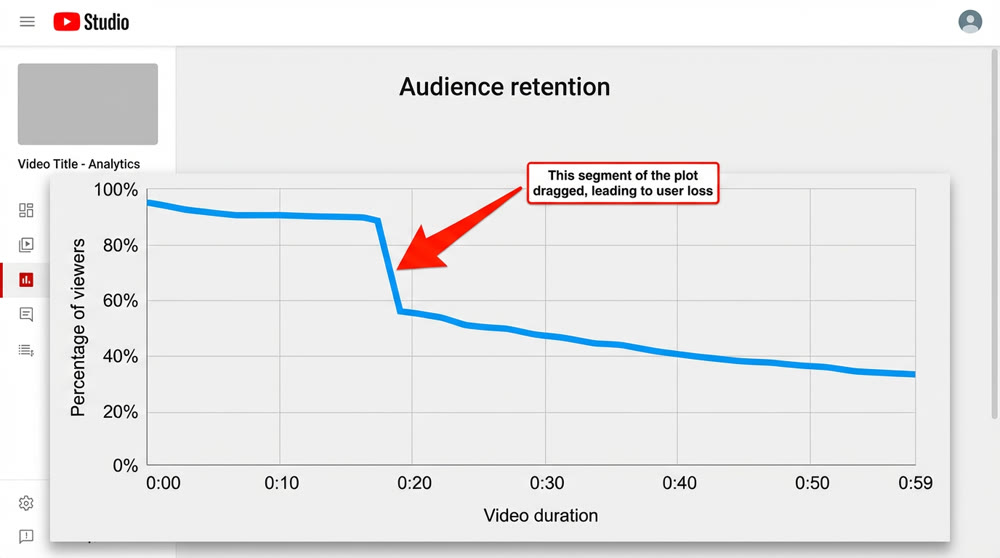
- Retention Graph Analysis: Analyze the "Audience retention" graph in YouTube Studio. If the curve shows a sharp drop-off, that part of your script is dragging or a character's performance failed.
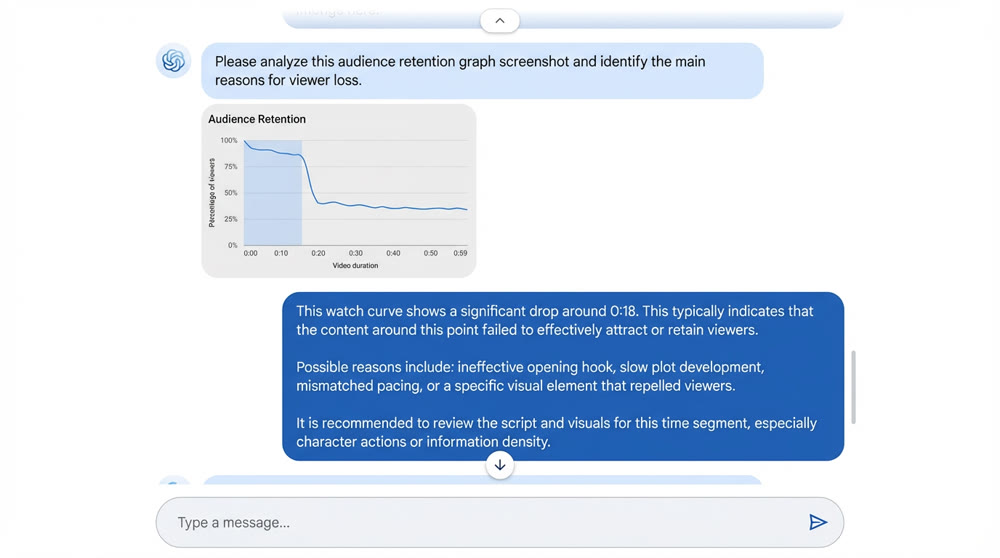
- 【Advanced Technique】 AI-Assisted Analysis: Take a screenshot of the retention graph and use an AI tool (like Gemini) to analyze it. The AI can help pinpoint the exact story beat corresponding to the drop-off, allowing for surgical script fixes instead of blind guesswork.
- Watch Time Optimization: Shorten the outro or create a seamless loop so viewers re-watch without realizing it, pushing watch time over 100%.
3. ✨ Building Your Library of Proven Assets
The ultimate goal of an engineered creative process is to build a knowledge base that reduces future trial and error, turning experience into reusable assets.
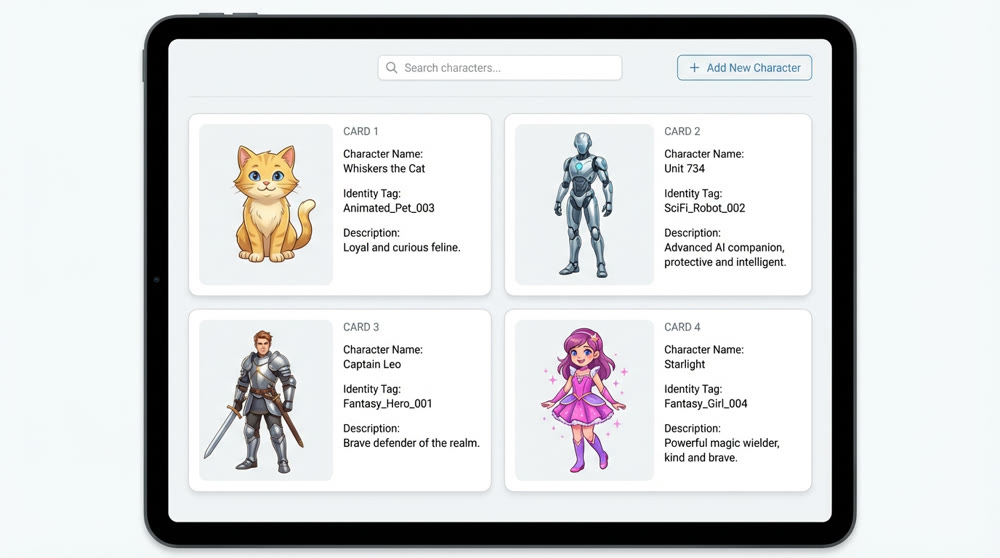
- Prompt Template Library: A collection of battle-tested, high-quality prompt templates with a high success rate (requiring fewer re-rolls). This should include:
- Text-to-Image Templates: With fixed modules for [Style], [Lighting], [Color Palette], [Quality] and swappable modules for [Subject] and [Environment].
- Video Generation Templates: Including commands to enhance coherence and motion, like "smooth, coherent video motion, follows realistic physics."
- Viral Element Library: Systematically organize and save the elements proven successful through your "fixed structure, variable content" method. This includes IP archetypes, viral script structures, and successful element combinations (e.g., variations of the "Peril + Rescue" formula).
- Character Asset Library: Save the validated character reference images used for image-to-image generation. Link them directly to their "identity tags" in your prompt library. This is the lifeblood of consistent storytelling.
To scale your channel, using specialized AI YouTube Shorts generators can help you automate the production process significantly.
💡 Boost Your Prompting Game: Accelerate your AI content creation with battle-tested directives. Access our High-Success-Rate Prompt Template Library, featuring modules for both image and video generation, designed to reduce iteration cycles and achieve consistent, high-quality outputs.
By implementing this systematic workflow, you shift your focus from manual labor to strategic execution and data analysis. You'll not only scale your content production but also dramatically increase your probability of creating consistent, viral hits.
Ready to stop crafting and start engineering? This systematic philosophy is the engine behind Genmi AI. Explore how Genmi AI's powerful video generator can become the core of your content factory today.
Recommended Articles

How to Access Nano Banana Pro? A Professional's Guide
Unlock Google's Nano Banana Pro. Our guide details every method for free users, pros, and developers to access 4K AI visual composition and advanced editing.

Mastering Prompt Engineering: A Blueprint for Automated AI Video Creation
Learn to build a systematic prompt engineering workflow for AI video. Deconstruct viral videos, automate content, and scale your AI video production efficiently

Best AI Video Generation Models: A 2025 Professional Comparison
Explore our in-depth comparison of the best AI video generation models like Runway, Pika, and Sora. Find the perfect tool for your creative or business needs.